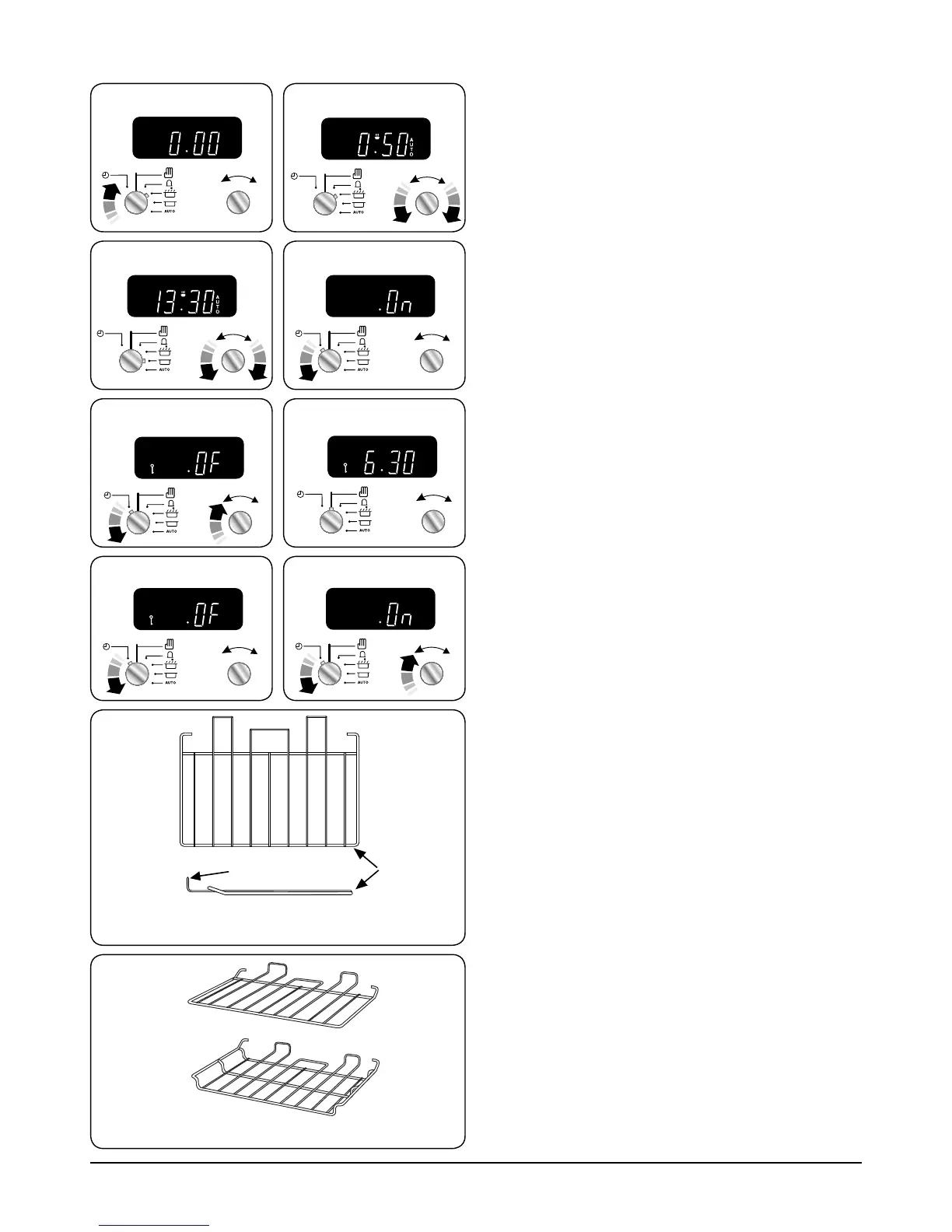
You cannot set a start time directly – this is set
automatically by a combination of the ‘cook time’ and
‘stop time’.
Turn the Timer knob to the () position (Fig.2-25). Use the
Adjusting knob to set the ‘cook time’ you need (Fig.2-26).
Turn the Timer knob to the () position. The display will show
the current time of day plus the ‘cook time’ you just set.
Use the Adjusting knob to set the ‘stop time’ required
(Fig.2-27).
The ‘stop time’ is displayed, followed by ‘AUTO’. Set the oven(s)
to the cooking temperature you need; turn the Timer knob to
the ‘AUTO’ setting.
When your cooking is finished, the beeper sounds. Turn the
Timer knob to the vertical () to return to manual cooking.
If you are out, don’t worry about the beeper going off – it
stops on its own after a while. When you return, turn the
Timer knob to the vertical () to return to manual cooking.
AUTO is showing, but you want to revert to
manual cooking
You can cancel any automatic settings by briefly turning the
Timer knob to the clock symbol () and then releasing it.
Key Lock
When the key lock is activated, the left-hand oven is locked
and will not come on.
To activate the key lock
Make sure that the clock is in manual mode and cancel any
active programs.
Turn and hold the Timer knob to the clock symbol () for
about 8 seconds. ‘On’ appears on the display (Fig.2-28).
Keep holding the Timer knob turned to the clock symbol ()
and turn the Adjusting knob clockwise until the key symbol
() and ‘OF’ shows on the display (Fig.2-29). Release the
knobs.
The oven is now locked, as confirmed by the display showing
the time of day alongside the key symbol (Fig.2-30).
To turn off the key lock
Turn and hold the Timer knob to the clock symbol () for
about 8 seconds. ‘OF’ will appear on the display (Fig.2-31).
Keep holding the Timer knob turned to the clock symbol ()
and turn the Adjusting knob clockwise until the key symbol
() goes out on the display and ‘On’ shows (Fig.2-32). Let go
of the knobs.
After a few seconds, the display reverts to showing the time
of day.
The oven can now be used normally.



 To Next Page