EasyManua.ls Logo

Raymarine E70293 - User Manual

Raymarine E70293
120 pages
Print Icon
To Next Page IconTo Next Page
Loading...
INSTALLATION &
OPERATION INSTRUCTIONS
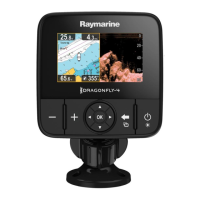
DRAGONFLY

Table of Contents

Questions and Answers

  • S
    Stanley DavisAug 6, 2025
    What to do if my Raymarine E70293 Fish Finder will not boot up?
    • M
      Mercedes DiazAug 6, 2025
      If your Raymarine Fish Finder won't boot up and is stuck in a re-boot loop, the issue may stem from the power supply and connection. Refer to the solutions for the problem 'Product does not turn on or keeps turning off'. Alternatively, software corruption could be the cause. In that case, try re-flashing the latest software from the Raymarine website. As a last resort, for display products, you can perform a 'Power on Reset,' but be aware that this will erase all your settings, presets, and user data, reverting the unit to its factory defaults.
  • Z
    Zachary LopezNov 20, 2025
    Why does my Raymarine E70293 not turn on?
    • E
      eallenNov 21, 2025
      If your Raymarine Fish Finder doesn't turn on or keeps turning off, start by checking the relevant fuses and breakers, and replace them if necessary. If the fuse continues to blow, inspect the cable for damage, broken connector pins, or incorrect wiring. Also, examine the unit’s connector for bent or broken pins, ensure the cable connector is fully inserted and locked, and check the power supply cable for damage or corrosion, replacing it if needed. Flex the power cable near the display connector while the unit is on to see if it causes a re-boot or power loss; replace the cable if it does. Verify the vessel’s battery voltage and the condition of the battery terminals and power supply cables, ensuring they are secure, clean, and free of corrosion. Finally, with the product under load, use ...

Summary

Chapter 4: Mounting

4.4 Testing and Adjusting the Transducer

Procedure to test and fine-tune transducer performance for optimal readings.

Chapter 7: Getting Started

7.3 Initial Set Up Procedures

Guide through the initial setup wizard and essential configuration steps.

Chapter 8: Fishfinder Applications

Chapter 9: Chart Application

9.8 Navigation

Guidance on navigating to cursor locations and waypoints on the chart.

Chapter 11: Tools & Settings

11.3 Backup and Reset

Procedures for saving data, restoring settings, and resetting the system.

Chapter 13: Troubleshooting

13.1 Troubleshooting

General guidance on diagnosing and correcting common installation problems.

13.2 Power Up Troubleshooting

Solutions for issues related to the unit not powering on or rebooting.

13.5 Wi-Fi Troubleshooting

Steps to resolve problems with Wi-Fi connectivity and network issues.

Raymarine E70293 Specifications

General IconGeneral
BrandRaymarine
ModelE70293
CategoryFish Finder
LanguageEnglish

Related product manuals