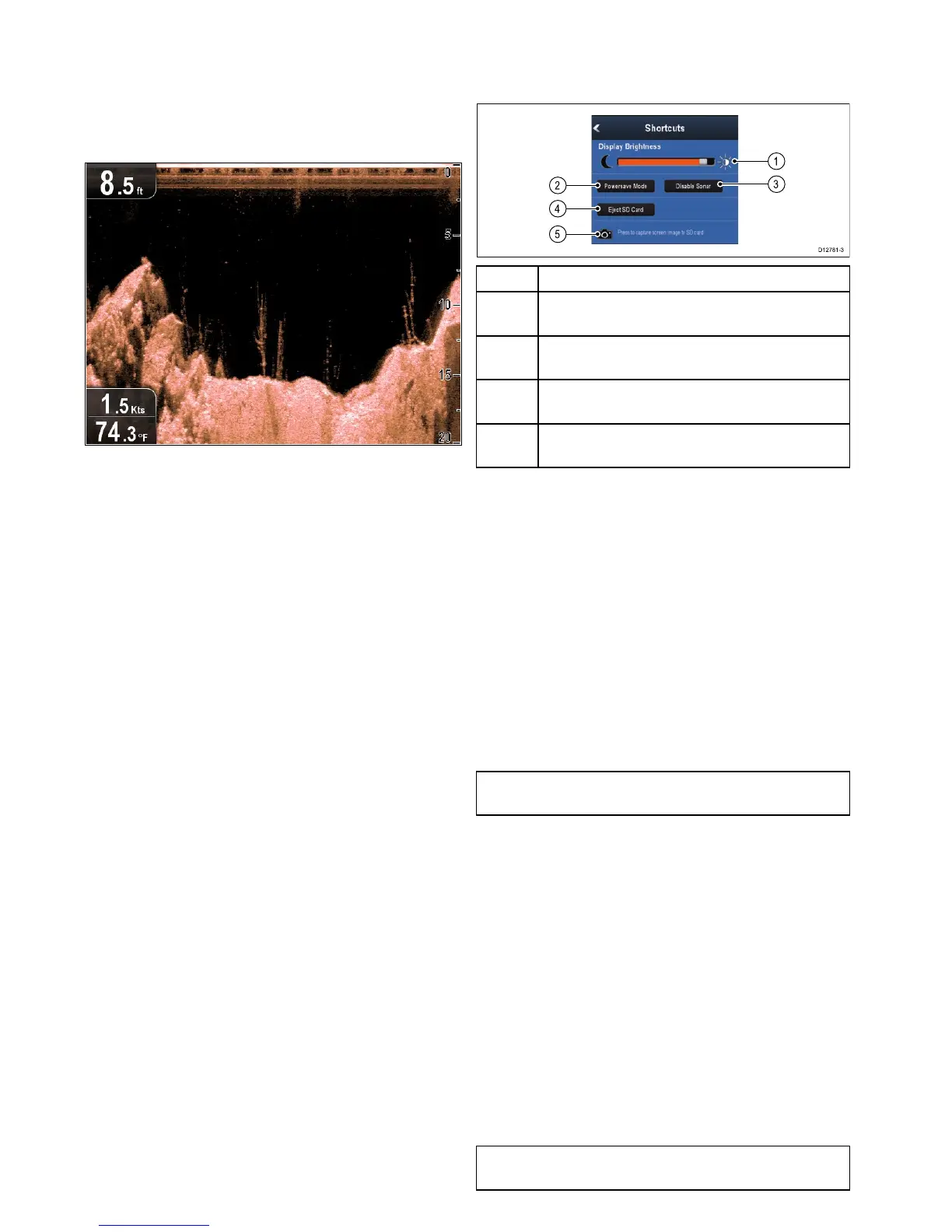
7.6CheckingtheDownVision
™
application
ProductswhichincludetheDownVision
™
applicationandtheCPT-DVorCPT-DVStransducer
canusetheDownVision
™
applicationtodisplay
underwaterstructureandobjects.
FromtheDownVision
™
application:
1.Checkthedisplay.
Withthetransduceractiveyoushouldseea
scrolling(lefttoright)imagethatshowsthe
bottomstructure,youshouldalsoseeadepth
readinginthetopleftdatabox.
7.7Shortcutspage
Theshortcutspageprovidesaccesstothefollowing
functions:
1Brightnesscontrol.
2
PowerSavemode—selectingwillactivate
PowerSavemode.
3
Enable/DisableSonar—selectingwillenableor
disabletheinternalsonarandDownVision.
4
EjectSDcard—selecttosafelyremovethe
memorycard.
5
Screencapture—selectingsavesascreenshotto
memorycard.
Openingtheshortcutspage
Withthedisplaypoweredon:
1.PressthePowerbuttononce.
Theshortcutspageisdisplayed.
2.UsetheDirectionalcontrolstohighlightan
option.
3.PresstheOKbuttontoselecttheoption.
Adjustingthedisplaybrightness
1.PressthePOWERbuttononce.
TheShortcutspageisdisplayed.
2.Adjustthebrightnesstotherequiredlevelusing
theTrackpad.
Note:Thebrightnesslevelcanalsobeincreased
bypressingthePowerbuttonmultipletimes.
PowerSavemode
InPowerSavemodeallfunctionsoftheproduct
remainactive,butthedisplayisplacedintoalow
powerstate.PowerSavemodeiscancelledby
pressingaphysicalbuttonorwhenanalarmevent
occurs.
EnablingPowerSavemode
ToenablePowerSavemodefollowthestepsbelow.
1.PressthePOWERbutton.
Theshortcutsmenuisdisplayed.
2.SelectPowerSaveMode.
ThedisplayisnowinPowerSavemode.
3.YoucanwakethedisplayfromPowerSavemode
atanytimebypressingaphysicalbutton.
Note:PowerSavemodeisautomaticallycancelled
ifanalarmeventoccurs.
54
Dragony–4/Dragony–5/Dragony–7/Wi–Fish




 To Next Page