Ensuretighteningtorquedoesnotexceed2Nm(1.48ftlb).Overtighteningmaycausedamageto
thetransducer.
Mountingthetransombrack et
Thetransducermustbemountedonthetransomusingthepartsprovided.Thestepsbelowdescribe
theinitialmountingstepsrequiredinordertotestyourtransducer’sperformance.Aftertesting
thetransduceryoumustfinishthemountingusingtheinstructionsinthe
Finishingthetransducer
mounting
section.
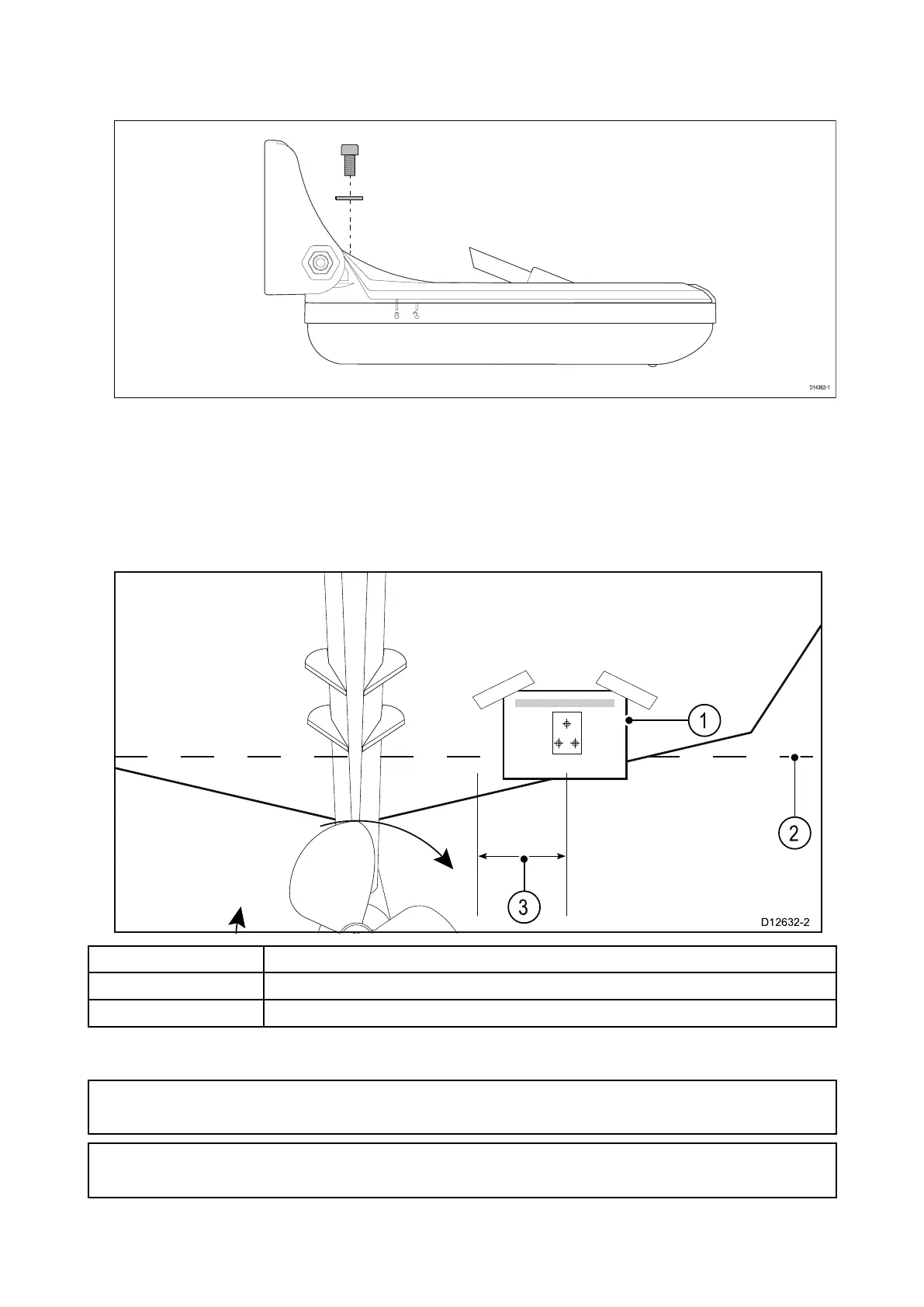
1.Fixthesuppliedtransducermountingtemplatetotheselectedlocation,usingmaskingor
self-adhesivetape.
1T ransducermountingtemplate
2
W aterline
3Mountawayfromthepropeller
2.Ensurethetemplateisparalleltothewaterline .
3.Drill2xpilotholesfortheadjustmentslotscrewsasindicatedonthetemplate.
Note:
T ohelppreventchippingofthemountingsurface,usepainter’stapetomaskthedrillarea.
Important:
DoNO Tdrillthethirdmountingholeatthisstage.
4.Fillthe2holeswithmarinegradesealant.
5.Inserttheadjustmentslotwashersintotheadjustmentslots.
Installation23


 To Next Page
 Loading...