EasyManua.ls Logo

Realistic PRO-2004 - Alignment Procedures

Realistic PRO-2004
74 pages
Print Icon
To Next Page IconTo Next Page
To Previous Page IconTo Previous Page
Loading...
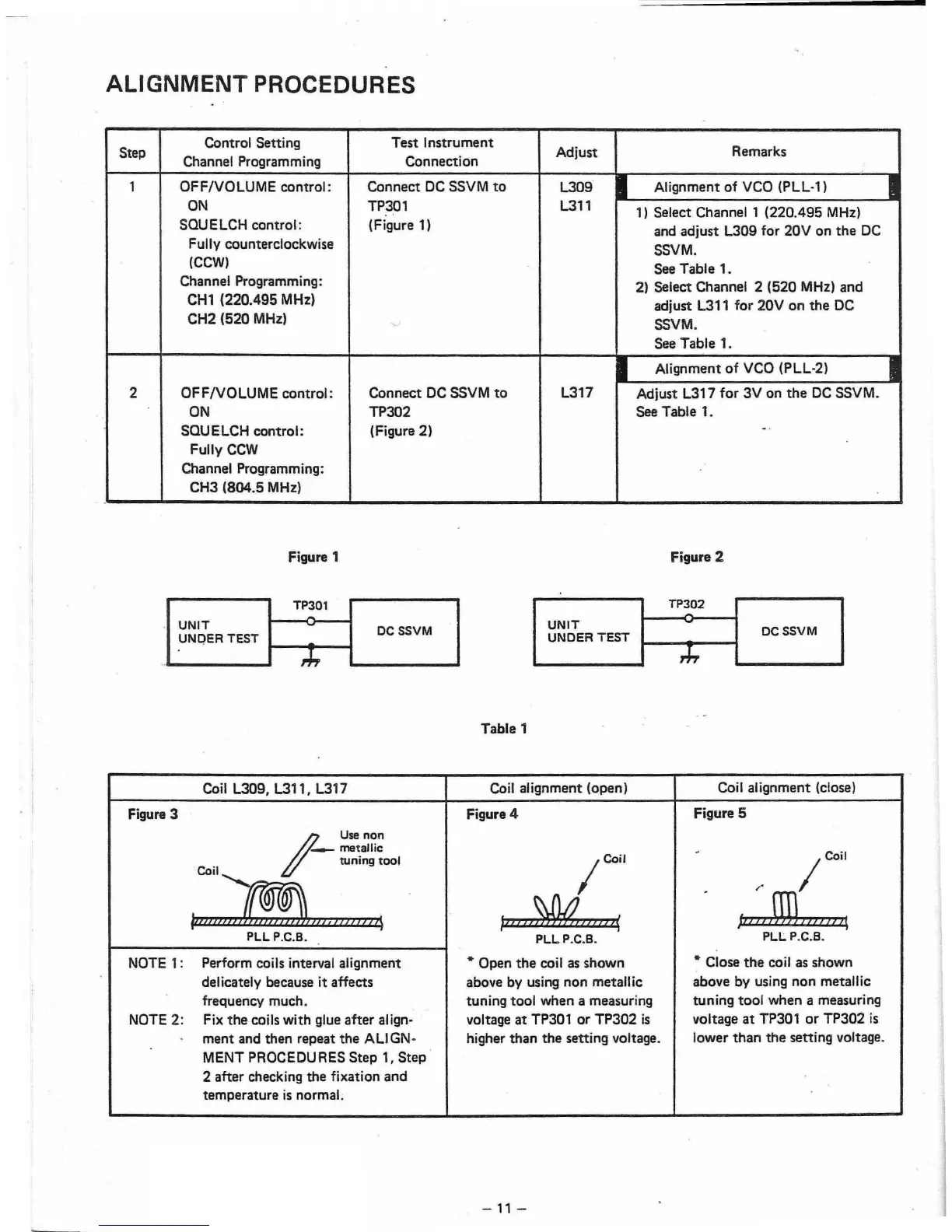
ALIGNMENT PROCEDURES
Step
Control Setting
Test
Instrument
Adjust
Remarks
Channel Programming
Connection
1
OFF/vOLUME
control:
Connect
DC
SSVM
to
L309
.
Alignment
of
VCO (PLL·1)
ON
TP301
L311
1) Select Channel 1
(220.495
MHz)
. .
SQU E
LCH
control:
(Figure 1)
and
adjust
L309
for
20V
on
the
DC
Fully counterclockwise
SSVM.
(CCW)
.
See Table 1.
Channel Programming:
2) Select Channel 2
(520
MHz)
and
CH1
(220.495
MHz)
adjust L311
for
20V
on
the
DC
CH2
(520
MHz)
SSVM.
"
.
See Table 1.
Alignment
of
VCO (PLL-2)
2
OFF/vOLUME
control:
Connect
DC SSVM
to
L317
Adjust L317
for
3V
on
the
DC
SSVM.
,
ON
TP302
See Table 1.
SQUELCH
control:
(Figure 2)
-.
Fully
CCW
Channel Programming:
CH3
(804.5
MHz)
,
.
Figure 1
TP301
UNIT
.UNOER TEST
1-----
DC SSVM
Table 1
Figure 2
TP302
UNIT
DCSSVM
UNDER
TEST
'T'
,,,
. -
, I
Coil L309, L311, L317
Coil alignment (open)
Coil alignment (close)
Figure
3
Figure 4
Figure 5
17
Use
non
metallic
-
Coil
tuning
tool
Coil
Coil~
LI
;'"
t'I
VJ
...
.....,
~
,.c;
PLL
P.C.B.
PLL
P.C.B.
PLL
P.C.B.
,
.
NOTE
1:
Perform coils interval alignment * Open
the
coil
as
shown
* Close
the
coil as
shown
delicately because it affects
above by using non metallic
above by using
non
metallic
.
frequency much. tuning tool when a measuring
tuning
tool
when a measuring
NOTE
2:
Fix
the
coils with glue
after
align·
voltage
at
TP301
or
TP302
is
voltage
at
TP301
or
TP302
is
.
ment
and then repeat
the
ALIGN·
higher
than
the
setting voltage.
lower
than
the
setting voltage.
.
MENT PROCEDU RES
Step
1,
Step
2 after checking
the
fixation
and
.
,
temperature
is
normal.
.
-
11
-

Other manuals for Realistic PRO-2004

Related product manuals