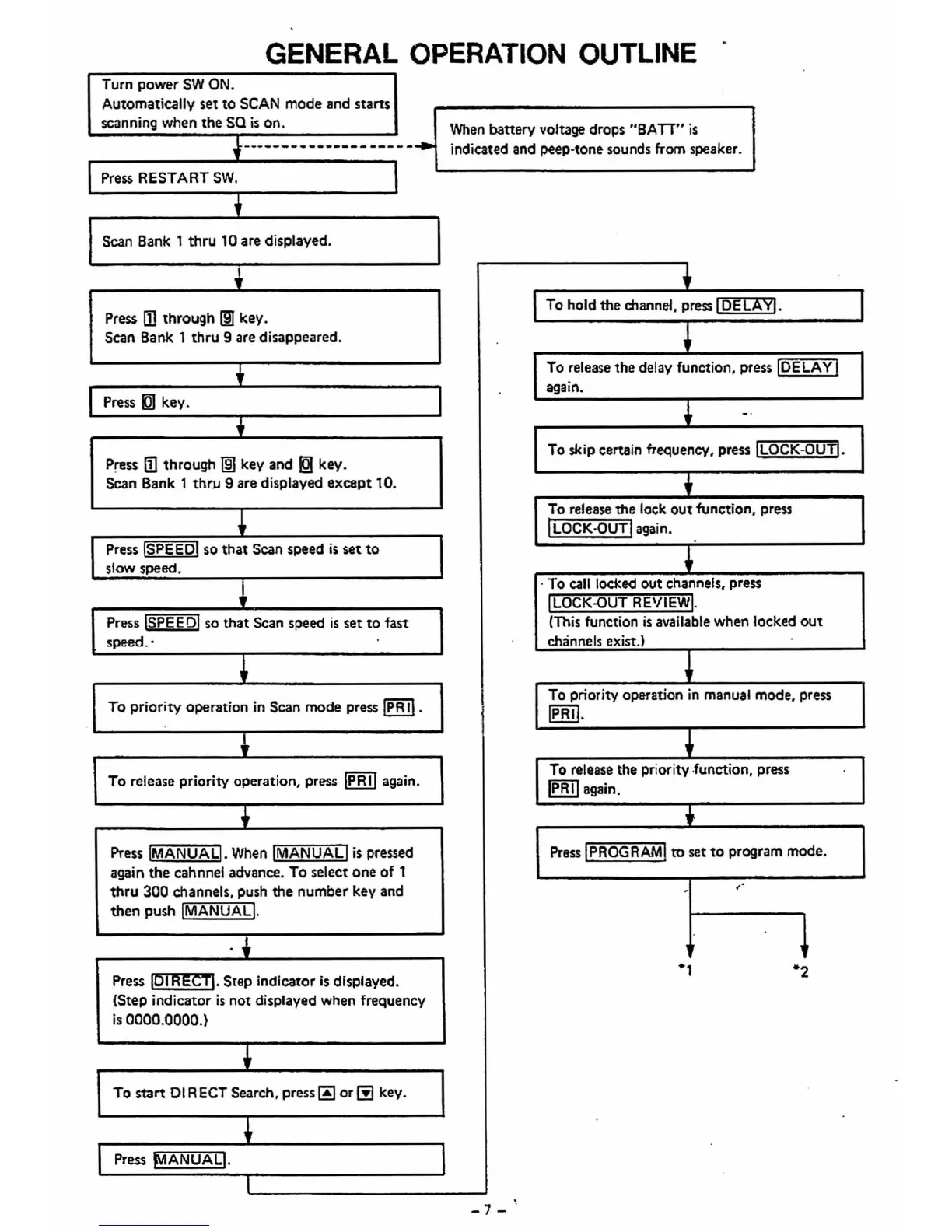
GENERAL OPERATION OUTLINE
•
•
Turn power
SW
ON.
Automatically set to
SCAN
mode and starts
scanning
when the sa
is
on.
When
battery voltage drops
"BAn"
is
f--------------------
indicated and peep-tone sounds from speaker.
Press RESTART
SW.
+
Scan Bank 1 thru 10 are displayed.
1
t
•
Press mthrough
1m
key.
To
hold the channel. press
loELAYl.
Scan Bank 1 thru 9 are disappeared.
0
To release the delay function, press
IOELA
YI
,
•
Press ~ key.
•
again.
1
-.
.i
To
skip certain frequency, press
ILOCK-GUTI.
Press
Iilthrougt'l
mJ
key and
EB
key.
Scan Bank 1
thrJ,J
9 are displayed except 10.
,
To
release the lock out function, press
.1
I
LOCK·OUTI
again.
Press !SPEEDI so that
Scan speed
is
set
to
•
slow speed.
•
. To
call
locked out channels, press
,
I
LOCK-GUT
REVIEWI.
Press
ISPEE
DI
so
that
SCan
speed
is
set
to
fast
(This
function
is
available when locked
out
speed
..
•
•
channels exist.)
•
To priority operation
in
Scan mode press
IPR
II.
To priority operation
in
manual mode, press
Ip
R
II.
0
.1
To release priority operation,
pr9SS
IPRII
again.
To release the priority.function, press
•
IPRII
again.
j
.-
Press
IMANUAL!.
When
IMANUAll
is
pressed
Press
IPROGRAMl
to
set
to
program mode.
again the cahnnel advance. To select one of t
thru 300 channels, push the number key and
~.
•
then push
IMANUAL].
•
0
.
.1
Press
lP'f'lmcl1.
Step indicator
is
displayed.
·1
"2
(Step indicator
is
not displayed when frequency
is
oaoo.OOOO.)
To
start
DIRECT Search, press
00
orffi
key.
•
•
•
•
Press
lYIANUAL].
0
•
-7-'













 To Next Page