•
•
•
•
•
•
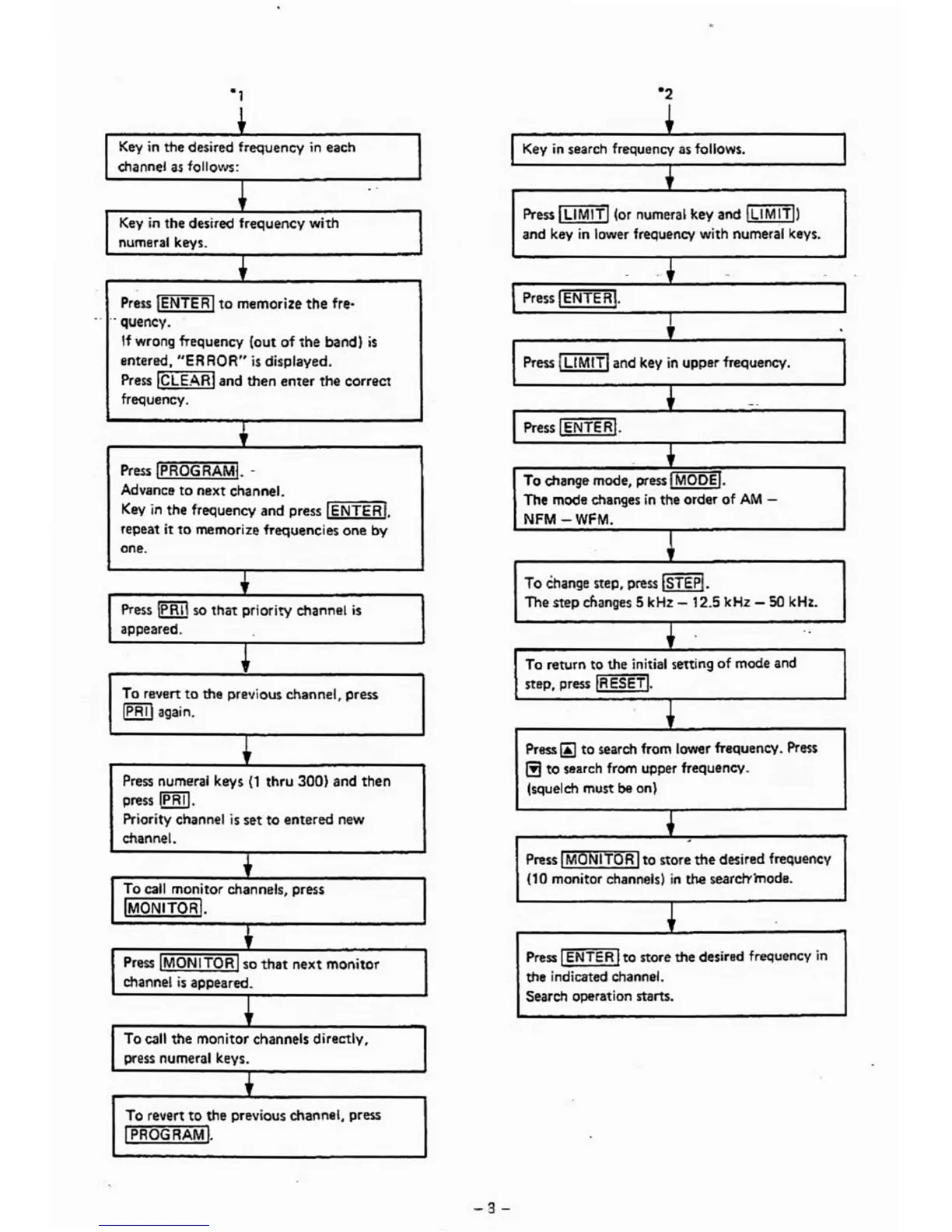
Key
in
search frequency
as
follows.
.i
Press
ILIMIT]
(or numeral key and
ILlMITIl
and key
in
lower frequency with numeral keys.
•
.+
-
•
Press I
ENTE
R}.
t
•
Press
I
L1MITI
and key
in
upper frequency.
.t
-.
Press I
ENTE
R
I.
•
.i
To change mode, press [
MODE].
The mode changes
in
the order of
AM
-
NFM
-WFM.
To
Change
step. press
ISTEPl.
The step
cflanges
5 kHz - 12.5 kHz -
SO
kHz.
••
•
To return to the initial sening of mode
and
step. press
lRESET/.
Press
~
to search from lower frequency.
Pr8'SS
(!l
to search
from
~per
frequency.
(squelch must
be
on)
•
•
Press
I
MONITOR
Ito store the desired frequency
(10 monitor channels)
in
the searcl'rmode.
.,
•
Press
I
ENTER
Ito store the desired frequency
in
the indicated channel.
Search operation starts.
•
Key
in
the desired frequency
in
each
channel
as
follows:
••
•
Key
in
the desired frequency with
numeral keys.
•
Press
IENTE
RI
to
memorize the fre'
• •
..
quency.
If
wrong frequency (out
of
the band)
is
entered, "ER ROR"
is
displayed.
Press
IfLEARI and then enter the correct
frequency.
+
Press
IPROGRAM!. -
Advanclt
to
next channel.
Key
in
the frequency and press [ENTER!.
repeat it
to
memorize frequencies one by
one.
•
Press
!PRII
so
that priority channel
is
appeared.
•
•
To revert to the previous channel, press
[PRIj
again.
~
Press
numeral keys
(1
thru 300) and then
press
IPRII.
Priority channel
is
set to entered new
channel.
t
To
call
monitor channels, press
(MONITORI.
~
Press
IMONITOR] so
that
next monitor
channel
is
appeared.
To
call the monitor channels directly,
press numeral keys.
i
To revert
to
the previous channel, press
I
PROGRAMI.
,
•
-8-













 To Next Page