EasyManua.ls Logo

Realistic PRO-43 - Operation.11; A Look at the Display.11

Realistic PRO-43
36 pages
Print Icon
To Next Page IconTo Next Page
To Previous Page IconTo Previous Page
Loading...
OPERATION
A
LOOK
AT
THE
DISPLAY
_
MON
1
23456
789
10
nnn
.
nnnnnn
n
fm
Quu
ch
uu
u
u
uu
a
am
AT
SRCH
SCAN
MAN
PGM
PR!
DLY
L/0
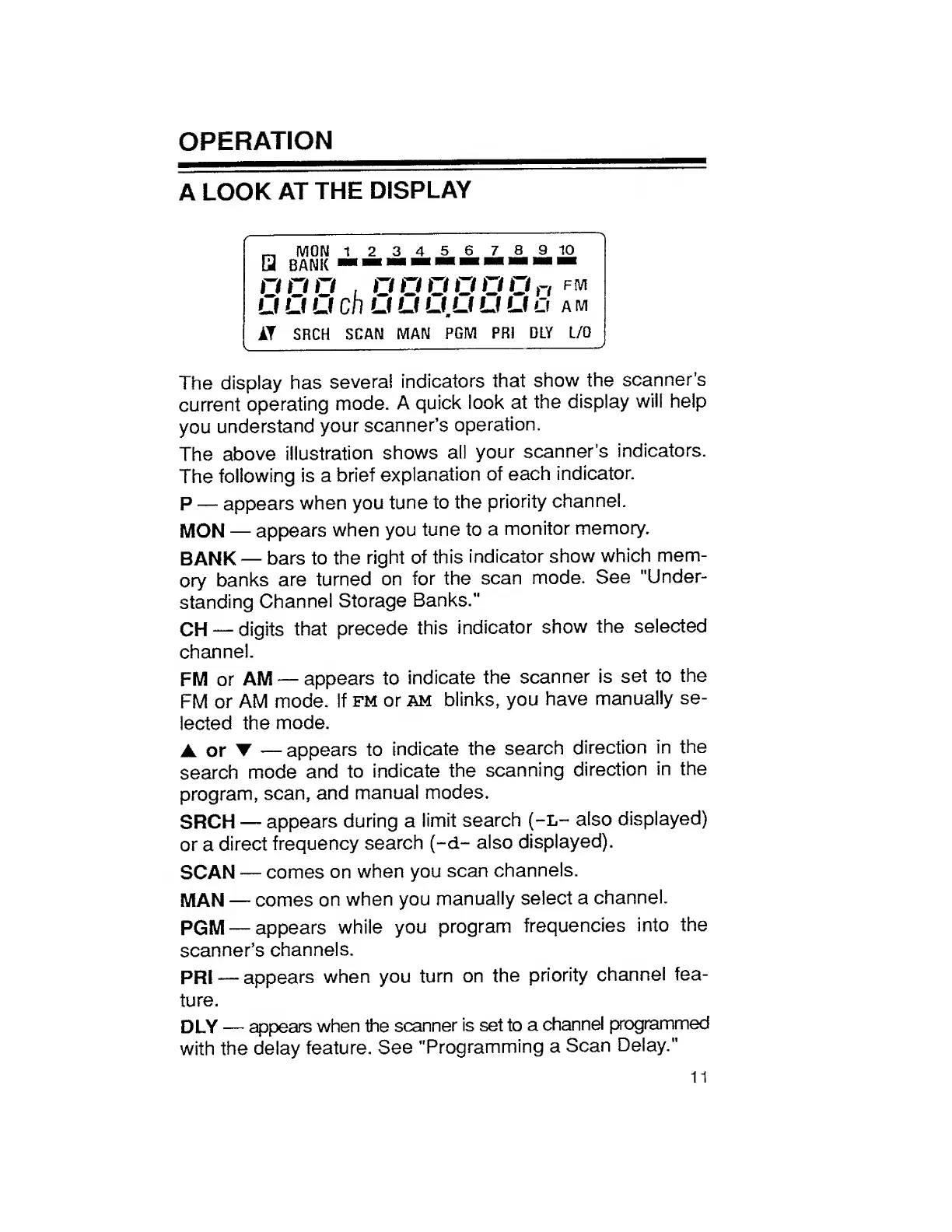
The
display
has
several
indicators
that
show
the
scanner’s
current
operating
mode.
A
quick
look
at
the
display
will
help
you
understand
your
scanner’s
operation.
The
above
illustration
shows
all
your
scanner’s
indicators.
The
following
is
a
brief
explanation
of
each
indicator.
P
appears
when
you
tune
to
the
priority
channel.
MON
appears
when
you
tune
to
a
monitor
memory.
BANK
bars
to
the
right
of
this
indicator
show
which
mem¬
ory
banks
are
turned
on
for
the
scan
mode.
See
"Under¬
standing
Channel
Storage
Banks."
CH
digits
that
precede
this
indicator
show
the
selected
channel.
FM
or
AM
appears
to
indicate
the
scanner
is
set
to
the
FM
or
AM
mode,
if
fm
or
am
blinks,
you
have
manually
se¬
lected
the
mode.
A
or
appears
to
indicate
the
search
direction
in
the
search
mode
and
to
indicate
the
scanning
direction
in
the
program,
scan,
and
manual
modes.
SRCH
appears
during
a
limit
search
(-L-
also
displayed)
or
a
direct
frequency
search
(-d-
also
displayed).
SCAN
comes
on
when
you
scan
channels.
MAN
comes
on
when
you
manually
select
a
channel.
PGM
appears
while
you
program
frequencies
into
the
scanner’s
channels.
PR!
appears
when
you
turn
on
the
priority
channel
fea¬
ture.
DLY
appears
when
the
scanner
is
set
to
a
channel
programmed
with
the
delay
feature.
See
"Programming
a
Scan
Delay."
11

Related product manuals