EasyManua.ls Logo

Realistic PRO-43 - Changing AM;FM Receive Mode; Programming a Scan Delay

Realistic PRO-43
36 pages
Print Icon
To Next Page IconTo Next Page
To Previous Page IconTo Previous Page
Loading...
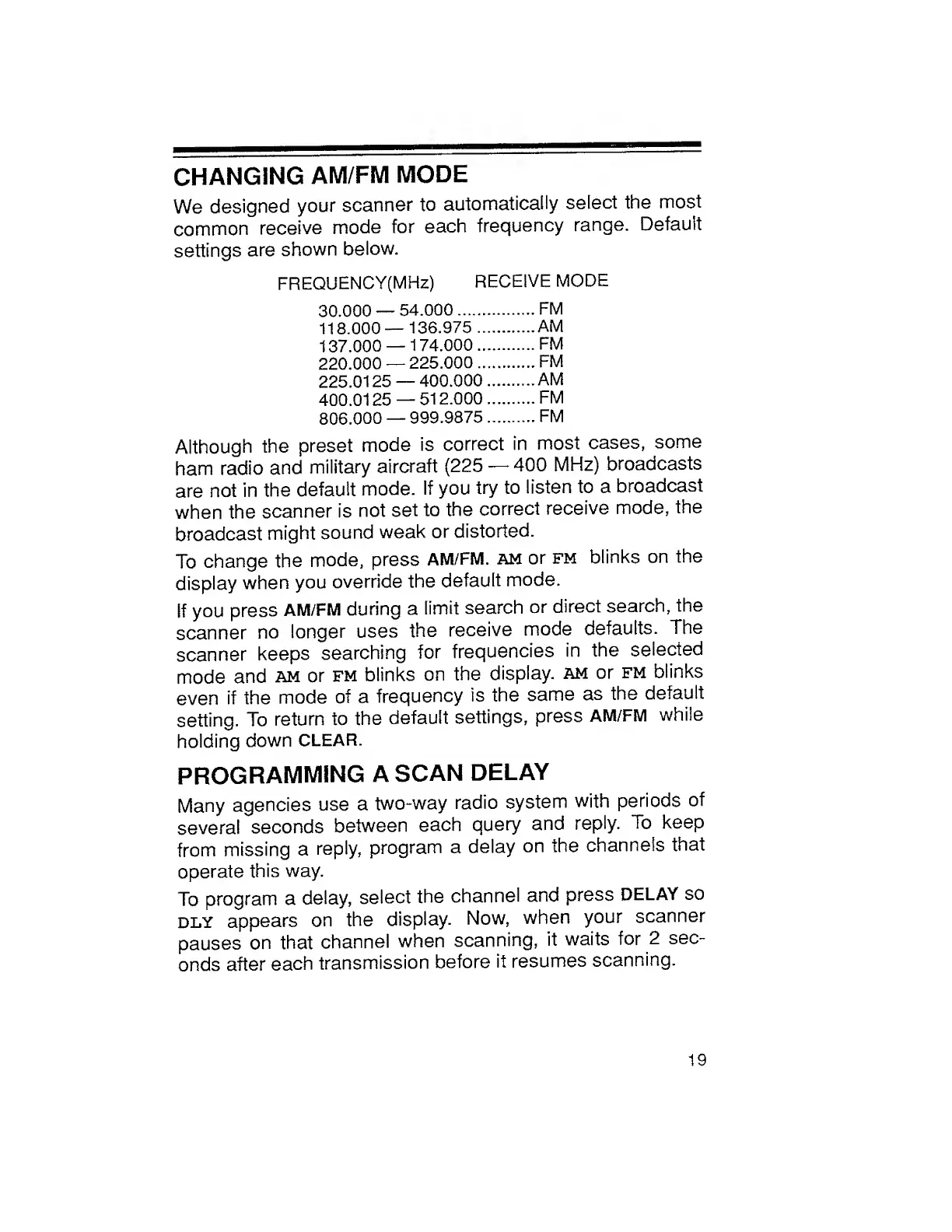
CHANGING
AM/FM
MODE
We
designed
your
scanner
to
automatically
select
the
most
common
receive
mode
for
each
frequency
range.
Default
settings
are
shown
below.
FREQUENCY(MHz)
RECEIVE
MODE
30.000
54.000.FM
118.000—136.975
.AM
137.000
174.000.FM
220.000
225.000.FM
225.0125
400.000
..AM
400.0125
512.000.FM
806.000
999.9875.FM
Although
the
preset
mode
is
correct
in
most
cases,
some
ham
radio
and
military
aircraft
(225
400
MHz)
broadcasts
are
not
in
the
default
mode.
If
you
try
to
listen
to
a
broadcast
when
the
scanner
is
not
set
to
the
correct
receive
mode,
the
broadcast
might
sound
weak
or
distorted.
To
change
the
mode,
press
AM/FM.
am
or
fm
blinks
on
the
display
when
you
override
the
default
mode.
If
you
press
AM/FM
during
a
limit
search
or
direct
search,
the
scanner
no
longer
uses
the
receive
mode
defaults.
The
scanner
keeps
searching
for
frequencies
in
the
selected
mode
and
am
or
fm
blinks
on
the
display,
am
or
fm
blinks
even
if
the
mode
of
a
frequency
is
the
same
as
the
default
setting.
To
return
to
the
default
settings,
press
AM/FM
while
holding
down
CLEAR.
PROGRAMMING
A
SCAN
DELAY
Many
agencies
use
a
two-way
radio
system
with
periods
of
several
seconds
between
each
query
and
reply.
To
keep
from
missing
a
reply,
program
a
delay
on
the
channels
that
operate
this
way.
To
program
a
delay,
select
the
channel
and
press
DELAY
so
dly
appears
on
the
display.
Now,
when
your
scanner
pauses
on
that
channel
when
scanning,
it
waits
for
2
sec¬
onds
after
each
transmission
before
it
resumes
scanning.
19

Related product manuals