EasyManua.ls Logo

Realistic PRO-43 - Moving Monitor Frequencies to Channels; Scanning Channels

Realistic PRO-43
36 pages
Print Icon
To Next Page IconTo Next Page
To Previous Page IconTo Previous Page
Loading...
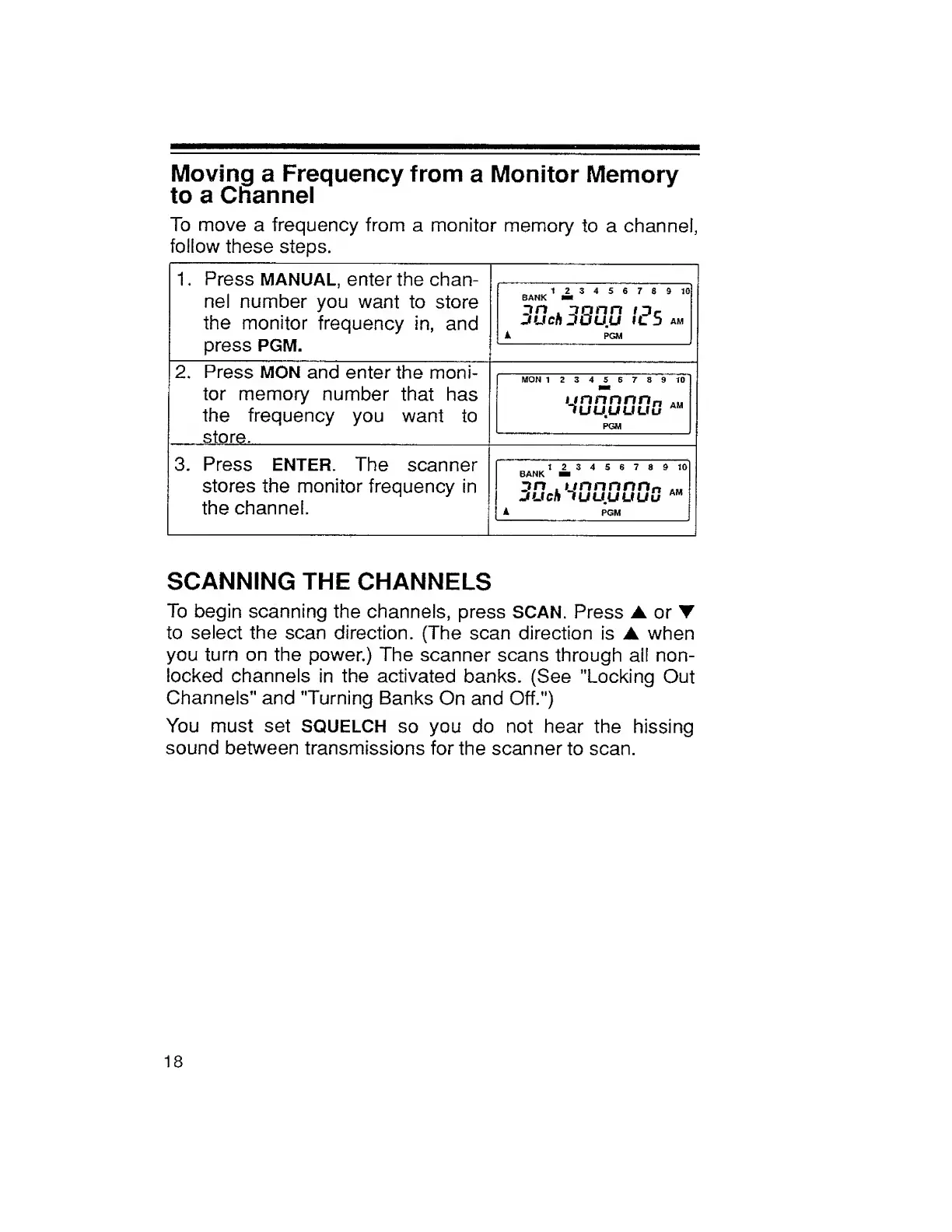
Moving
a
Frequency
from
a
Monitor
Memory
to
a
Channel
To
move
a
frequency
from
a
monitor
memory
to
a
channel,
follow
these
steps.
1.
Press
MANUAL,
enter
the
chan¬
nel
number
you
want
to
store
the
monitor
frequency
in,
and
press
PGM.
BANK
1
£
3
4
5
6
7
8
9
10
Itn
jnnn
/
j
c
juch
DOuu
il5
am
A
PGM
2.
Press
MON
and
enter
the
moni¬
tor
memory
number
that
has
the
frequency
you
want
to
store.
MON
123456789
10
unnnnn
n
AM
TUUUUUu
AM
PGM
3.
Press
ENTER.
The
scanner
stores
the
monitor
frequency
in
the
channel.
123456789
10
BANK
Hi
zm
.
unnnnn„
jucti
lUUUUUu
AM
A
PGM
SCANNING
THE
CHANNELS
To
begin
scanning
the
channels,
press
SCAN.
Press
or
to
select
the
scan
direction.
(The
scan
direction
is
when
you
turn
on
the
power.)
The
scanner
scans
through
all
non-
locked
channels
in
the
activated
banks.
(See
"Locking
Out
Channels"
and
'Turning
Banks
On
and
Off.")
You
must
set
SQUELCH
so
you
do
not
hear
the
hissing
sound
between
transmissions
for
the
scanner
to
scan.
18

Related product manuals