EasyManua.ls Logo

Realistic PRO-43 - Limit Search Details; Direct Search Function

Realistic PRO-43
36 pages
Print Icon
To Next Page IconTo Next Page
To Previous Page IconTo Previous Page
Loading...
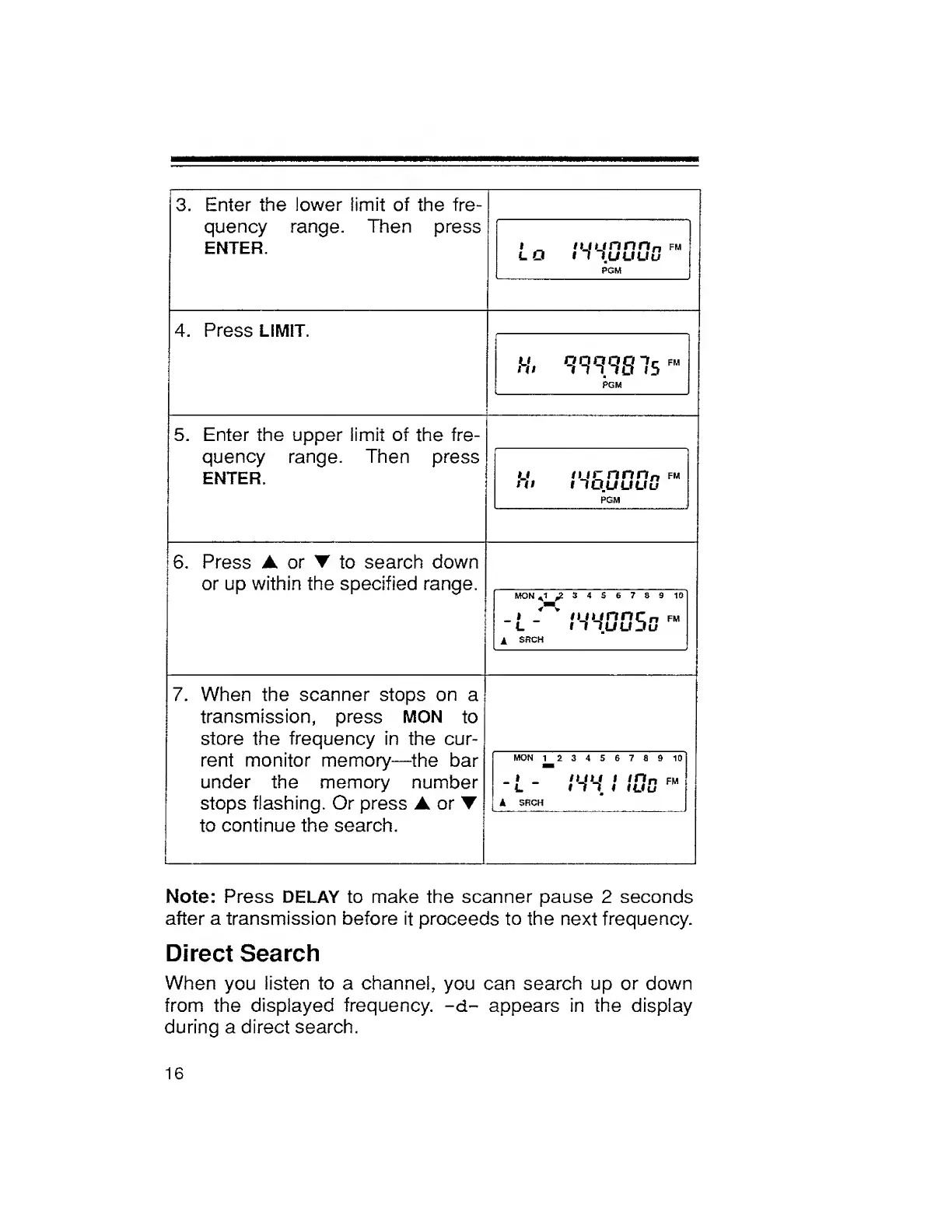
3.
Enter
the
lower
limit
of
the
fre¬
quency
range.
Then
press
ENTER.
i
_
njunnn
n
fm
lO
i
1luuuu
PGM
4.
Press
LIMIT.
H.
<m.9S7s
F
PGM
5.
Enter
the
upper
limit
of
the
fre¬
quency
range.
Then
press
ENTER.
u
nir
n
n
n
fm
Hi
llOUUUu
PGM
6.
Press
A
or
T
to
search
down
or
up
within
the
specified
range.
MON
A
1
,23456789
10
-
L
tWOOSD
A
SRCH
7.
When
the
scanner
stops
on
a
transmission,
press
MON
to
store
the
frequency
in
the
cur¬
rent
monitor
memory—the
bar
under
the
memory
number
stops
flashing.
Or
press
A
or
to
continue
the
search.
MON
123456789
10
_
*
_
n_fu
I
in
n
fm
l
m,
i
iuu
k
SRCH
Note:
Press
DELAY
to
make
the
scanner
pause
2
seconds
after
a
transmission
before
it
proceeds
to
the
next
frequency.
Direct
Search
When
you
listen
to
a
channel,
you
can
search
up
or
down
from
the
displayed
frequency,
-d-
appears
in
the
display
during
a
direct
search.
16

Related product manuals