RTL87x2x Quick Start User Guide
Copyright 2023 Realtek Semiconductor Corporation.
All Rights Reserved. 12
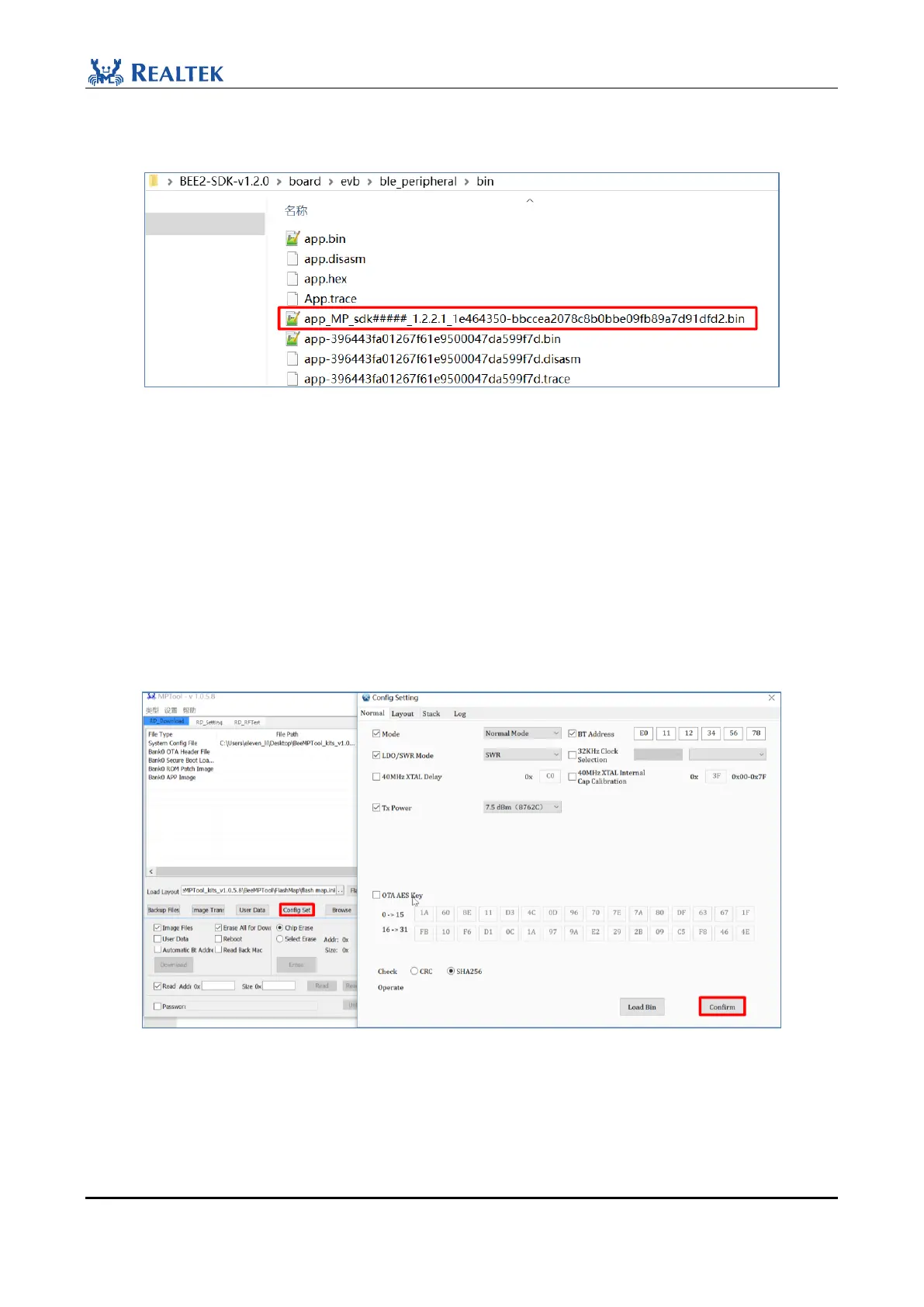
The MP Tool uses MD5 as the checksum of the burned file, and requires the MD5 value to be added to the suffix
of the file name to be burned. Therefore, it should be noted that the app image with MP prefix is burned.
Figure 2-15 APP image
2.3.5 Generate Config
1. Use the Debug mode of MP Tool (click "Type" at the upper left corner of the interface to select the mode; if the
font is grey, it cannot be operated, please refer to Section 2.2 of this document).
2. Click "Config Set" on the interface, and the Config Setting interface will appear.
3. After setting the parameters, click Confim to generate the Config File and load it to the corresponding area.
File path: BeeMPTool_kits_vx.x.x.x\BeeMPTool\ConfigFile.
Figure 2-16 Generate Config
For beginners, you are advised to keep the default Settings on the Config Setting screen. For details, refer to the
RTL87x2x MP Tool User Guide.



 To Next Page