RTL87x2x Quick Start User Guide
Copyright 2023 Realtek Semiconductor Corporation.
All Rights Reserved. 18
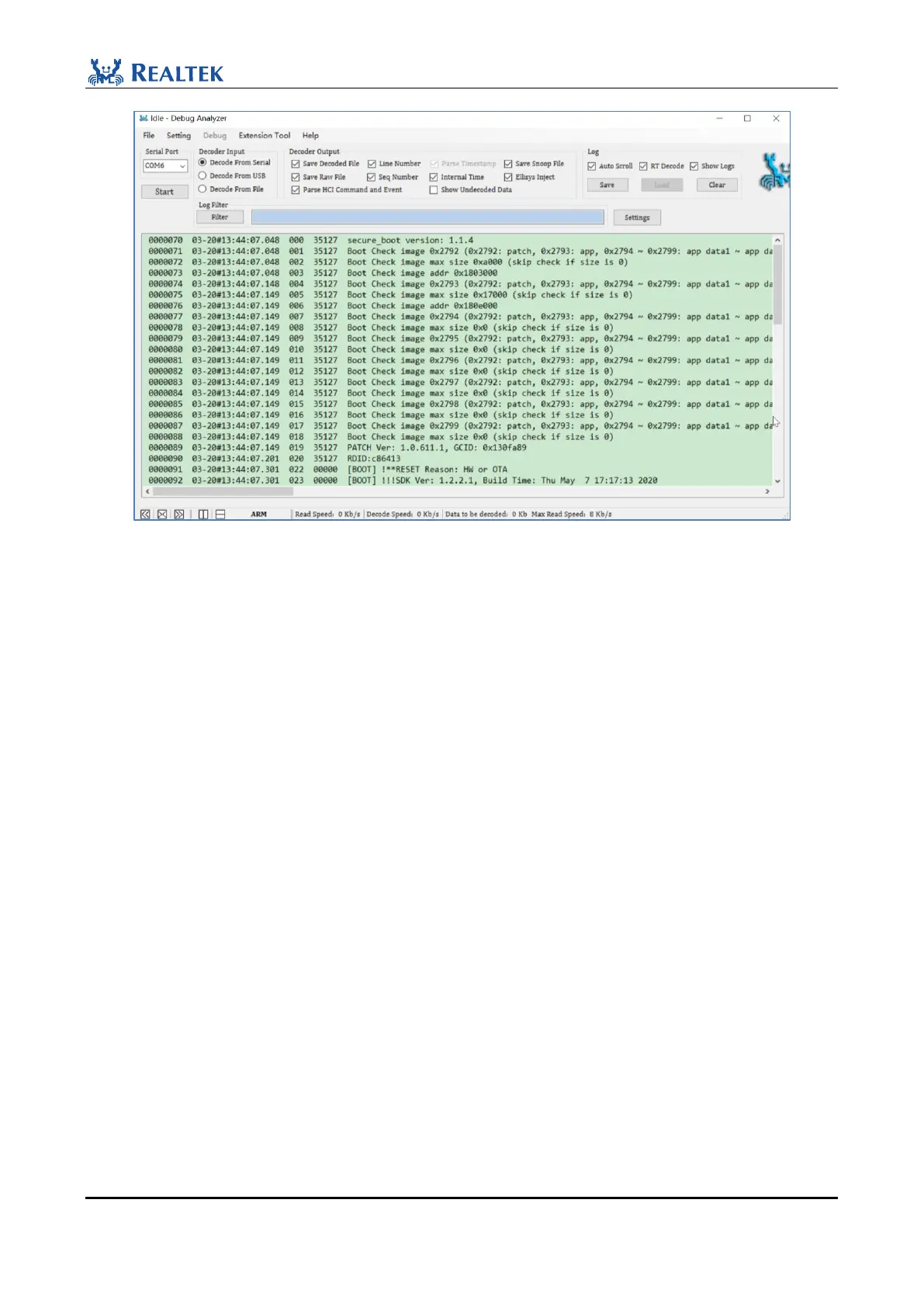
Figure 2-30 Print Logs successfully
NOTE:
If users encounter problems in the development process, please provide the corresponding .log & .bin & .cfa & .trace
file to Realtek for analysis, where the path of .log & .bin & .cfa is: DebugAnalyzer\DataFile, .trace file: BEE2-
SDK-vx.x.x\board\evb\ble_peripheral\bin. If Hardfault occurs, also need to provide app.disasm, path: BEE2-SDK-
vx.x.x\board\evb\ble_peripheral\bin
2.5 Verification Test
After the firmware is burned, users can also check the broadcast to see if the EVB board is working properly.
Take the ble_peripheral project of RTL8762C as an example, BEE2-SDK-vx.x.x\board\evb\ble_peripheral, image
download after completion (note: Disconnect P0_3 and GND), press the Reset button on the EVB board, or power
on the EVB again. Users can search for BLE broadcasts through the mobile Bluetooth App (the default broadcast
name is BLE_PERIPHERAL).
MP Tool Config Bluetooth address setting is shown in Figure 2-31.



 To Next Page