EasyManua.ls Logo

Reboot ARC145 - User Manual

Reboot ARC145
9 pages
Print Icon
To Next Page IconTo Next Page
Loading...
Version Number: ARC145-20210106A1
1
Operation Manual
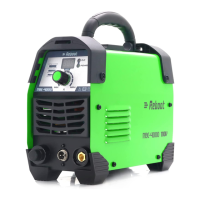
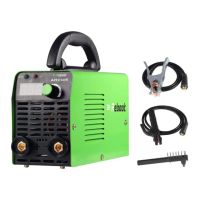
Reboot ARC145 is an intelligent and easy-to-operate welding machine with manual welding mode. It has the
characteristics of good welding performance, diversified usage scenarios, and outstanding welding effects. It is highly
praised by welding enthusiasts and is also very good for beginners in welding. Friendly and can get started quickly.
Part 1: Machine Introduction
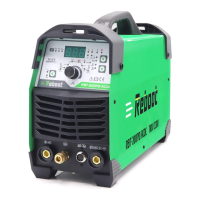
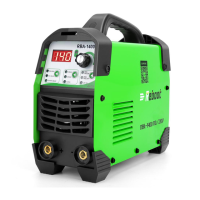
1. Power indicator light
Turn on the power, this light will be on.
2.
Current display meter
Only displays the preset current.
3.
Fault light
When the welding load is overloaded and the output current of the machine is too large, this light will be on. This situation is
normal and the machine can be restored; when there is damage inside the machine, this light will be on. In this case, the machine
is abnormal and requires maintenance.
4.
The current adjustment knob
Just adjusts the current.
5.
Positive connection
Install welding holder and grounding clamp.
6.
Negative connection
Install welding holder and grounding clamp.
Note: ARC145 AC 110V OR AC 220V voltage input
Part 2: Introduction to the product and configuration list.

Questions and Answers

Summary

Machine Introduction

Power Indicator Light

Indicates when the power is turned on. Essential for confirming machine status.

Current Display Meter

Shows the preset welding current, allowing for accurate adjustments.

Fault Light Indicator

Signals overload or internal machine damage, indicating potential maintenance needs.

Current Adjustment Knob

Used to adjust the welding current for different applications.

Positive Connection Terminal

Terminal for installing the welding holder and grounding clamp.

Negative Connection Terminal

Terminal for installing the welding holder and grounding clamp.

Product Configuration and Introduction

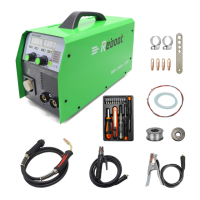
Included Accessories

Details the components included with the welding machine, such as welding holder and ground clamp.

Power-On Test and Precautions

Power Connection Safety

Ensures correct voltage, circuit breaker, plug, and extension cord selection for safe operation.

Machine Operation Guidance

Connecting Holder and Clamp

Step-by-step instructions for connecting the welding holder and ground clamp.

Adjusting Welding Current

Guidance on how to adjust the current using the designated knob.

Ground Clamp Connection

Instructions for connecting the ground clamp to a clean metal surface for conductivity.

Welding Distance and Technique

Recommendations for ideal welding rod to workpiece distance and handling adhesion.

Suitable Welding Rods

Lists suitable and unsuitable welding rod types for optimal performance.

Internal Machine Diagram

EMC Board Function

Explains the role of the EMC board in isolating internal and external circuits.

Transformer and Capacitors

Details the all-copper transformer and high-power capacitors for stability.

Heat Dissipation System

Highlights the thicker radiator for enhanced heat dissipation.

Power Output Components

Describes the imported IGBTs and rectifier tubes for stable current output.

Troubleshooting

Stick Welding Problems

Identifies common issues like excessive spatter, craters, inclusions, and their causes.

Electrical Failures

Addresses power-related issues such as machine not turning on or thermal overload.

Welding Parameter Settings

Parameter Recommendations

Provides recommended settings for welding thickness, electrode diameter, and current.

Overview

The Reboot ARC145 is an intelligent and user-friendly welding machine designed for manual welding, offering excellent welding performance, versatility across various scenarios, and superior welding results. It's highly regarded by welding enthusiasts and is also suitable for beginners due to its ease of use and quick learning curve.

Function Description:

The ARC145 is a stick welding machine that supports both AC 110V and AC 220V voltage input, making it adaptable to different power supplies. It features a clear digital display for preset current and indicators for power and fault conditions. The machine is equipped with a current adjustment knob for precise control over the welding process.

Key Components and Indicators:

  • Power Indicator Light (1): Illuminates when the machine is powered on.
  • Current Display Meter (2): Shows the currently preset welding current.
  • Fault Light (3): Activates under two conditions:
    • When the welding load is overloaded or the output current is excessively large (a normal situation, and the machine can recover).
    • When there is internal damage to the machine, indicating an abnormal condition requiring maintenance.
  • Current Adjustment Knob (4): Used to set the desired welding current.
  • Positive Connection (5): For installing the welding holder and grounding clamp.
  • Negative Connection (6): For installing the welding holder and grounding clamp.

Usage Features:

The ARC145 is designed for ease of use, even for beginners. It supports welding rods below 4.0mm (5/32in), with common sizes being 2.5mm (3/32in) and 3.2mm (1/8in). It's compatible with various electrode types:

  • European style: E6013
  • American style: E7018
  • Stainless steel: ER308

The machine can weld carbon steel with thicknesses ranging from 1-8mm (1/64-5/64in) and stainless steel from 1-5mm (1/64-7/32in). It is important to note that this machine cannot weld aluminum. For carbon steel, carbon steel electrodes should be used, and for stainless steel, stainless steel electrodes are required.

Operational Guidance:

  1. Connecting Accessories: Connect the welding holder and ground clamp to the respective positive and negative connections.
  2. Ground Clamp Connection: Ensure the ground clamp is connected to clean, bare metal, free from rust, paint, or other coatings, to ensure good electrical conductivity.
  3. Current Adjustment: Use the current adjustment knob to set the desired welding current.
  4. Welding Distance: Maintain an ideal distance of 1-2mm (1/64-5/64in) between the welding rod and the workpiece for continuous and stable contact. Avoid holding the rod too high or pressing too low to prevent arc breaking and adhesion.
  5. Arc Starting: For novices, adhesion during welding is common. Friction arc starting can help prevent this.
  6. Electrode Compatibility: Suitable for ordinary welding rods like 7018, 6013, but not for special welding rods such as 7010, 7011.

Important Technical Specifications (ARC145 Model):

  • Input Power Voltage: 1 phase AC220V±15%, 50/60Hz
  • Rated Input Current: 29.1 A
  • Rated Power Capacity: 6.4 KVA
  • Current Adjustment Range: 30-145 A
  • Welding Thickness: >1.0 mm
  • Voltage Adjustment Range: 23.2-25.6 V
  • No-load Voltage: 56±5 V
  • Rated Duty Cycle: 60%
  • Efficiency: 80%
  • Power Factor: 0.7
  • Protection Class: IP21S
  • Insulation Class: F
  • Size (mm): 300290330
  • Weight (Kg): 3.85

Important Technical Specifications (ARC145D Model):

  • Input Power Voltage: 1 phase AC110V/220V±15%, 50/60Hz (Dual-voltage input)
  • Rated Input Current: 44/29.1 A
  • Rated Power Capacity: 6.4 KVA
  • Current Adjustment Range: 30-115/30-145 A
  • Welding Thickness: >1.0 mm
  • Voltage Adjustment Range: 23.2-25.6 V
  • No-load Voltage: 56±5 V
  • Rated Duty Cycle: 60%
  • Efficiency: 80%
  • Power Factor: 0.7
  • Protection Class: IP21S
  • Insulation Class: F
  • Size (mm): 300290330
  • Weight (Kg): 4

Power-on Precautions:

  1. Power Supply Voltage: Ensure your power supply voltage is 110V±15% or 220V±15%. The ARC145D supports both 110V and 220V input in North America and Japan, while the ARC145 supports 220V input in the UK, EU, and other regions. If using a generator, ensure it provides at least 4000W.
  2. Circuit Breaker Protection: A 50A circuit breaker is recommended for 110V power supply, and a 30A circuit breaker for 220V.
  3. Power Plug: Choose a power plug that complies with local electrical regulations.
  4. Extension Cord: Use a #12 AWG or larger extension cord, no longer than 25 feet (8m).

Upon powering on, the fan at the back of the machine should rotate, and the digital display on the panel should indicate normal operation. The fan may continue to rotate for a few seconds after power-off to reduce the machine's working temperature, which is normal.

Maintenance Features and Troubleshooting:

The ARC145 is designed with internal protection mechanisms. During high-strength continuous welding, the machine may enter protection mode, indicated by the "OC" light on the panel. After a period of heat dissipation, the machine will automatically return to normal operation.

Troubleshooting Common Issues:

  • No Arc:
    • Check if the ground wire is properly connected to the workpiece and if the workpiece is free of rust, paint, or other coatings.
    • Verify the distance between the welding rod and the workpiece (ideal is 1-2mm).
    • Ensure the welding object is clean; polish with sandpaper or a grinder if necessary.
  • OC Fault Light On During Welding: This indicates over-current protection. Stop welding, allow the machine to cool for a few minutes, and it should automatically recover. If it doesn't recover after 10 minutes, shut down and restart.
  • OC Light On When Machine is Turned On: Contact customer support.
  • Poor Welding Quality (large spatter, broken arc): Try exchanging the connection of the welding clamp and grounding clamp with the machine.
  • Machine Fails to Turn On (Power LED off):
    • Check for input voltage.
    • Inspect the supply plug or cable for faults.
    • An internal fuse might have tripped; allow time for auto-reset.
  • Thermal Overload (Thermal LED on):
    • The unit may have been operated beyond its capacity rating.
    • Airflow through the machine might be restricted, or the fan may have failed.

Internal Components (for maintenance reference):

  1. EMC Board: Isolates external power grid and internal circuits to prevent mutual interference.
  2. All-copper Main Transformer: Provides substantial power.
  3. High-power Large Capacitors: Enhance machine stability.
  4. Thicker Radiator: Ensures better heat dissipation.
  5. Imported IGBTs (4): Deliver stable and powerful current output.
  6. Imported Rectifier Tubes (3): Ensure stable and powerful current output.

For any problems that cannot be solved, or if you are interested in translating the manual into other languages, contact service@mirthtek.com.

Reboot ARC145 Specifications

General IconGeneral
BrandReboot
ModelARC145
CategoryWelding System
LanguageEnglish

Related product manuals