Beijing Reci Laser Technology Co., Ltd
User Guide for Single Module Fiber Laser
Chapter 4 Using of the product
4.1 Front Panel
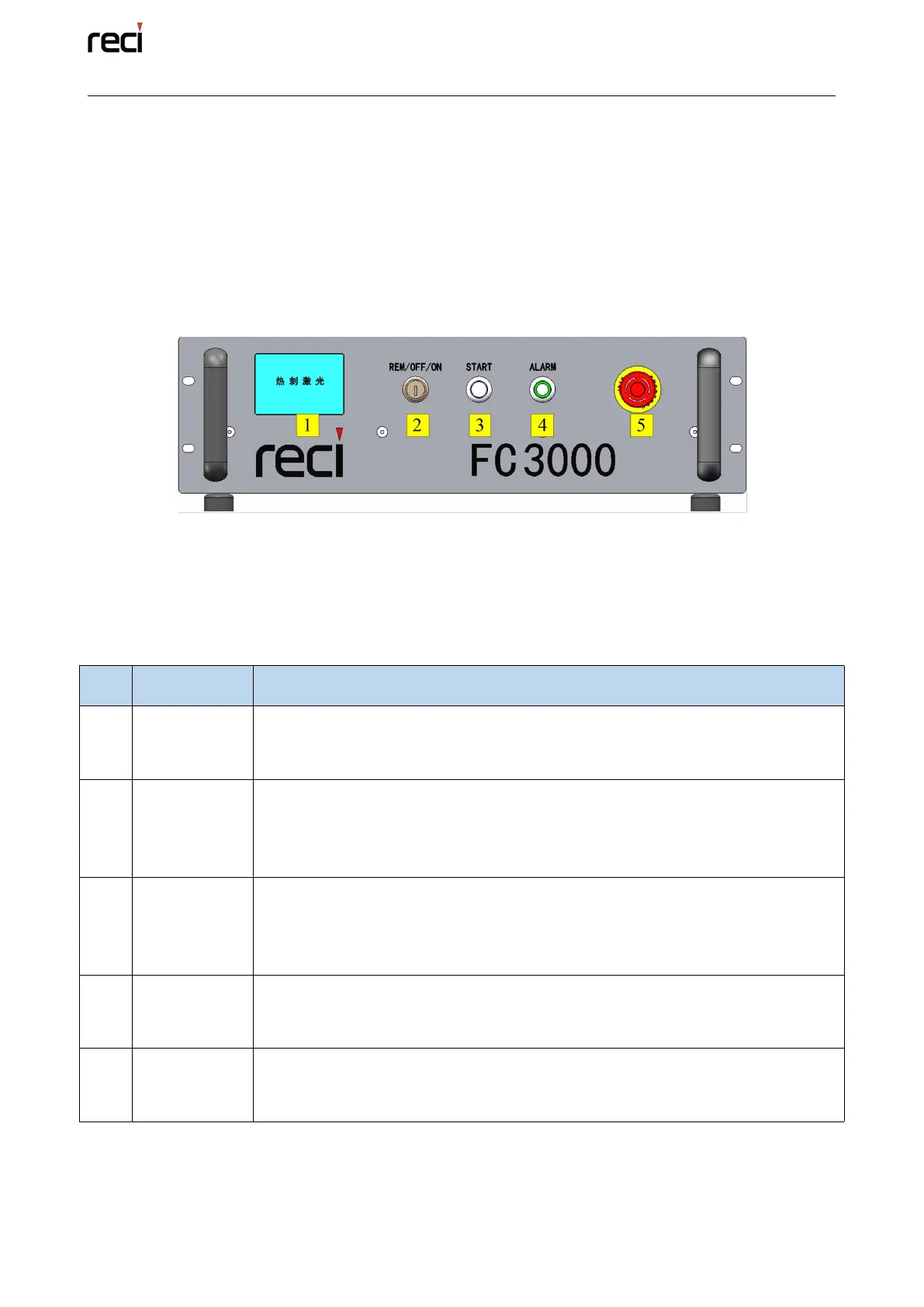
The layout of the front panel is shown in Figure 4.1, 1000W, 1500W, 2000W
and 3000W are the same style. Take FC3000 as an example.
Figure 4.1 the font panel of FC3000 (the same as other single module Fiber Lasers)
The button functions of the front panel are as the table 4.1.
Table 4.1(a) Function of the button/switch on the Front Panel
Check the laser status.
Clear the fault, detect the signal, query the fault, query the fault shielding
and clear the fault. See 4.1 (b) for details.
Power switch of laser.
Insert the key, rotating to REM, means the laser is operating in the far end
mode; rotating to ON, means the laser is operating in local mode; rotating to
OFF, means the laser power is off.
Start laser.
Local mode power-on button, after the laser source power supply air switch
opened, need press the button again, then the laser source power supply can
power-on.
Abnormal situation light of laser.
Indicator light, green means that the laser power supply is normally powered
on; red means that the laser is faulty.
Emergency stop.
Press to turn the laser off and lock immediately, and turn it clockwise to
release the button.



 To Next Page