27
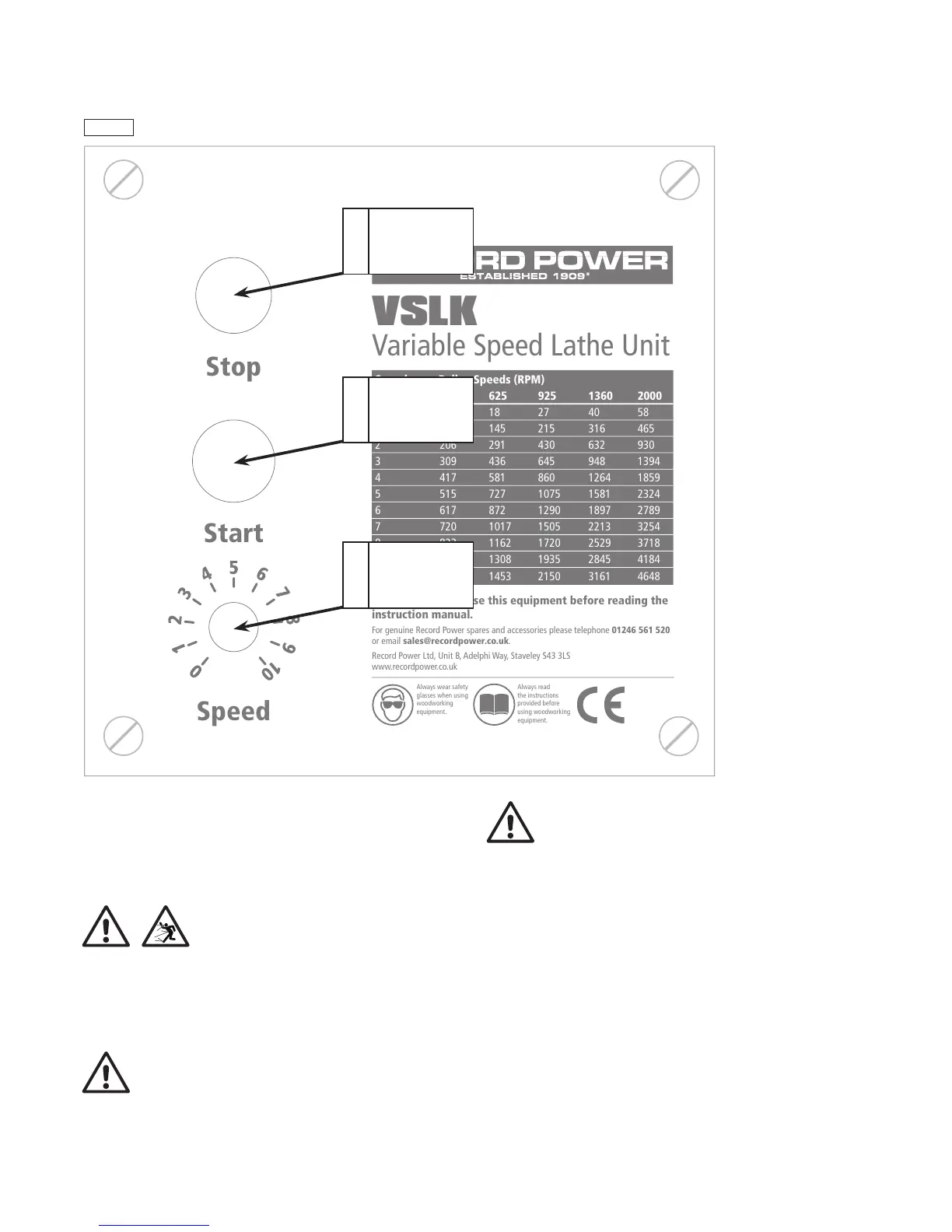
Please refer to Fig.10.1 for control references.
1. To start the drive unit push button B.
2. To adjust the speed of the lathe, turn the variable speed control C to
achieve the required speed. To increase the speed turn the control knob
clockwise and to decrease the speed turn the knob anti-clockwise.
IMPORTANT: Before starting the machine with work mounted, always
ensure that the speed control knob is set to the lowest speed setting and
gradually increase the speed as the work piece becomes balanced
and concentric.
3. To stop the machine or in case of emergency, push button A.
WARNING: As the lathe slows down after switching off, do not attempt
to slow the lathe down by hand. This could lead to severe damage to the
hands, through splinters, burning of the skin or even trapping of hands
between workpiece and toolrest / bed bars. Marking of the workpiece or
trapping could also occur if using a rag or cloth as a brake.
IMPORTANT: DO NOT run the variable speed unit below number 3 on the
speed control dial for more than 30 minutes without providing extra cooling
for the motor.
CAUTION: Even when the speed control dial is set to 0 the motor will still
turn slowly in a jerky motion. This is a safety feature designed to indicate
that the rotary switch C is on. DO NOT run the lathe at this setting (see note
above).
10. Lathe Operation - cont.
CONTROLS AND FUNCTIONS OF THE VARIABLE SPEED UNIT (CL4-CAM ONLY)
Stop
Start
Speed
VSLK
Variable Speed Lathe Unit
Speed Pulley Speeds (RPM)
Setting 425 625 925 1360 2000
0 13 18 27 40 58
1 103 145 215 316 465
2 206 291 430 632 930
3 309 436 645 948 1394
4 417 581 860 1264 1859
5 515 727 1075 1581 2324
6 617 872 1290 1897 2789
7 720 1017 1505 2213 3254
8 823 1162 1720 2529 3718
9 926 1308 1935 2845 4184
10 1029 1453 2150 3161 4648
WARNING: Do not use this equipment before reading the
instruction manual.
For genuine Record Power spares and accessories please telephone 01246 561 520
or email sales@recordpower.co.uk.
Record Power Ltd, Unit B, Adelphi Way, Staveley S43 3LS
www.recordpower.co.uk
Always wear safety
glasses when using
woodworking
equipment.
Always read
the instructions
provided before
using woodworking
equipment.



 To Next Page