FORMAT MEDIA
RED SSDs can be formatted as either FAT32 or UDF (UDF is only supported on firmware v6.4 or later).
FAT32: All camera firmware versions support FAT32. When an SSD is formatted as FAT32, all video clips
(including R3D, .mov, and .mxf) are separated into 4GB segments (but display as a single clip when referenced
together).
UDF: Only camera firmware 6.4 and later supports UDF. When an SSD is formatted as UDF, .mov files are not split
into multiple smaller files. However, R3D and .mxf files are still separated into 4GB segments.
Both Mac and Windows- based computers support SSDs formatted as either FAT32 or UDF. Refer to the
documentation for your operating system to determine if there are any limitations to its support of file format.
FORMAT MEDIA IN-CAMERA
IMPORTANT: Ensure that data is backed up before formatting media, since formatting erases all data on the SSD.
NOTE: The procedure below is specific to firmware v6.4. The procedure may change based on your camera firmware
version.
1. Insert the RED SSD into the media slot on a media module with the RED
®
logo facing outward (away from camera
body).
NOTE: When fully inserted, the SSD protrudes slightly from the SSD slot.
2.
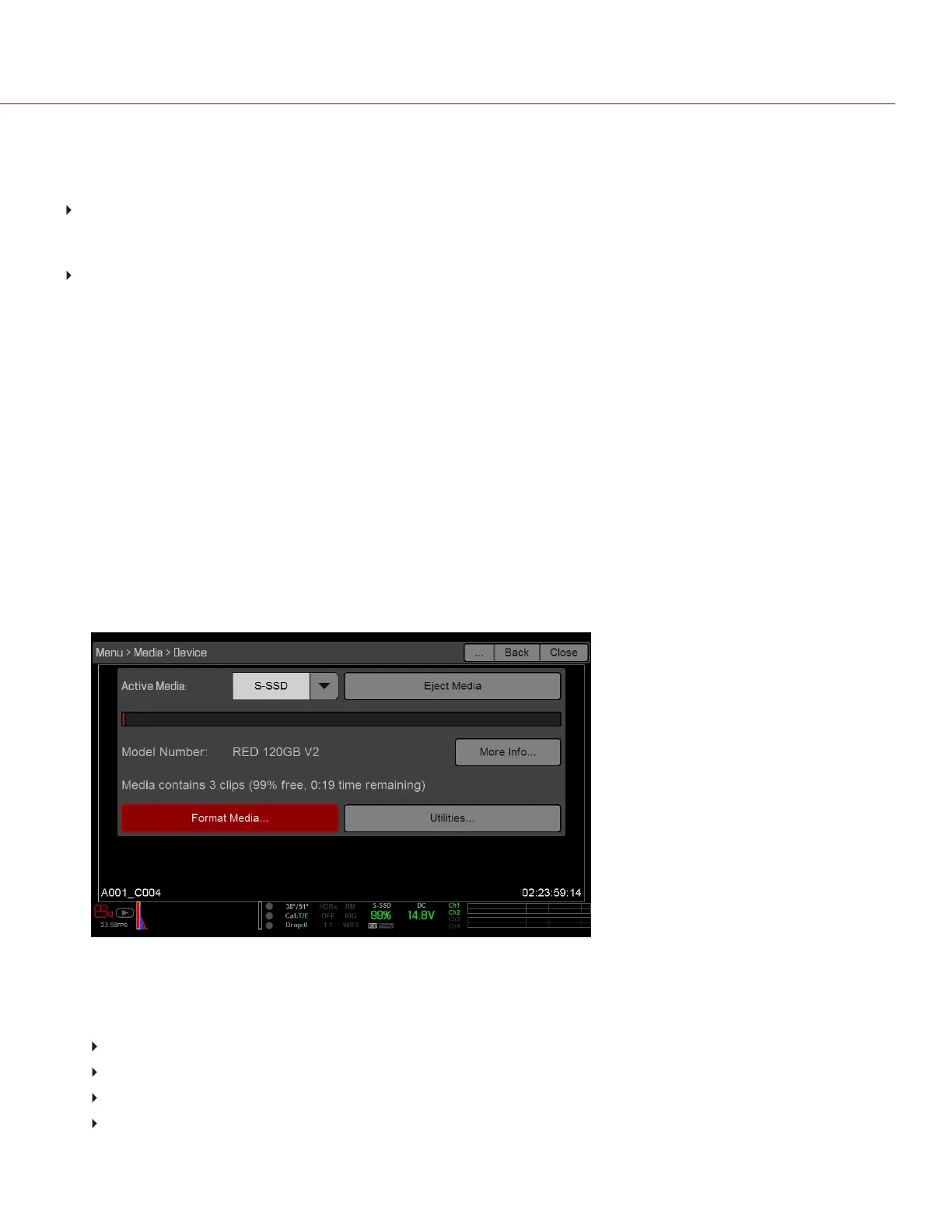
Go to Menu > Media > Device.
3.
Select an option from the Active Media drop-down menu.
4.
Select Format Media....
Figure: Format Media
5.
Select FAT32 or UDF from the File System drop-down menu.
6. Select the following options to add camera identity information and 3D position properties:
Reel Number: Select a value in the range 1–999.
Camera ID: Select a letter in the range A-Z to identify the camera.
Camera Position: Identify the camera position as Right, Left, or Center.
Edge Timecode Start: Manually enter an Edge Timecode Start value (seldom used).
C O PYRIGHT © 2 017 R ED.C OM , LLC 955- 0047, REV- AH| 43
RED DSMC MEDIA OPERATION GUIDE


 To Next Page