service@redliro.com service@redliro.com
12
13
M button:
Press the M button while in standby mode to switch to custom mode. Select between time setting (setting
range 5:00 ~ 99:00), distance setting (setting range1 ~ 99miles ) and calorie setting( setting range 20 ~ 990 ).
Press M button to change the cyclic display or xed display mode when in use.
Cyclic display mode: The default mode when in use. The left screen displays Time, Step and Calorie in a
loop. The right screen displays Speed and Distance in a loop. The display between each option in 5 second
intervals.
Fixed display mode: When in cyclic display mode, press the M button to xed the option on the left or right
screen.
P button:
In standby mode, it is used to select 12 preset automatic programs (P01 ~ P12)
The 12 preset programs have the following speeds:
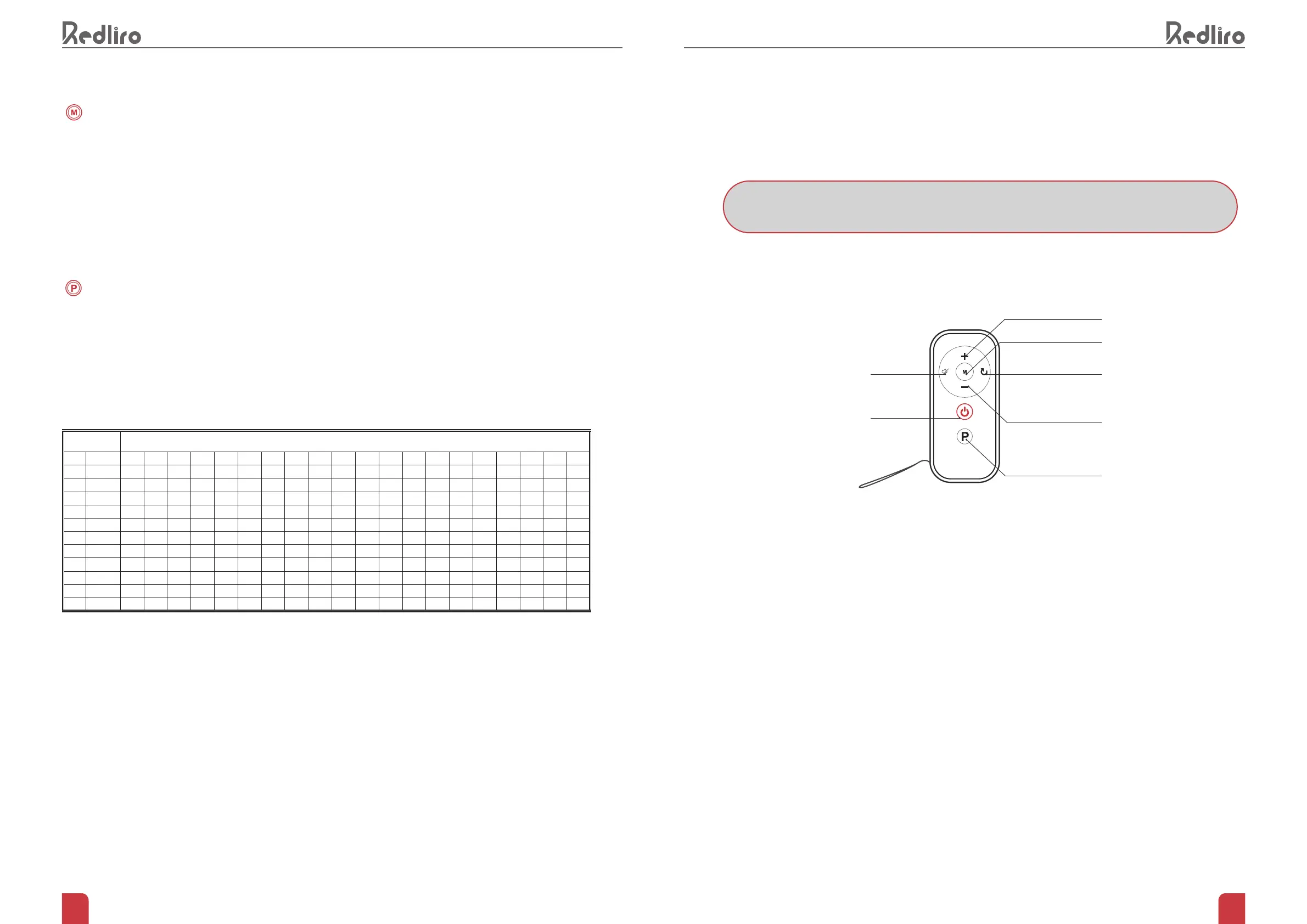
REMOTE CONTROL INSTRUCTIONS
HOW TO ESTABLISH A NEW CONNECTION
1.
Ensure the treadmill is connected to the power source but keep it powered on.
2.
Hold the Mute button and Reset buttons on the remote control simultaneously for 5 seconds. The light on
the remote control will ash as it enters pairing mode.
3.
The remote control will pair with treadmill automatically after a few seconds.
Increase Speed
Mode
ResetMute
Start / Stop
Reduce Speed
Programs
NOTE: TO USE THE REMOTE CONTROL, YOU MUST FIRST ESTABLISH A NEW CONNECTION
SET TIME/20=RUNNING TIME FOR EACH SECTION
P1 SPEED 2.0 2.0 3.0 4.0 5.0 3.0 4.0 5.0 5.0 3.0 4.0 5.0 4.0 4.0 4.0 2.0 3.0 5.0 3.0 2.0
P2 SPEED 2.0 3.0 4.0 5.0 6.0 4.0 6.0 6.0 6.0 4.0 5.0 6.0 4.0 4.0 4.0 2.0 4.0 5.0 3.0 2.0
P3 SPEED 2.0 4.0 4.0 6.0 6.0 4.0 7.0 7.0 7.0 4.0 7.0 7.0 4.0 4.0 4.0 2.0 5.0 3.0 3.0 2.0
P4 SPEED 2.0 5.0 5.0 6.0 6.0 6.0 6.0 4.0 4.0 2.0 2.0 4.0 7.0 6.0 6.0 6.0 6.0 6.0 4.0 2.0
P5 SPEED 3.0 3.0 5.0 7.0 6.0 6.0 7.5 5.0 5.0 7.5 7.5 5.0 6.0 5.0 7.5 5.0 7.0 5.0 4.0 3.0
P6 SPEED 3.0 7.5 7.5 7.0 7.5 6.0 7.5 6.0 4.0 2.0 5.0 4.0 7.0 6.0 6.0 6.0 7.5 6.0 4.0 3.0
P7 SPEED 3.0 4.0 6.0 6.0 7.5 6.0 7.5 7.0 5.0 6.0 6.0 6.0 6.0 7.0 7.5 7.0 6.0 6.0 5.0 3.0
P8 SPEED 3.0 5.0 6.0 7.0 7.5 7.5 7.0 7.5 4.0 7.0 7.0 4.0 7.0 7.0 7.5 7.0 7.5 7.0 5.0 3.0
P9 SPEED 4.0 7.0 3.0 1.0 7.0 7.0 7.5 7.5 5.0 7.5 6.0 7.0 6.0 7.0 7.5 7.5 7.0 7.0 5.0 3.0
P10 SPEED 4.0 5.0 3.0 7.5 7.5 7.5 7.5 7.5 4.0 7.5 5.0 4.0 7.0 7.5 7.0 7.0 7.5 7.0 6.0 4.0
P11 SPEED 4.0 7.5 6.0 7.5 7.0 6.0 6.0 7.5 5.0 7.5 7.5 6.0 6.0 6.0 6.0 6.0 7.0 7.5 7.5 2.0
P12 SPEED 4.0 4.0 7.0 7.5 2.0 7.5 7.5 7.5 7.5 7.5 7.5 7.5 7.0 7.5 7.5 2.0 7.5 7.5 7.5 2.0


 To Next Page