8
Operating Instructions
Prior to first use with the meter, the pH electrode should
be calibrated. Refer to the pH Calibration section
of this manual for further instructions.
Power ON/OFF
Turn the meter on by pressing the POWER button. To turn the meter off,
press, hold and release the POWER button for 2 seconds.
Note:
adapter (sold separately).
pH or ORP Modes
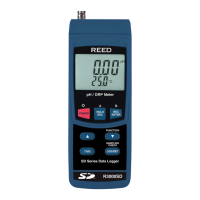
This meter offers pH and ORP modes of measurement capable of
measuring 0.00 to 14.00 pH and 0 to 1999 mV (ORP).
pH measurements achieve better results when the temperature of the
solution being tested is known and a temperature compensation factor
is applied. This can be attained using manual or automatic temperature
compensation.
is not connected to the meter and the temperature of the solution under
test is manually entered. The temperature compensation value appears
on the lower part of the LCD display.
probe is connected to the meter (R3000SD-ATC) and inserted into
the solution under test. The temperature compensation value will also
appear on the lower part of the LCD display.
pH Measurement Mode (Manual Temperature Compensation)
1. Connect the Optional pH Electrode into the pH/ORP Input BNC Jack.
2. Press the FUNCTION button to select pH mode.
3. Set the pH Manual Temperature Compensation value. Refer to Setup
Mode for details.
4. Place the pH electrode into the measured solution, so that the tip of
the electrode and junction are fully immersed and stir at a moderate,
uniform rate. The top of the LCD will display the pH value while
the bottom part of the LCD will display the setting for the manual
temperature compensation value.
continued...
REED Instruments
1-877-849-2127 | info@reedinstruments.com | www.reedinstruments.com



 To Next Page