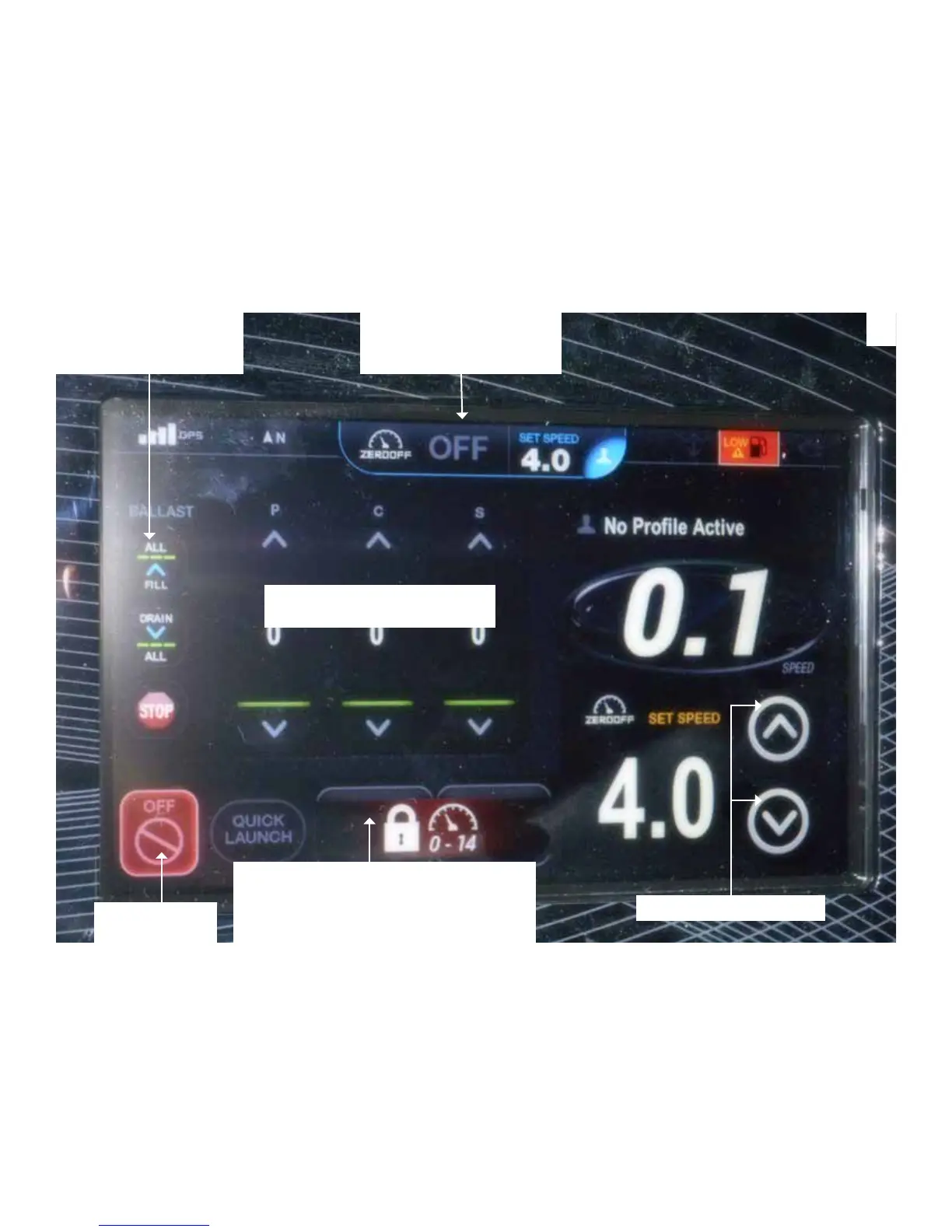
3. After initial surf display activation you can program the display to accomodate the surf rider. Use illustration B
below to ll the ballast bags. Choose FILL all tab at the left hand ballast column and all bags will ll automatically and
then shut off. If you want to individualize ballast weight for a rider you can ll them individually by pressing the up
arrows to the desired amount. To empty the ballast bags choose the EMPTY all tab at the left hand ballast column.
4. Press the ZERO OFF tab to the ON position to enter the surf mode and set the surf rider speed. Use the arrows
to set the speed at 11 mph for most riders. For a steeper wake (more push) choose 10 mph. For a longer wake ( easy
cruise) choose 10.5 or 11. The wake speed can be adjusted in 1/2 increments.
5. Press the RED icon button at the bottom left of the surf tab control screen display to TURN OFF the surf tab
circuit.Activate the PORT or STBD. surf tab at the bottom to choose left or right. Tabs are locked when engine is OFF.
B
FILL/EMPTY INDIVIDUAL
BALLAST TANK
ALL 3 BAGS FILL OR
EMPTY AT THE SAME
TIME
ON/OFF TO ZERO OFF
MUST BE ON TO HOLD
SPEED POSITIONS.
SET SPEED @ 11 MPH
DEPLOYS PORT or STBD SURF TAB.
NOTE THAT TABS ARE LOCKED
WHEN ENGINE IS OFF.
(AS SHOWN ABOVE)
PRESS TO SET
SURF TABS
6. The QUICK LAUNCH tab shown next to the surf tab in illlustration B is a factory preset program for surf tab en-
hancements. The surf tabs in this mode automatically adjust for a loaded boat to aid in improved visibility by assisting
in keeping the bow down and a more efcient ride through the entire RPM range.
Note that the pre-programmed surf tab positions are factory set and can’t be altered by the end user.
7. Notice that it is possible to save an individual’s surf riding prole. Just press the PROFILE tab and the unit saves
the surf rider’s information so the display screen need not be programmed again for that surt rider.


 To Previous Page