14
Blood Glucose Tests
2
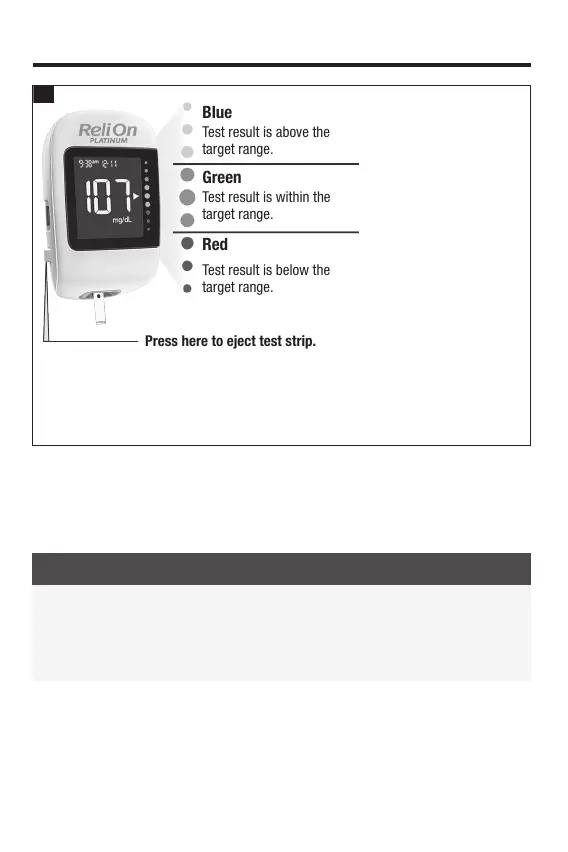
Blue
Test result is above the
target range.
Green
Test result is within the
target range.
Red
Test result is below the
target range.
Press here to eject test strip.
*The target range is set by default at 70–180 mg/dL. Consult your healthcare professional
before changing the target range. To change the target range, pair the meter to a mobile
device or connect it to a PC with diabetes management software installed. Then follow the
diabetes management software or mobile app instructions. Functionality may vary by
software or mobile app. For questions, contact Customer Service at 1-800-819-1097.
NOTE
When performing a blood glucose test: If the control bottle symbol and the flashing L1
or L2 appear on the display with your blood glucose result, an error has occurred.
• Do not act on the blood glucose result.
• Discard the test strip and repeat the blood glucose test with a new test strip.
Your test result appears with an arrow. This arrow shows if your test result falls above,
within, or below the target range.* The target range is represented by the green region
of the target range indicator. The arrow will flash if your test result falls above or below
this range.
83561_09410155001A EN ReliON.indd 1483561_09410155001A EN ReliON.indd 14 3/23/2022 11:24:03 AM3/23/2022 11:24:03 AM



 To Next Page