21
4
Review Your Data
Overview
• The meter automatically stores at least
720 blood glucose results in memory
with the time and date of the test.
• Once 720 blood glucose results are in
memory, adding a new blood glucose
result deletes the oldest blood glucose
result.
• If more than 720 blood glucose tests are
performed within a 90-day period, only
the 720 most recent test results are
included in the 90-day average.
• The meter automatically stores at least
30 control results in memory, but only
the current control result can be viewed
on the meter. To view stored control
results, transfer them to a compatible
software application.
• Once 30 control results are in memory,
adding a new control result deletes the
oldest control result.
• Control results are not viewable in
memory and are not included in the 7,
14, 30, or 90-day averages.
WARNING
Do not change your therapy based on
an individual test result in memory.
Talk to your healthcare professional
before changing therapy based on test
results in memory.
NOTE
The meter may have time and date
auto-sync capability when paired with a
mobile device that may update the
meter time and date automatically. Even
if you use your meter in multiple time
zones, results are stored from newest to
oldest and not by time and date.
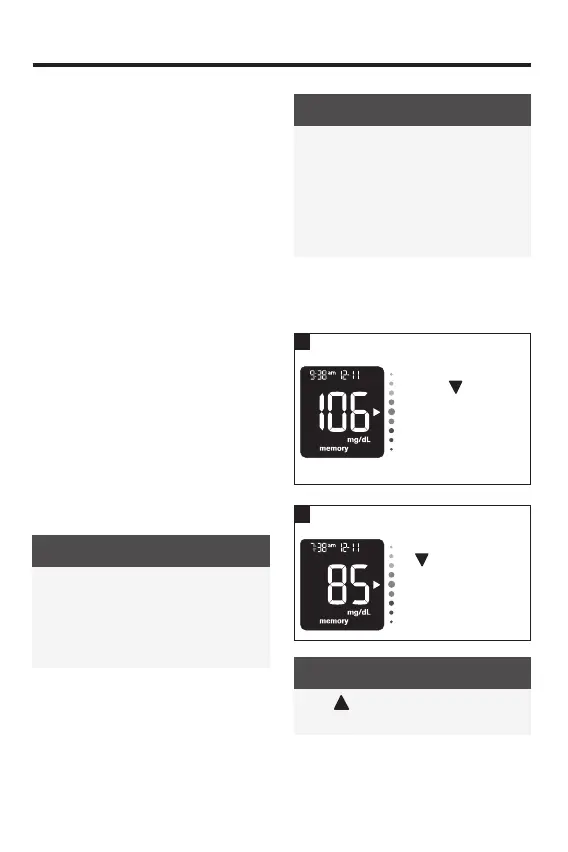
Reviewing Blood Glucose Results
in Memory
1
With the meter o,
press
to view
the most recent
blood glucose
result with its time
and date at the top
of the display.
Continue to press
to view previous
test results from
newest to oldest.
NOTE
Press to move back through oldest to
newest test result.
83561_09410155001A EN ReliON.indd 2183561_09410155001A EN ReliON.indd 21 3/23/2022 11:24:09 AM3/23/2022 11:24:09 AM



 To Next Page