30
Meter Maintenance and Troubleshooting
8
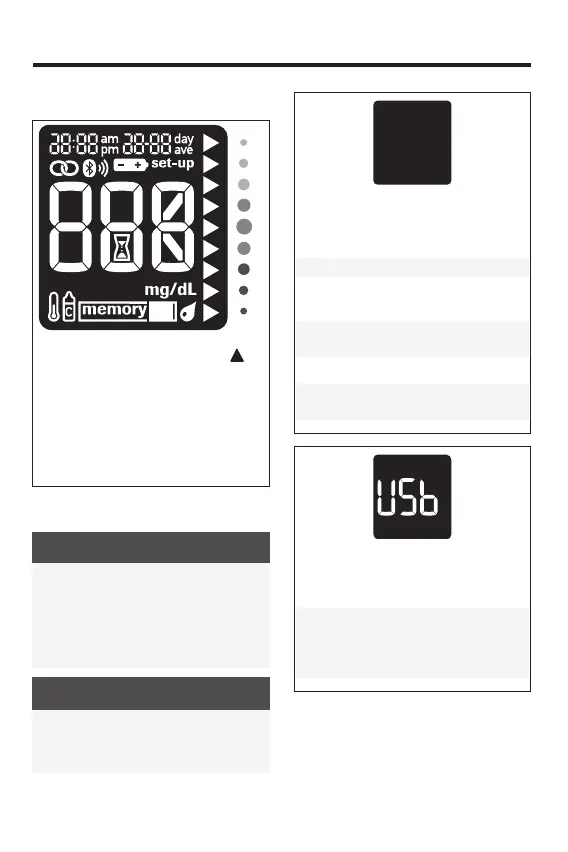
Checking the Meter Display
With the meter o, press and hold
until all display segments appear. Check
the meter display for missing segments.
All segments should look like the picture
above. If any segments are missing from
the display, contact Customer Service at
1-800-819-1097, as there may be a
problem with the meter.
Error Messages
WARNING
• Never make therapy decisions based
on an error message.
• If you have any concerns or see any
other error message, contact Customer
Service at 1-800-819-1097.
NOTE
The error code and Err will alternate on
the display for all coded error messages
(E-1 through E 14).
The meter will not turn on or the display
is blank.
• Batteries are dead.
Insert new batteries.
• Display is damaged. / Meter is
defective.
Contact Customer Service at
1-800-819-1097.
• Extreme temperatures.
Move the meter to a location with a
more moderate temperature.
The meter is connected to a PC and a
blood glucose or control test cannot be
performed.
EITHER remove the USB cable and
perform a blood glucose or control test
OR remove the test strip and start a
data transfer.
83561_09410155001A EN ReliON.indd 3083561_09410155001A EN ReliON.indd 30 3/23/2022 11:24:24 AM3/23/2022 11:24:24 AM



 To Next Page