2.155
ENG_UD77256_3
Boîte de vitesses automatique Levier Electronique (HJB - Renault)
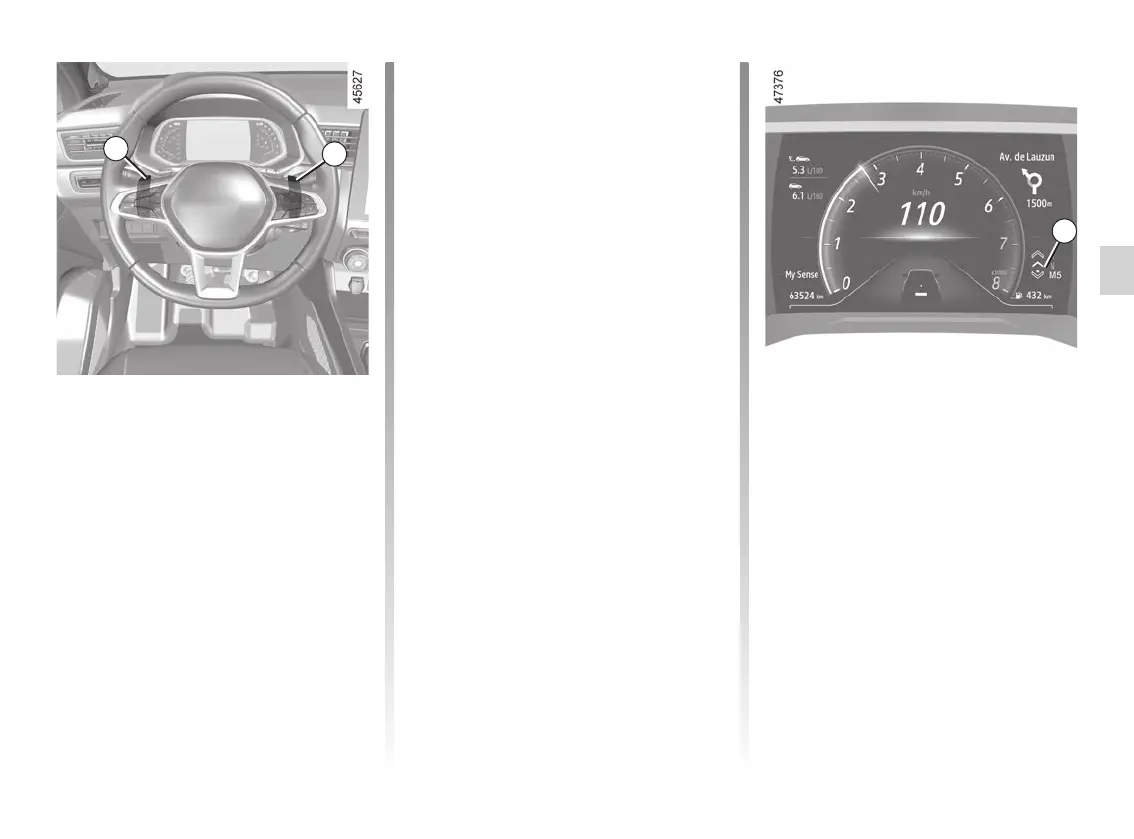
Driving in manual mode
When driving in position D you can
switch to manual driving mode using
paddles 8 and 9 on the steering wheel.
Depending on the vehicle, two manual
driving modes are available:
– the “temporary” manual mode
can be used to force gear shifting
by briefly pressing one of the two
paddles. the driving mode D and
the gear engaged appear on the in-
strument panel. the letter D and the
lower arrow appear brighter on the
indicator light 3.
Note: the gearbox adjusts itself to
automatic mode D if the gear en-
gaged is no longer optimal to vehi-
cle performance or if no action has
been taken on a paddle for a certain
amount of time.
– permanent manual mode is ac-
tivated by pressing and holding
either of the paddles. Driving mode
M and the gear engaged will appear
on the 10 display on the instrument
panel. All of the letters and the lower
arrow appear as backlighting on the
indicator light 3.
Note: depending on the vehicle, you
can return to automatic mode by
pressing and holding the right-hand
paddle or by moving the one-touch
lever 1 one or two notches back-
wards.
In all situations:
– to move down through the gears,
press the left-hand paddle;
– to move up through the gears, press
the right-hand paddle.
Note: depending on the display, the +
and - or and indicators
will suggest moving up or down a gear.
10
Gear shifting paddles 8 and 9
Depending on the vehicle, you can use
paddles 8 and 9 to change gear when
the lever is in position D.
8: Change to a lower gear.
9: Change to a higher gear.
P, N and R are not accessible using the
paddles.
8
9
AUTOMATIC GEARBOX, ELECTRONIC LEVER (4/6)














 To Next Page