parking distance control.............................
(up to the end of the DU)
driving aids ................................................
(up to the end of the DU)
central door locking ...................................
(current page)
driving ........................................................
(current page)
lighting:
see-me-home .......................................
(current page)
windscreen washer/wiper ..........................
(current page)
daytime running lights................................
(current page)
trip computer and warning system.............
(current page)
doors..........................................................
(current page)
instrument panel ........................................
(up to the end of the DU)
locking the doors .......................................
(current page)
1.84
ENG_UD78482_3
Menu de personnalisation des réglages du véhicule (HJB - Renault)
VEHICLE SETTINGS CUSTOMISATION MENU (2/3)
Vehicles not fitted with a
multimedia screen
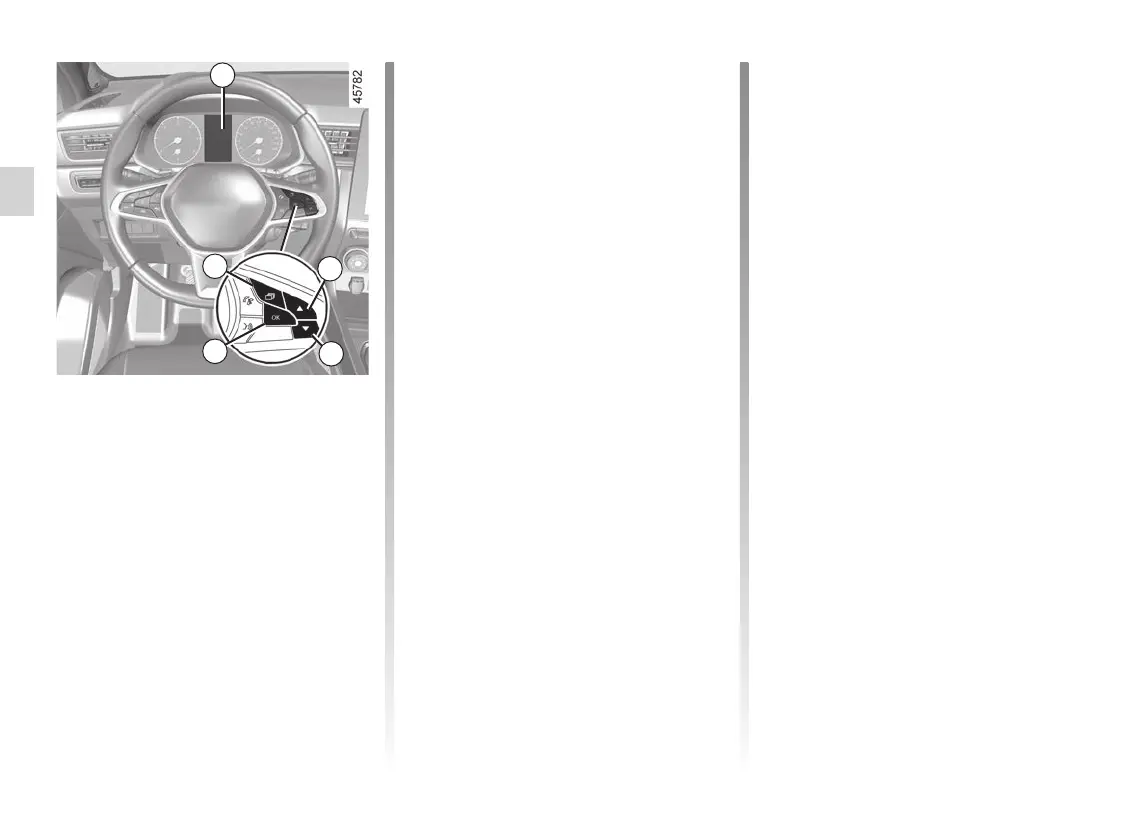
Accessing the settings menu on
display 2
With the vehicle stopped, press the 3
switch as many times as required to
reach the “Vehicle” tab. Press repeat-
edly on the 4 or 5 switch to access the
“Settings” menu, then confirm by press-
ing 6 “OK”.
Adjusting the settings
Navigate using the 4 or 5 control to
select the function to be modified and
press 6 “OK” to confirm (display may
vary according to vehicle equipment
and country):
a) “DASHBOARD”:
– Language;
– Unit;
– Style;
– Colour;
b) “VEHICLE“:
– Rear windscreen wiping in re-
verse gear;
– Automatic windscreen wiping;
– Front/rear drip wiping function;
– Free wheel in ECO mode;
– External welcome;
c) “PARKING ASSIST”:
– Beep sound volume;
2
d) “DRIVING ASSIST”:
– Lane departure warning sound
volume;
– Lane departure warning sensitiv-
ity;
– Lane departure warning vibration;
– Lane keeping assist sensitivity;
– Blind spot warning;
– Active braking;
– Overspeed warning;
– Distance warning;
e) “LIGHTING”:
– Courtesy light auto mode;
– Automatic follow-me-home light-
ing;
– Follow-me-home lighting: XX sec-
onds;
f) “ACCESS”:
– Lock doors during driving;
– Opening/closing in hands-free
mode;
– Unlock the driver’s door only;
– Automatic re-locking;
– Silent locking;
– Automatic opening/closing;
– Automatic fold-out of mirrors;
g) “RESET“.
= function activated
< function deactivated
3
4
5
6














 To Next Page