2
1
3
4
2
NU760_1_G2-FRA.qxd 9/11/05 17:02 Page 2.10
ASSISTED PARKING BRAKE
2.10
Applying the assisted parking
brake
Manual mode
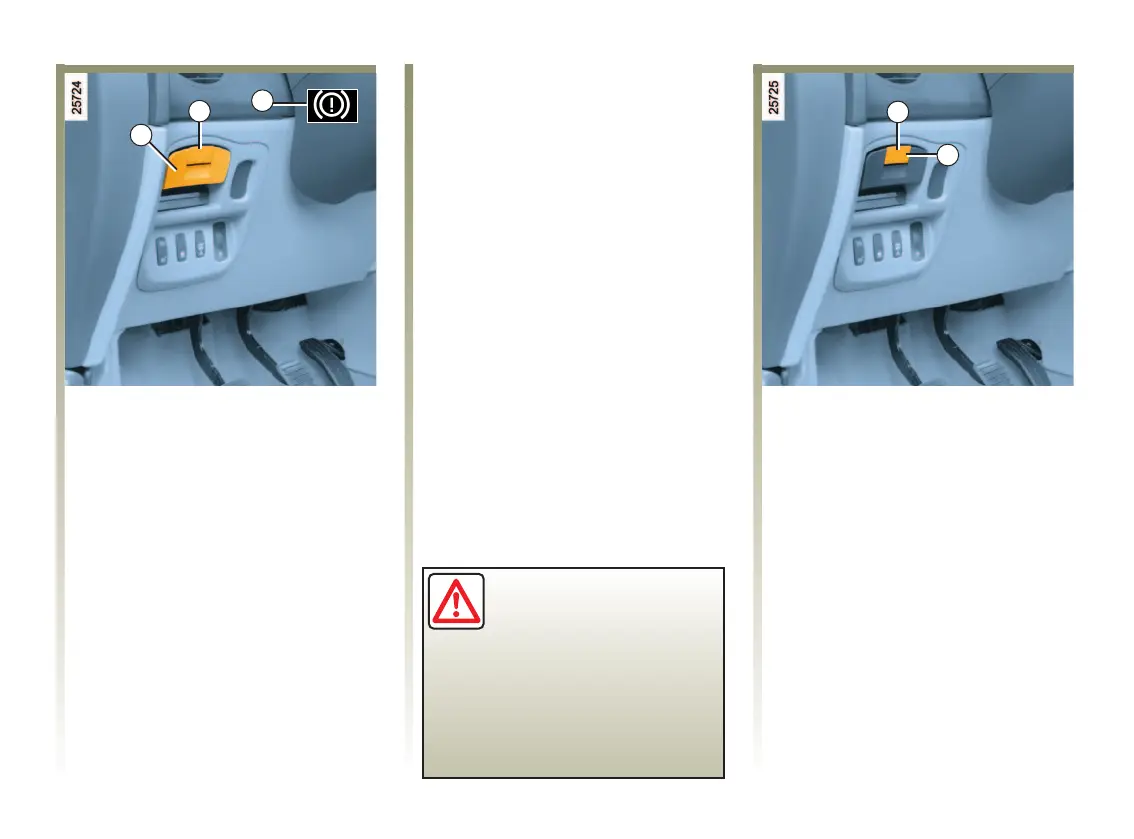
Pull out and release handle 1.
Automatic mode (depending on
the country)
The assisted parking brake ensures
the automatic vehicle immobilisation
when the engine is stopped by
pressing the engine start/stop
button.
In all other instances, e.g. engine
stalling, the assisted parking brake is
not applied automatically. Manual
mode must be used.
Releasing the assisted parking
brake
Manual mode
To release the assisted parking
brake: with the engine running, pull
handle 1 while pressing unlocking
button 4 and release. Indicator
lights 2 and 3 go out.
Automatic mode
The brake will be released
automatically as soon as the vehicle
starts and accelerates.
Indicator light 2 on the dashboard
and indicator light 3 on the
instrument panel light up to confirm
that the assisted parking brake is
applied. Indicator lights 3 and 2 go
out when the doors are locked.
Depending on the vehicle, the
message Parking brake applied may
appear on the instrument panel.
Note:
When the driver’s door is opened, if
the assisted parking brake is not
applied, a beep sounds and,
depending on the vehicle, the
message Apply parking brake may
appear on the instrument panel.
In this case, to immobilise the
vehicle, you must pull and release
the handle 1.
For certain country-specific model
versions, the automatic application
function is not activated. Refer to
the information on Manual mode.
Before leaving the vehicle,
check that the assisted
parking brake is fully
applied.
Indicator light 2 on the dashboard
and indicator light 3 on the
instrument panel light up
permanently to indicate that the
parking brake is applied.
NU760_1_G2-ENG.qxp 27-Dec-05 18:39 Page 2.10 (Black/Process Black plate)













 To Next Page