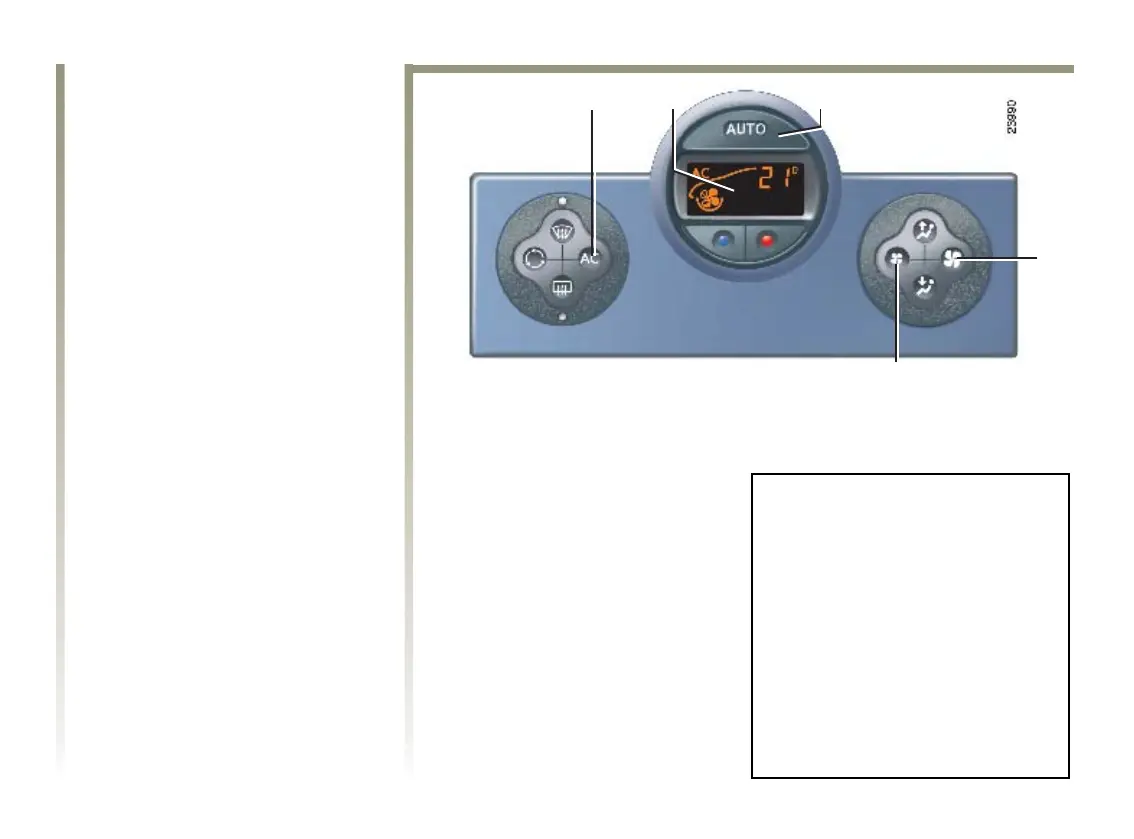
13 12 11 11
5
6
9
3
NU710_6_G3-FRA 4/03/05 9:54 Page 3.12
J77 - NU710-5
C:\Documentum\Checkout\NU710_6_T3-ENG.win 2/5/2005 9:39
-page12
3.12
CLIMATE CONTROL (continued)
Varying the ventilation speed
In automatic mode, the system uses
the most suitable amount of air to
reach and maintain the desired
temperature.
Exit automatic mode by pressing
buttons 9 and 11.
These buttons allow you to increase
or decrease ventilation speed.
Switching the air conditioning
on or off
In automatic mode, the system
switches the air conditioning
system on or off, depending on the
exterior weather conditions.
Exit automatic mode by pressing
button 3: the AUTO warning light
on display 5 goes out.
Button 3 activates (display warning
light comes on) or stops (warning
light goes out) the air conditioning
function.
Note: the “Clear View” function
automatically operates the air
conditioning (indicator light on).
Press button 6 to return to automatic
mode.
In automatic mode, in cold
weather, the ventilation will not
start immediately at maximum
power but will increase gradually
until the engine temperature is
warm enough to heat the passenger
compartment air. This may take a
few seconds or several minutes.












 To Next Page