MountingtheMCR20ontotheCMM
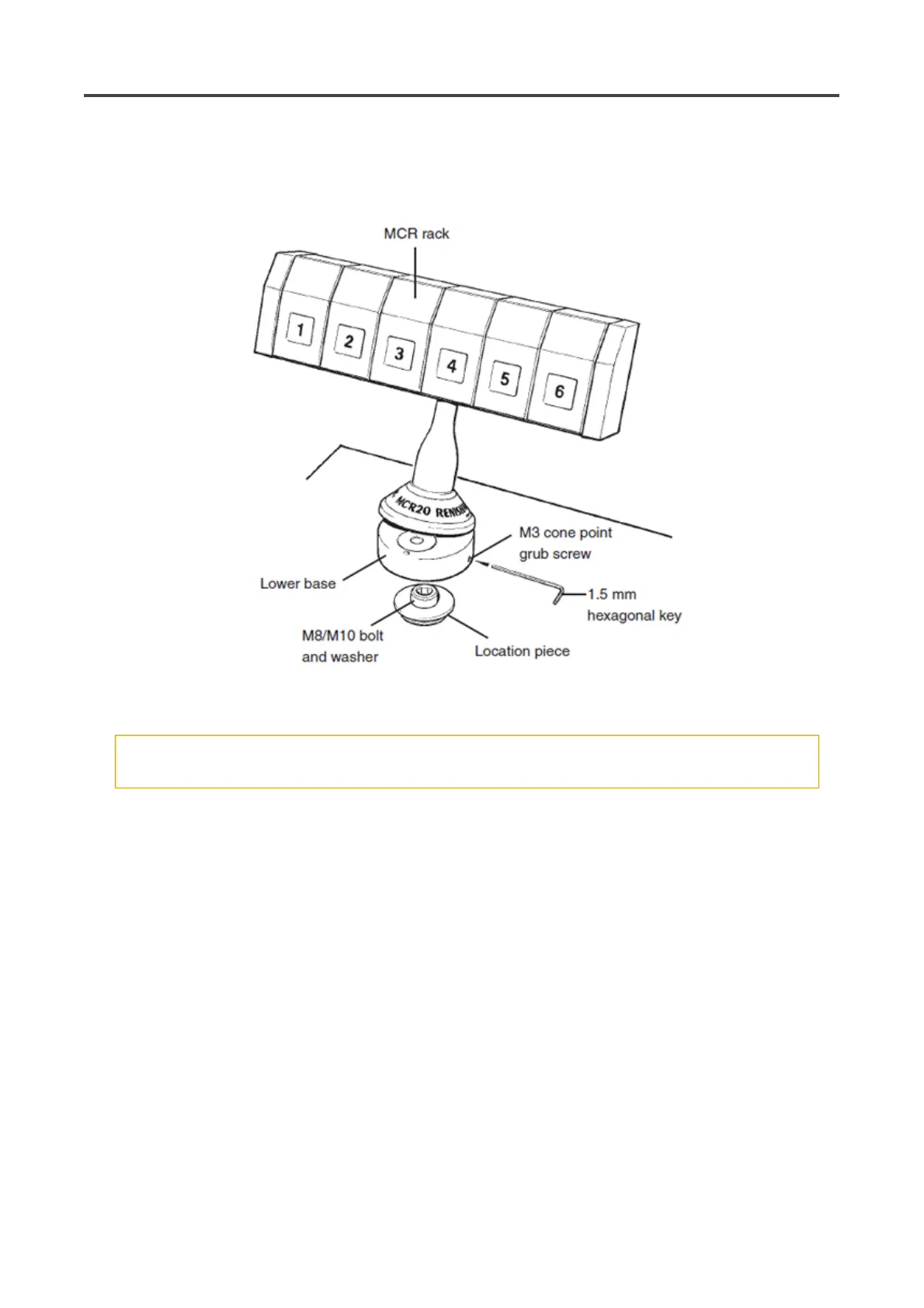
To mount the MCR20 change rack onto your CMM use the following procedure.
NOTES: Whilst the PH20 system does not require that the MCR20 is aligned with the CMM axes, ease of
programming or software constraints may make alignment with the CMM axes desirable.
The MCR20 is not designed for horizontal operation with the ports in a vertical orientation.
CAUTION: For optimum crash protection, it is recommended that the MCR20 is mounted as close as
possible to the extreme edge of the CMM's operating envelope
1. Place the location piece in the desired position on the CMM table and secure in place using the
supplied M8/M10 bolt and washer. Using the appropriate allen key, fully hand tighten the M8/M10
bolt into the threaded insert on the CMM table.
2. Mount the lower base of the MCR20 change rack over the location piece and rotate the X axis of the
rack until the required alignment is obtained.
3. using the 1.5 mm hexagonal key supplied, fully hand-tighten the M3 cone point grubscrew (0.5 Nm -
1.0 Nm) to lock the MCR20 in position.
Pa
e 64 of 73PH20 user's
uide
19/12/2012file://C:\TEMP\~hh906A.htm



 To Next Page