97
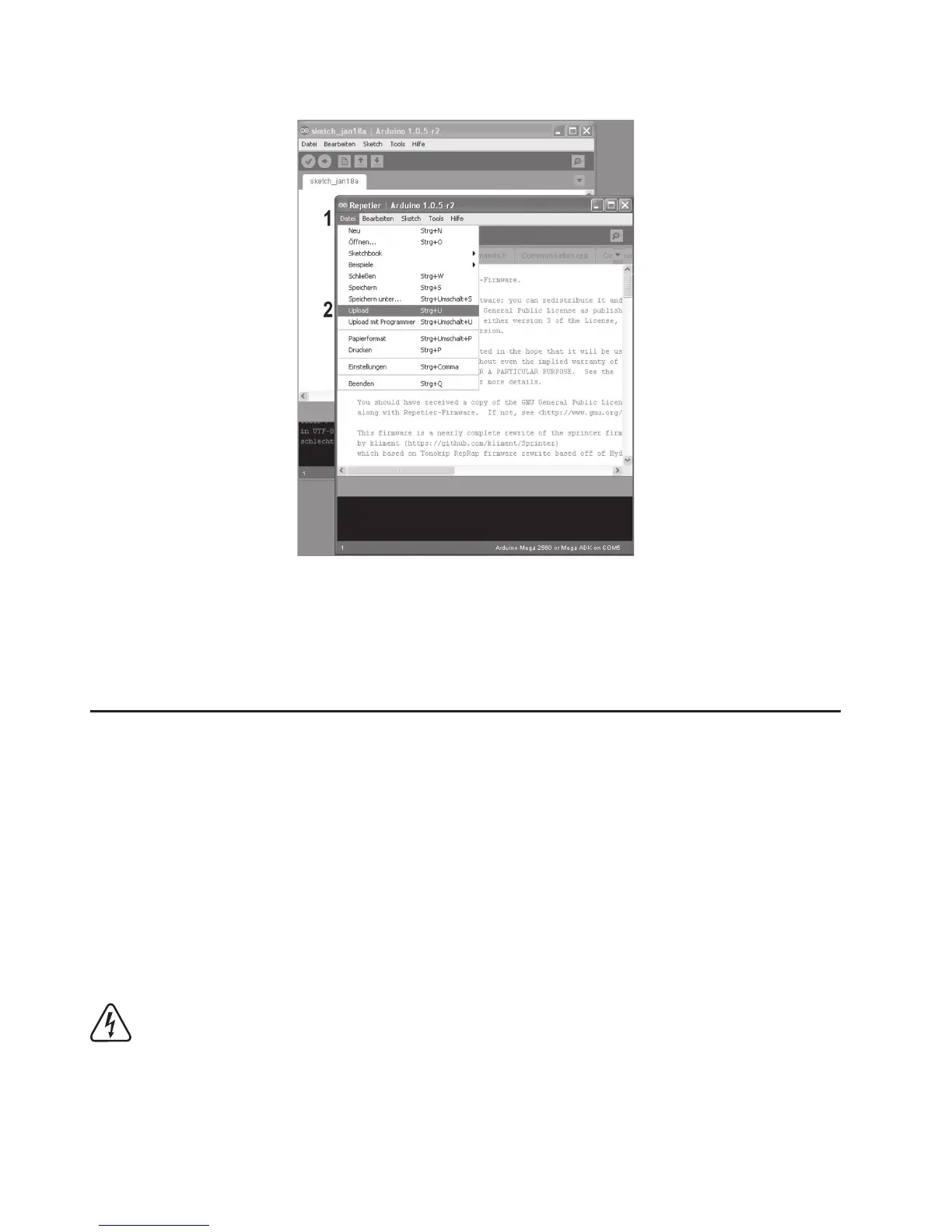
• A new window opens.
• Click “Upload” in the menu “File” here to transfer to the new firmware to the 3D printer.
• After a successful firmware update, the 3D-printer will start again and briefly display the new firmware version in the first dis
-
play line after the start.
19. Maintenance
a) General Information
Periodically verify the technical safety of the 3D printer, e.g. check for damage to the mains cable and the casing.
If you have reason to believe that the device can no longer be operated safely, disconnect it immediately and make sure it is not
operated unintentionally. Pull the mains plug from the mains socket!
It can be assumed that safe operation is no longer possible if:
• the device is visibly damaged
• the device no longer works
• the device has been stored under unfavourable conditions for an extended period of time or
• after exposure to extraordinary stress caused by transport
Always observe the following safety information before cleaning or servicing the 3D printer:
Live components may be exposed if covers are opened or components are removed.
The device must be disconnected from all power sources before any servicing or repair work is carried out.
Capacitors inside the device may still carry voltage even though they have been disconnected from all power sour
-
ces.
Only qualified experts familiar with the hazards involved and the relevant regulations must perform repairs.



 To Next Page