- 18 -
Station ID:
KAZPHOEN11, not KAZPH0EN11
K = USA station designation
AZ = Arizona
PHOEN = Phoenix
11= station 11 in Phoenix, AZ
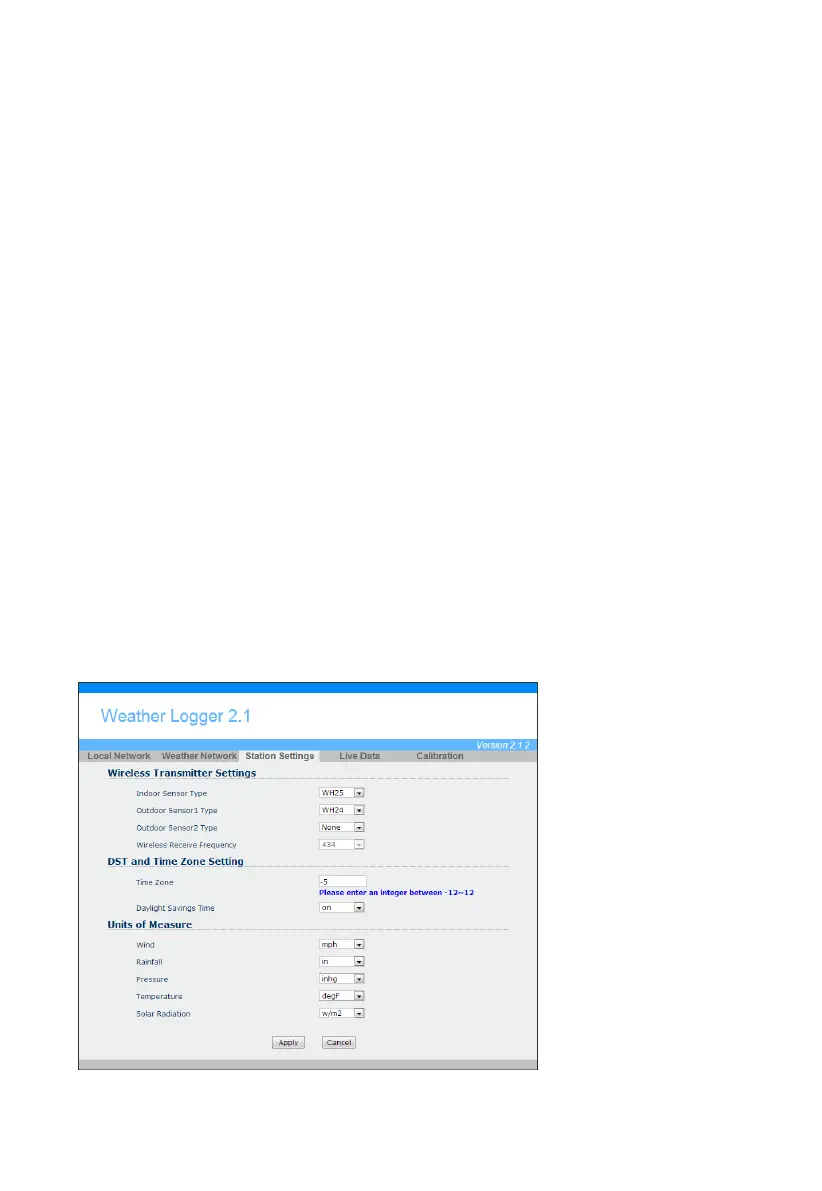
4.6.7 Station Settings
Select Apply to confirm any of the changes in this section.
4.6.7.1 Wireless Transmitter Settings
1. Indoor Sensor Type: Enter WH25 for the indoor thermometer-hygrometer-barometer
(default).
2. Outdoor Sensor1 Type: Enter WH24 for the outdoor sensor array (default).
3. Outdoor Sensor2 Type: Enter none. At the present time, additional sensors are not
available.
4.6.7.2 Time Zone Setting
Enter your local time zone and daylight Savings Time.
4.6.7.3 Daylight Savings Time
There are three options to select from:
1. Off-If it is not Daylight Saving Time for your location.
2. On-If it is Daylight Saving Time for your location(you will need to switch this off when your
location returns to Standard Time)
3. Auto-Your station will automatically turn Daylight Saving Time on and off based on German
(868 MHz and 433 MHz version) or US (915 MHz version) Daylight Saving Time.
4.6.7.4 Units of Measure
Enter your preferred units of measure for each parameter.
Figure 28



 To Next Page