- 2 -
5. Updating Firmware
You must own a PC to update the firmware. Sorry, Linux products are currently not supported.
5.1 Updating on Windows products:
1. You can contact your reseller to obtain the update firmware.
2. Important Note: Close all of other applications while running the firmware update. This
will insure the upgrade process will not be interrupted.
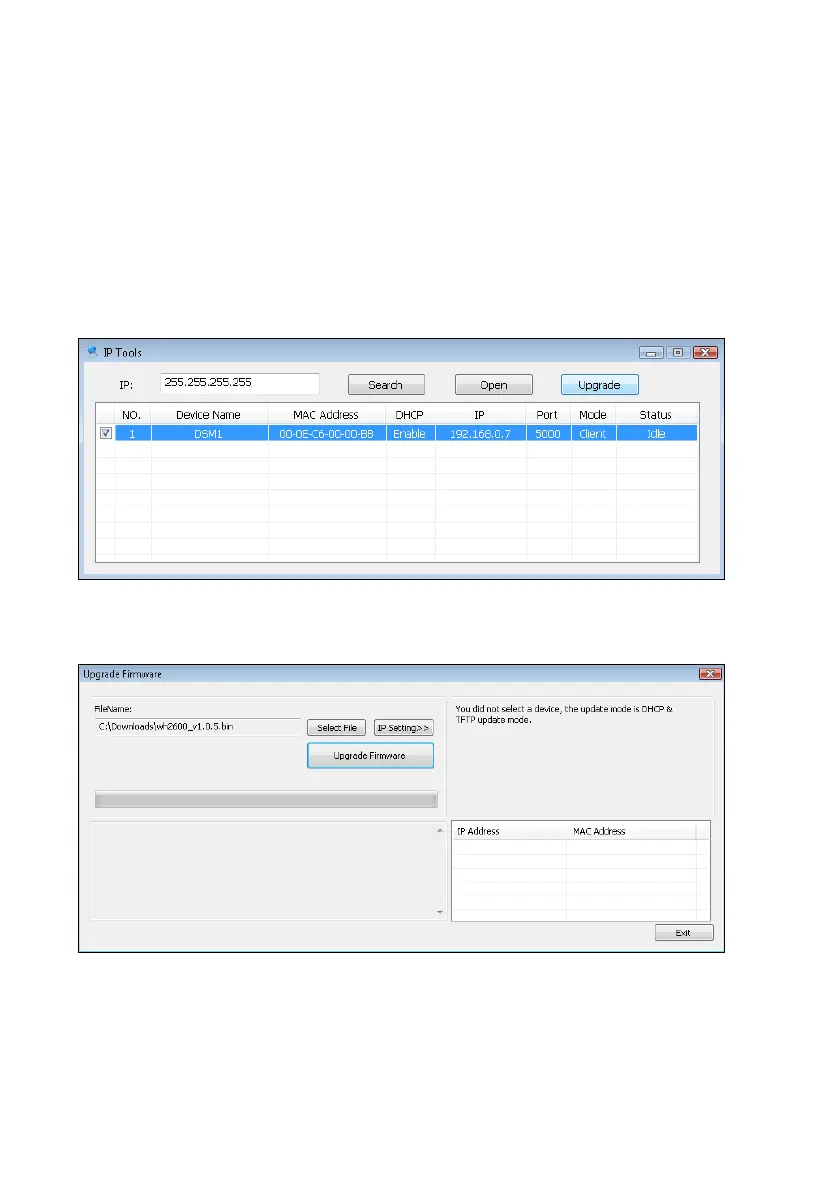
3. Launch the IP Tools application as referenced in Section 4.6.4.1, and locate the device on
Figure . Select the Upgrade button to begin the firmware upgrade.
device is 192.168.0.7. Make a note of your IP address
(your results will vary).
Figure 31
4. Reference Figure 32. Select the Select File button, and browse to the location of the file
Figure 32
5. Select the Upgrade Firmware button. Reference Figure 33. The dialog box will display
Received a Read Request from the device. A green progress bar will provide you with the
upgrade status.
DO NOT OPERATE THE MOUSE OR KEYBOARD WHEN UPGRADING to prevent
interruption of the upgrade.
3
your network. Reference
As shown in this figure, the IP address of the



 To Next Page