- 4 -
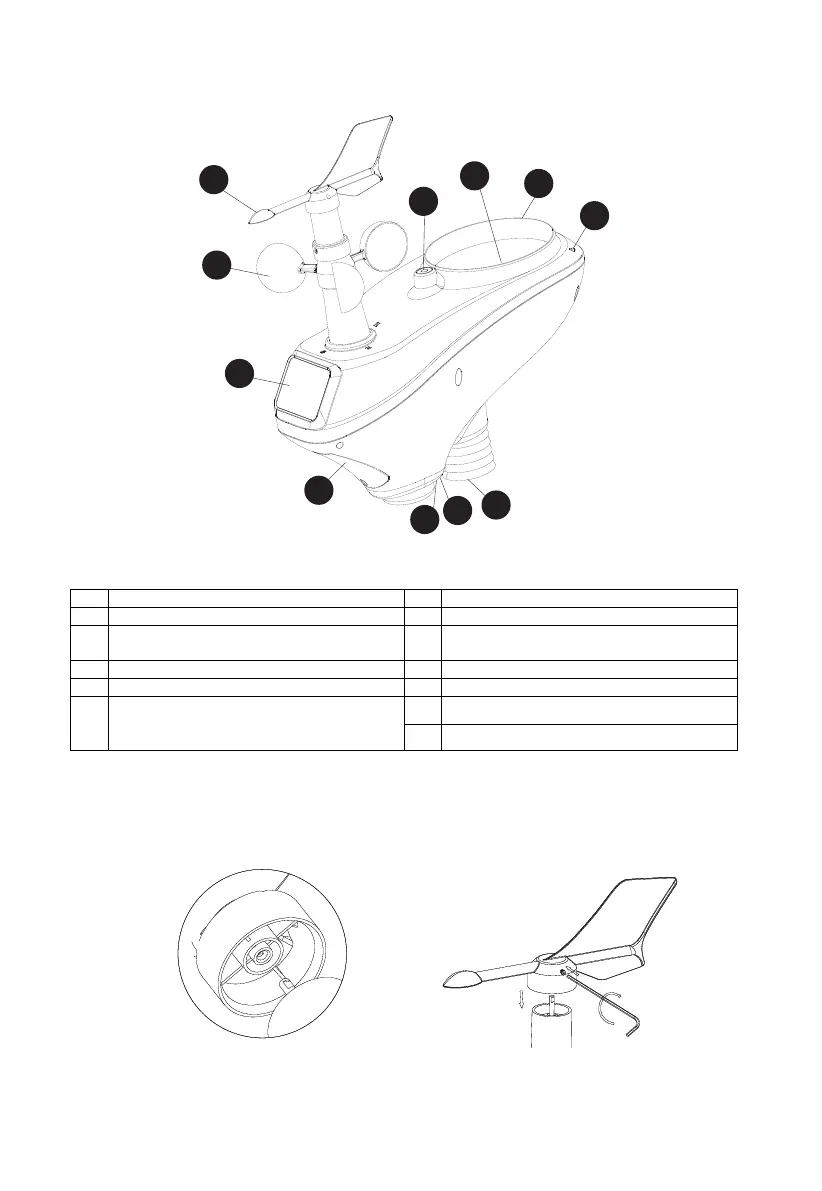
4.3 Sensor Array Set Up
Figure 1
No Description No Description
1 Wind Vane (measures wind direction) 6 Reset button
2 Wind Speed Sensor (measures wind speed) 7 Thermo-hygrometer Sensor (measures
temperature and humidity)
3 Solar collector 8 UV sensor
4 Battery compartment 9 Solar Radiation Sensor
10 Rain Collector (self emptying) 5 LED transmission indicator (turns on for 10
seconds on power up, flashes once per 16
seconds)
11 Bubble Level
4.3.1 Install Wind Vane
Reference Figure 2. (a) Locate and align the flat key on the wind vane shaft to the flat key on the
wind vane and push the vane on to the shaft. (b) tighten the set screw with the hex wrench
(included).
Figure 2
10
11
1
2
3
4
5
6
7
8
9
(a)
(b)



 To Next Page