Chapter 7
Testing and Calibration
1062788 BiPAP Vision Service Manual © Respironics, Inc. 7-23
7.7.1 System Final Test Setup
CAUTION: To avoid damage to static-sensitive components, perform this procedure
an ESD-approved workstation. Ensure that trained service personnel
perform the system final test.
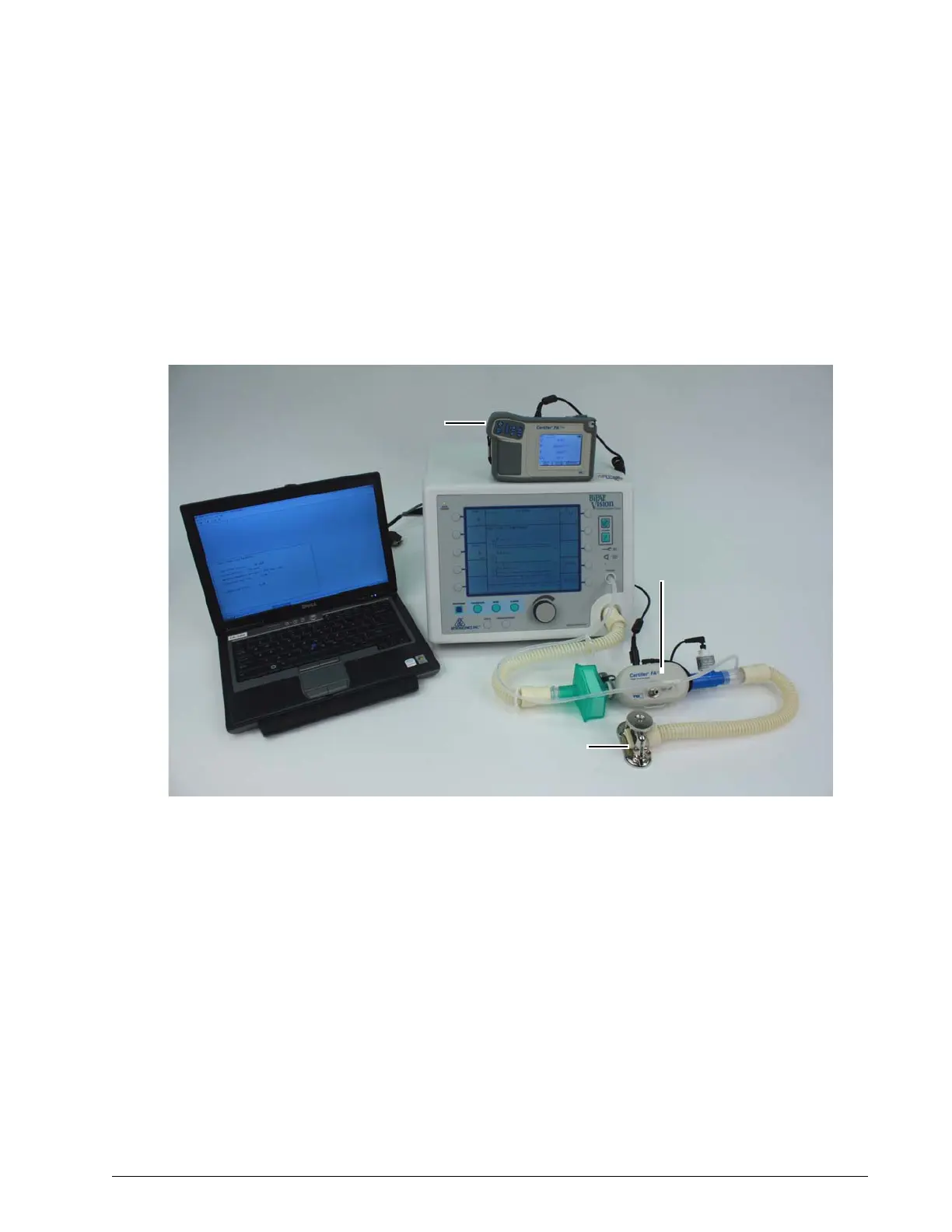
Figure 7-7 shows the initial equipment setup for the system final test. This
setup varies according the equipment used.
Figure 7-7: Initial Equipment Setup for System Final Test
1. Non-upgraded ventilators s/n 105999 and below: remove the
ventilator top enclosure, then connect the test cable from the service
laptop RS-232 port to the ventilator PCS connection (J3 on the PCS
board or the test cable labeled “PC”).
Newer (s/n 106000 and above) or upgraded ventilators: connect test
cable from service laptop to the RS-232 connector on the ventilator
back panel.
2. Connect patient tubing to the ventilator outlet. Connect a pressure
pick-off port to the tubing, then connect a flowmeter. Use another
length of patient tubing to connect the flowmeter outlet to a restrictor
valve. Adjust restrictor valve to create a small amount of circuit leak.
3. Use a tee fitting to connect the manometer, pressure pick-off port, and
ventilator pressure port together.
Flow analyzer
Flow restrictor
Certifier FA Plus
high flow module
Service laptop computer















 To Next Page