Chapter 6
Troubleshooting
1062788 BiPAP Vision Service Manual © Respironics, Inc. 6-5
6.2.2 Patient Alarm Indicators
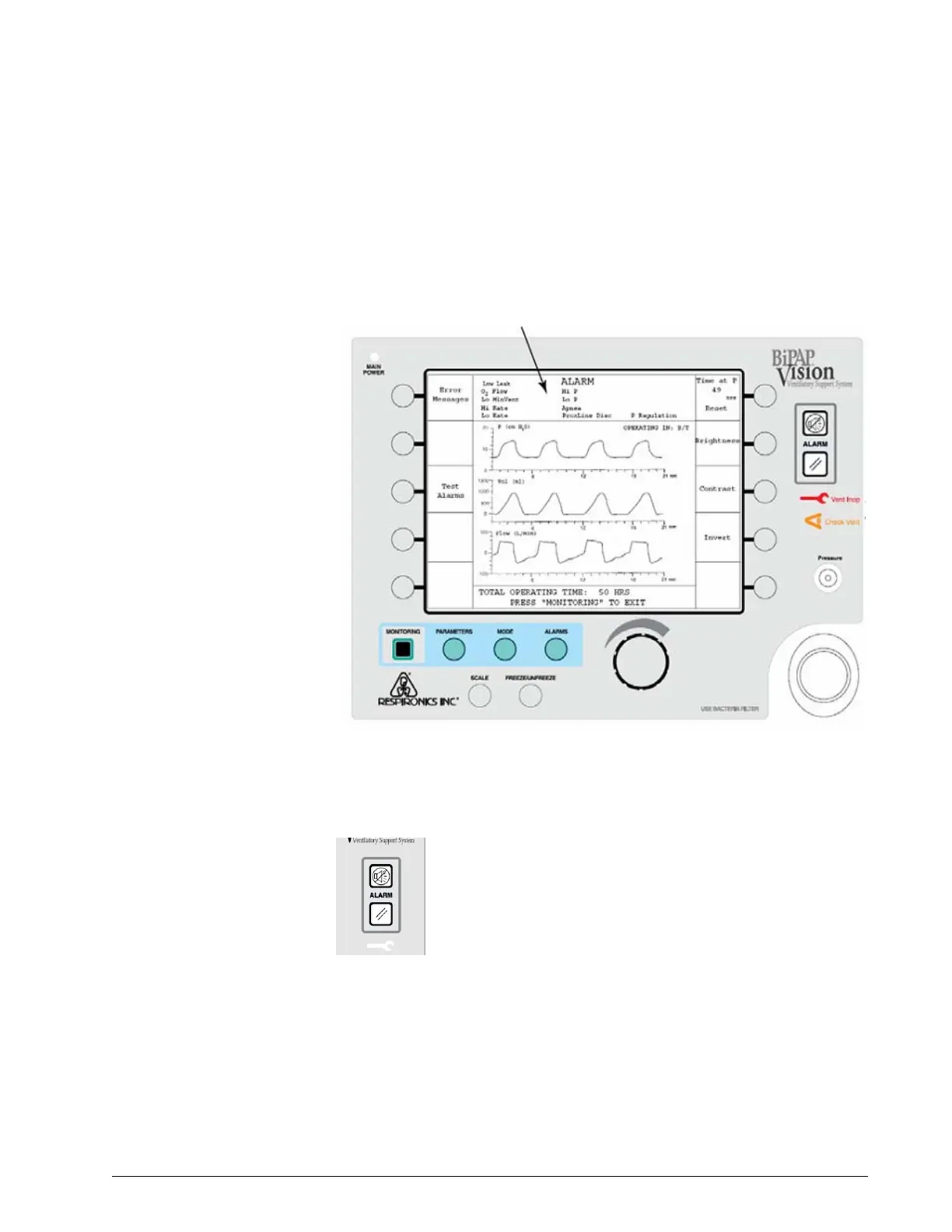
Patient alarms include audible and visual indicators. When an alarm is active,
the audible alarm sounds and the display shows the alarm condition in the
mode/message area (Figure 6-1).
Figure 6-1: Example Patient Alarm in Mode/Message Area
6.2.3 Alarm Silence and Alarm Reset
The ventilator turns off the audible indicator for most patient
alarms if the alarm condition is corrected. An operator can press
the Alarm silence key to turn off the audible alarm for 2 minutes
(subsequent presses have no effect on the alarm).
During the 2-minute alarm silence, the message Alarm Silenced
appears in the mode/message area. Except for an apnea alarm,
any new alarm that occurs during the 2-minute alarm silence is displayed but
an audible alarm does not sound.
If an alarm condition is corrected, the audible alarm turns off. The only way to
clear a visual patient alarm indicator is to press the Alarm reset key. If the
alarm condition is not corrected, the audible and visual alarm indicators
immediately turn on.
Alarm messages
Alarm reset
Alarm silence





 To Next Page