• When + or - appears over the frequency, it is indicates that frequency difference direction is selected.
If frequency difference transmitting frequency is out of allowance range, the transmitting can’t be proceeded. In this occasion, adjust
receiving frequency to make the transmitting frequency within the band frequency range, or change frequency difference direction.
Choose Frequency Difference
To access a repeater station with non-standard frequency difference between receiving and transmitting frequencies, change default
frequency difference (most repeater stations use). The default frequency difference in the UHF frequency band is 5.0 MHz.
1.Press FUN, MHZ/SET key in turn, then rotate the coding knob to choose menu number 10 (OFFSET).
2.Press [MHZ/SET], and then turn the encoding knob to select the appropriate difference frequency.
• Optional difference frequency ranges from 0.00MHz to 99.9875MHz with step size of 50KHz.
3.Press MHZ/SET key to save settings, or press any other key to cancel.
4.Press any other key to exit menu mode, except MHZ/SET key.
Choose CTCSS/DCS Signaling Code
Transmitting 1750HZ
Change CALL key settings
1.Press FUN, MHZ/SET key in turn, then rotate the coding knob to choose menu number 18 (CK).
2.Press MHZ/SET key and rotate the coding knob to choose CALL or 1750.
3.Press MHZ/SET key to save settings, or press any other key to cancel.
4.Press any other key to exit menu mode, except MHZ/SET key.
Some repeater station needs the mobile radio to receive a section of continuous signal after transmitting 1750Hz tone. The mobile radio can
remain transmitting mode for 2s after transmitting 1750Hz tone.
1.Press FUN, MHZ/SET key in turn, then rotate the coding knob to choose menu number 19 (HLD).
2.Press MHZ/SET key and rotate the coding knob to choose ON or OFF (default).
3.Press MHZ/SET key to save settings, or press any other key to cancel.
4.Press any other key to exit menu mode, except MHZ/SET key.
Reverse Frequency Function
Exchange Transmitting and Receiving Frequency
Press FUN, REV key in turn to turn on (off) reverse frequency function.
•The screen displays R when the function is activated.
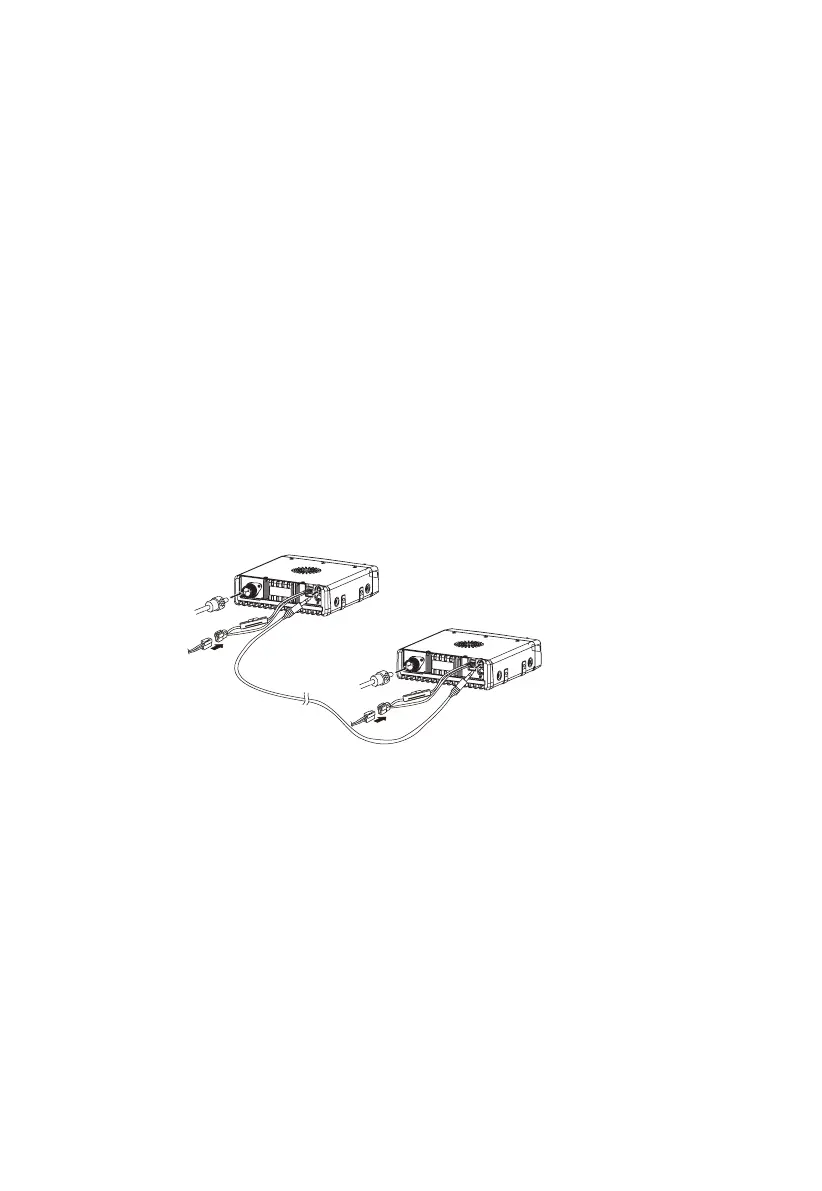
Repeater Station Installation
1.Connect two mobile radios with clone/ transfer cable ( through DATA socket).
2.Two mobile radios are connected to the 50Ω antenna compile with transmitting impedance.
3.Connect DC power.
Repeater Menu Setting
To achieve repeater function, transfer functions of two mobile radios need to be turned on.
1.Press FUN, MHZ/SET key in turn, then rotate the coding knob to choose menu number 11 (RELAY).
2.Press MHZ/SET key and rotate the coding knob to switch the function to ON.
• The clone cable must be plugged and the function is activated. The function is automatically deactivated and there is a beep when
unplugging the cable.
• Connect the antenna completely before the function is activated.
3.Press MHZ/SET key to save settings, or press other key to exit.
Frequency Difference Program Procedure
1.Choose receiving frequency (The frequency aims at transmitting frequency through the mobile radio in the repeater station).
2.Choose frequency difference direction (The direction aims at opposite frequency difference direction through the mobile radio in the
repeater station).
3.Choose frequency frequency (If it is needed to be as non-standard repeater station).
4.Choose CTCSS/DCS signaling code (If needs).
Note:
• Transmitting and receiving channels transfer function will be achieved after programming the frequency difference of the mobile radio. If
the other transmitting and receiving channels need to be scanned, program the frequency difference of the mobile radio of the other mobile
radio.
• The channel is the same frequency of transmit-receive must set frequency difference to transfer; Different frequencies can directly transfer.
DTMF Function
Manual Dial-up
Keys on the microphone keyboard can be used as DTMF key, included complement keys (A, B, C, D). Operate as following steps to
proceed manual dial-up.
1.Press the microphone PTT key to transmit.
2.Press keys on the keyboard in order to transmit DTMF tone when transmitting. That is to transmit corresponding DTMF tone.
13


 To Next Page
 Loading...










