Basic Operations
Power On/Off
1.Press (power key) to turn on the mobile radio.
The mobile radio makes loud dual beeps. The screen displays power message for a moment, then displays frequency and other indicators.
To turn off the mobile radio, press (power key) for about 1s. When turning off the mobile radio, the mobile radio makes low-volume dual
sound, saves the current frequency and specifications, and calls out specifications next power on.
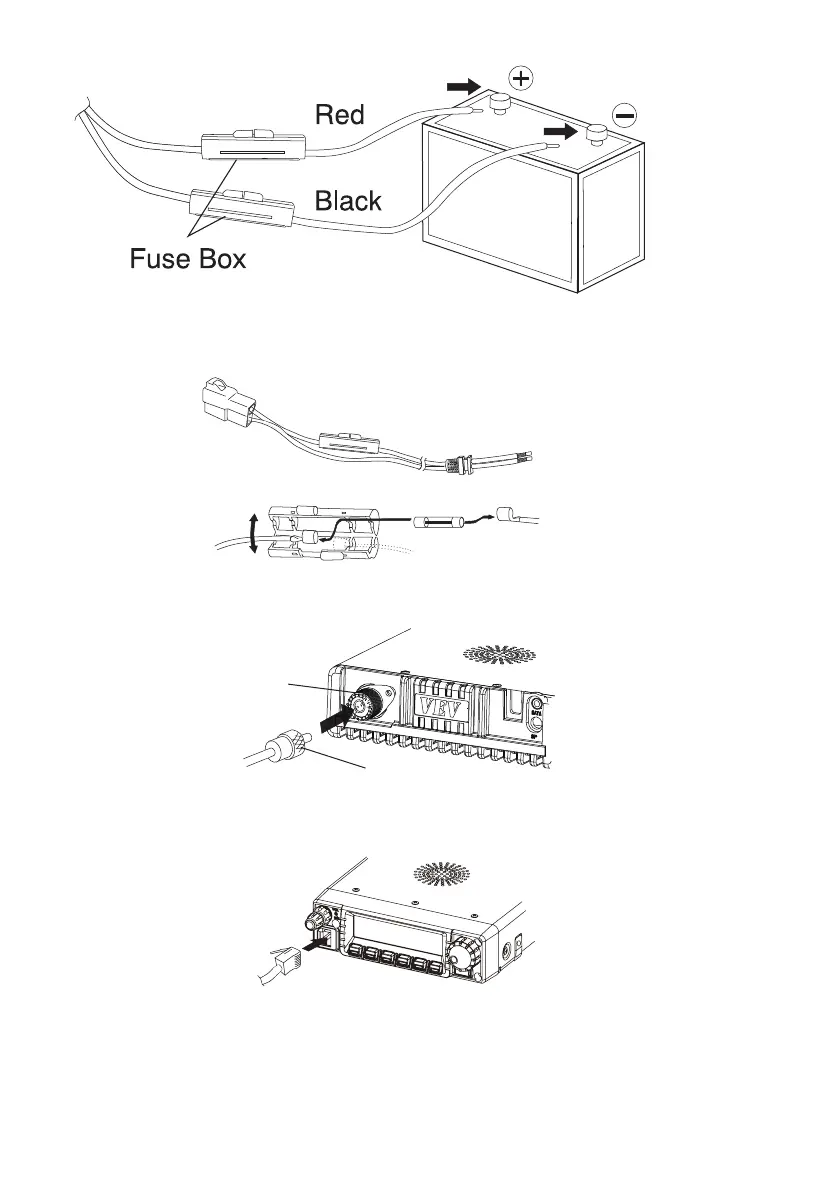
2.Connect the DC power cable to the power connector of mobile radio
3.Replace Fuse Wire: If the fuse wire is fusing, confirm the reason and problems, then replace fuse wire.
4.Antenna Connection: As the figure shown: connect the antenna connector and the mobile radio (Note: ensure the connection between
mobile radio and antenna is completed before transmitting).
5.Microphone Connection
Before voice communication, plug the microphone connector into the mobile radio base jack of front panel and press tightly. As shown in the
figure:
6.PC Programming Cable Connection
Connect the programming cable in the package to the PC through DATA socket and install the specific programming software to read and
write the mobile radio.
7.Use the CL-900 clone or transfer cable to connect two mobile radios (through DATA socket).
04
Antenna Connector
Antenna Antenna Feeder Connector



 To Next Page