Preparations
Mobile Radio Installation
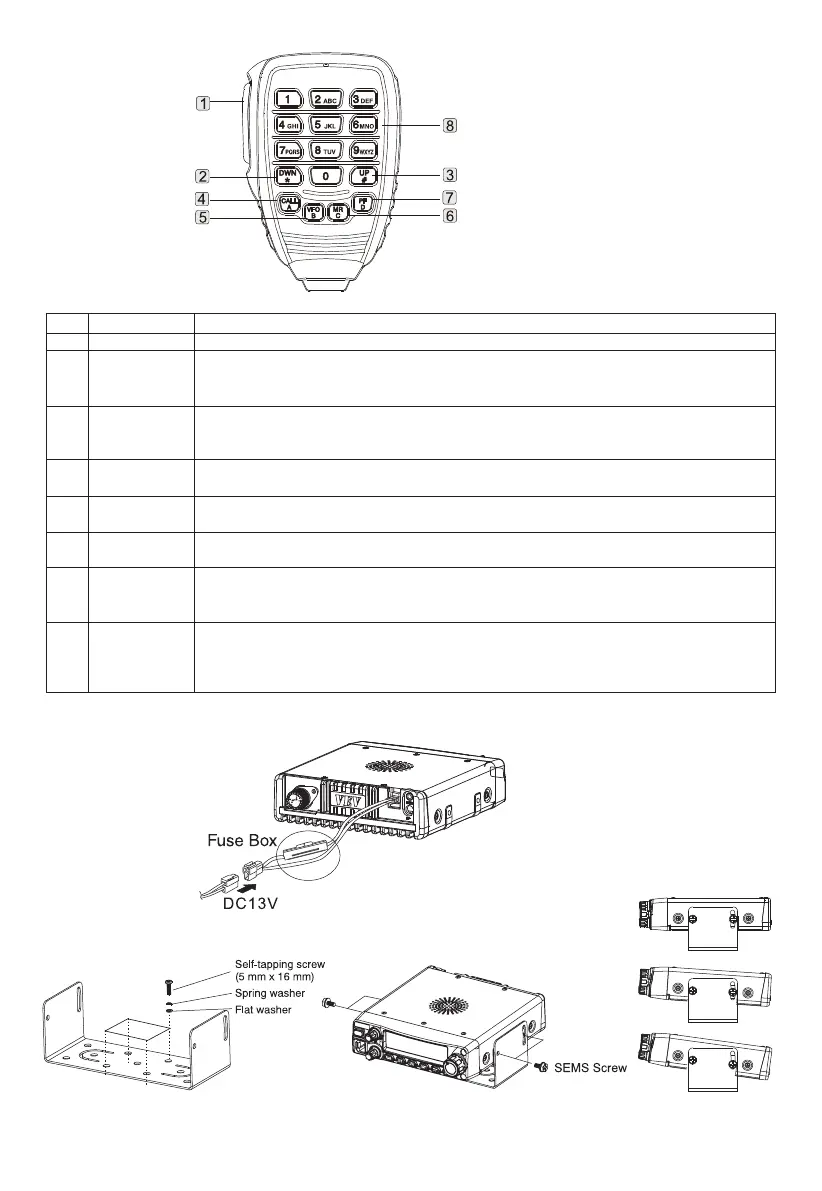
List
1
2
3
4
5
6
7
8
Name
PTT Key
DWN/*Key
UP/# Key
CALL/A Key
VFO/B Key
MR/C Key
PF/D Key
DTMF Keyboard
Function
Press the key to transmit signals and release to receive signals.
Press the key to decrease operating frequency, memory channel numbers, menu numbers, etc.
Continuously press to repeat operations. For multi-choice functions, the key can switch different values.
Press microphone PTT key, then press DWN/* key to transmit.
Press the key to increase operating frequency, memory channel numbers, menu numbers, etc.
Continuously press the key to repeat operations. For multi-choice functions, the key can switch different
values. Press microphone PTT key, then press UP/# key to transmit.
The same as the Call key in front panel. If needs, program the key again. Press the microphone PTT key,
then press CALL/A key to transmit A. The key is PF4 and can be reprogrammed.
The same as the VFO key in front panel. If needs, program the key again. Press the microphone PTT key,
then press VFO/B key to transmit B. The key is PF3 and can be reprogrammed.
The same as the MR key in front panel. If needs, program the key again. Press the microphone PTT key,
then press MR/C key to transmit C. The key is PF2 and can be reprogrammed.
The default function is 1MHZ step. Use coding knob or microphone UP/DWN key to change operating
frequency with 1MHz. The mobile radio is dual standby, long press the key to switch main frequency and
sub-frequency. If needs, program the key again. Press the microphone PTT key, then press PF/D key to
transmit D. The key is PF1 and can be reprogrammed.
The keyboard has 16 keys, which are used in DTMF or directly input operating frequency or memory
channel numbers. DTMF also can be used to program memory channel name, power message or other
words.
1.Install mobile radio as following figure
1.Connect to the power and ensure the correctness. Connect the power cable to the lead accumulator (not take off the fuse wire from the
power cable.
Microphone
03



 To Next Page