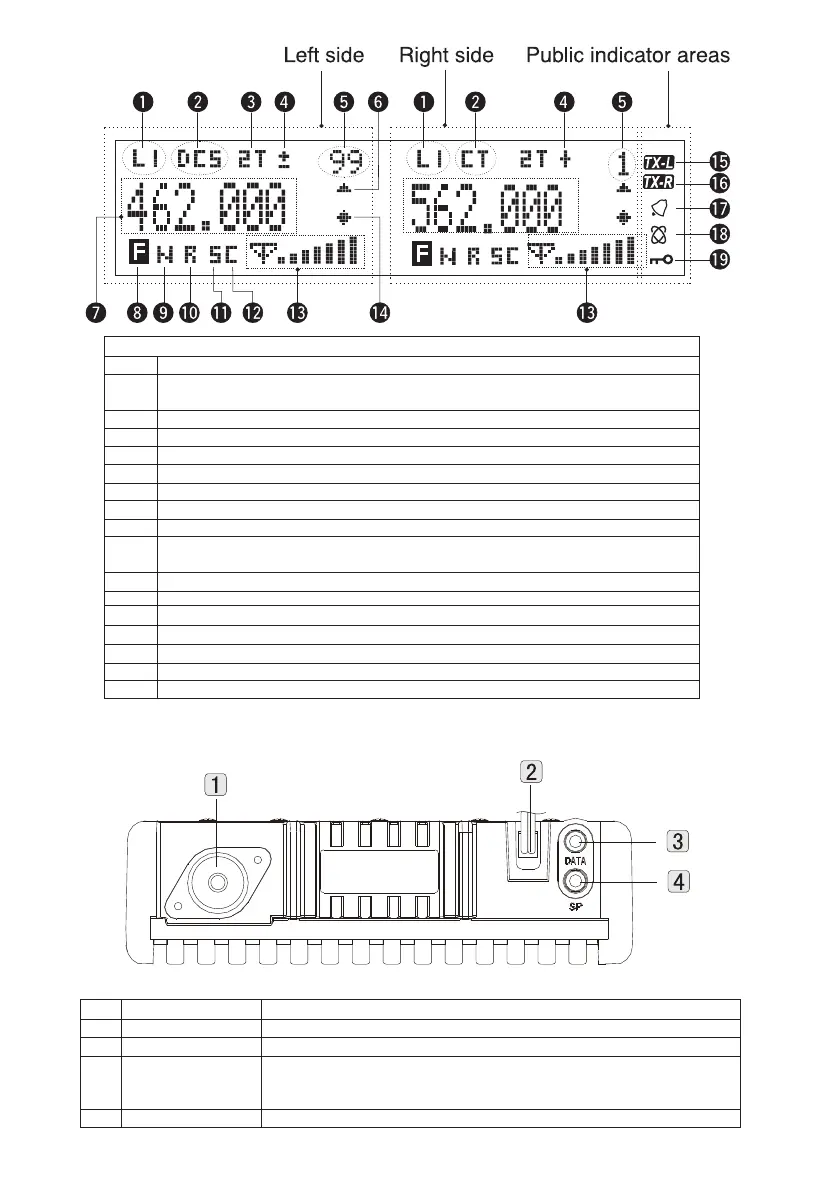
Back Panel
List
1
2
3
4
Name
Antenna Jack
13.8V DC cable
DATA socket
SP (Speaker) socket
Function
Connect to an external antenna
Connect to 13.8V DC, please use the power cable in package to connect
Use the programming cable to plug in the socket and connect to the PC to program the
mobile radio. Use the programming cable or clone/transfer cable to copy information or
communication transfer through connecting to the computer by the socket.
Connect to 3.5mm mono (dual cables) socket external speaker
Lists
1
2
3
4
5
6
7
8
9
10
11
12
13
14
15
16
17
18
19
Choose RF power levels
Appear when DCS/CTCSS function is activated.
Appear when 2TONE function is activated.
Appear when repeater station offset function is activated.
Display menu numbers, memory channel numbers and status.
Appear when data appearing in displayed memory channel.
Display frequency, menu setting, memory name and other information.
Appear when pressing the menu key.
Appear when narrowband frequency mode is chosen.
Appear when Reverse frequency function is activated.
Appear when scramble function is activated.
Appear when the voice companding function is activated.
Display the strength of transmission and reception signal.
Appear when Memory Channel Lock is activated.
The left of display is main frequency and the right is sub-frequency.
The right of display right is main frequency and the left is sub-frequency.
Appear when AIN identity code is correct
Appear when the transfer function is activated.
Appear when the key lock function is activated.
Display
02



 To Next Page