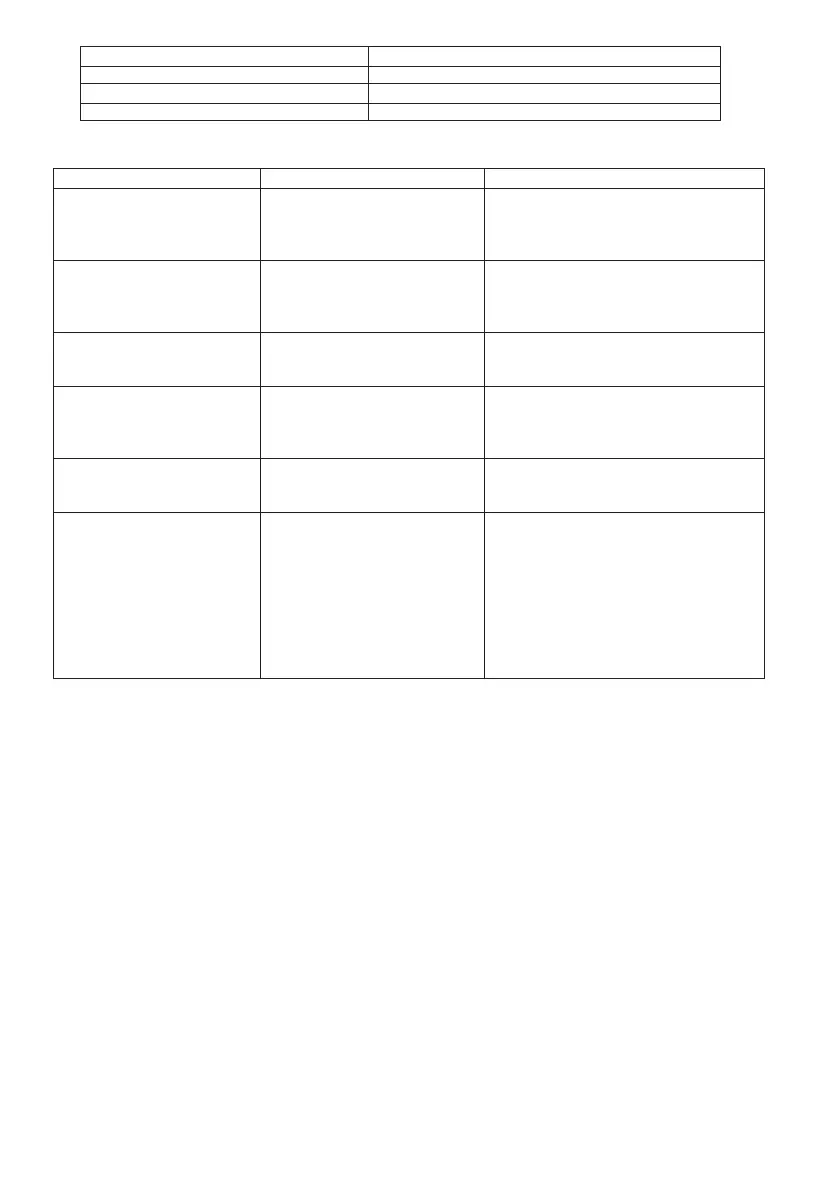
Power Voltage
Current Consumption
Current Consumption
RF Power
13.8V±15%, Negative pole grounding
Receiving: (RF 2W), ≤1A
Transmitting(Max): ≤14A
Low:5W, High: 40W
Problems
Connect 13.8V DC power and press
(power) key, the mobile radio can’t
be turned on and screen doesn’t
display.
Screen is still dark even the higher
brightness is chosen.
Frequency can’t be chosen through
rotating coding control knob or
pressing microphone UP/DWN key.
Most keys and coding control knob
don’t work.
Memory channel can’t be chosen
through rotating coding knob or
pressing microphone UP/DWN key.
Mobile radio can’t transmit even
pressing PTT key.
Reasons
1. Power cable is connected backwards.
2. One or more fuses of power cable cut
down.
Supply voltage is low.
Memory call out mode is chosen.
1. Lock function is activated.
2. The mobile radio is in channel display
mode.
Memory channel doesn’t save data.
1. Microphone plug doesn’t fully plug
into the connector of front panel.
2. Selected transmitting frequency
difference makes transmitting frequency
is out of allowance range
Measures
1.Connect randomly supplied power cable
correct: Red (+) and Black (-).
2.Check the reason of blown fuse and recorrect.
Install new fuse wire with the same rating.
Supply voltage needs to be 13.8V DC ±15% (11.7
V to 15.8 V DC). If input voltage is out of the
range, adjust stable power supply and check all
power cables connection.
Press VFO key.
1. Unlock all lock functions.
2. When the mobile radio is turned off, press
(power) key + REV key to exit channel display
mode.
Save data in some memory channels.
1.Turn off the mobile radio and plug microphone
plug until it is fixed.
2.Press FUN and MHZ/SET key, then rotate the
coding control knob to choose menu number 5
(SFT).
Press MHZ/SET key and rotate the coding knob
to choose OFF.
Press MHZ/SET key to save settings and press
any key to exit menu mode, except MHZ/SET key.
Fault Elimination
20



 To Next Page