30 31
• All the rmware congurations will be set back to default.
• The BLE card whitelist will be cleared (all wireless
peripherals will be unpaired).
• Once the Cabin module has been factory reset, the Cover
module will be unpaired after a few seconds, and as well
the Keypad and the User APP will be unpaired.
the Keypad will require to delete the paired Cabin
module and the APP will require to remove the previously
paired Cabin module.
X
X
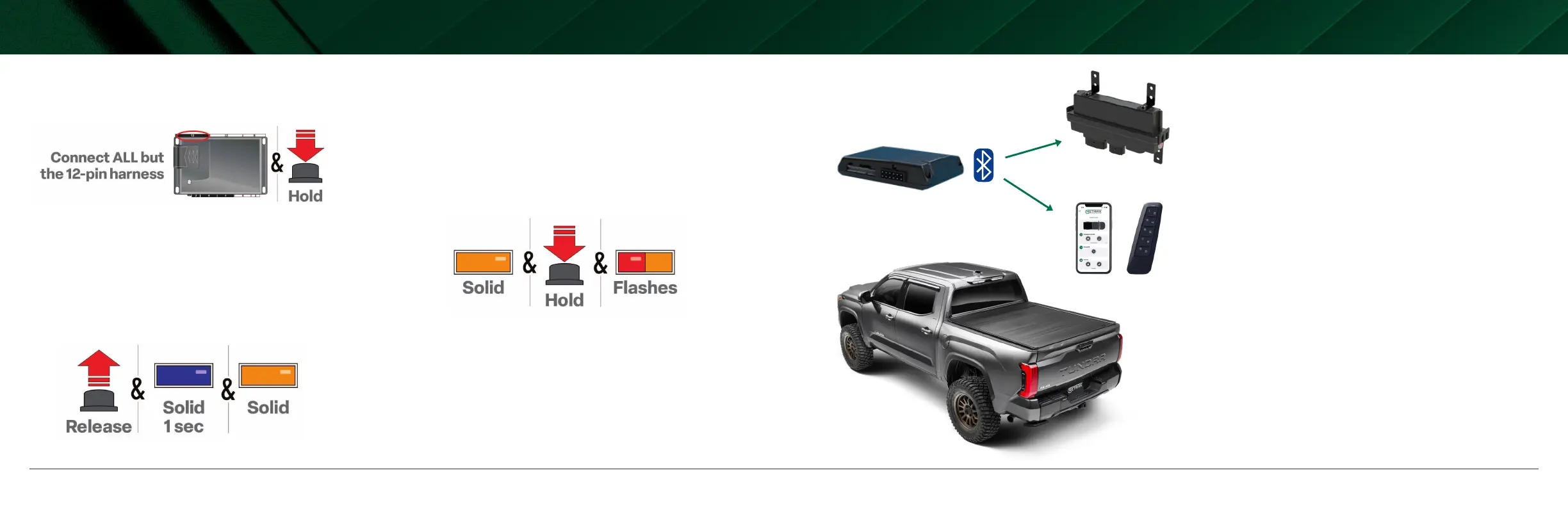
• If required for your installation, connect all harnesses to the
module, except the 12-pin main power harness. Then, press and
hold the programming button, and connect the 12-pin harness to
the cabin module.
• After three seconds, the LED turns on solid orange. Keep holding
the programming button until the LED ashes red, then orange
slowly.
• Release the programming button. The Cabin module’s LED will
illuminate Blue (BLE card initialization) and then solid orange,
meaning there was a previously ashed digital rmware.
DOING A FACTORY RESET TO THE CABIN MODULE


 To Next Page