14
Step 2
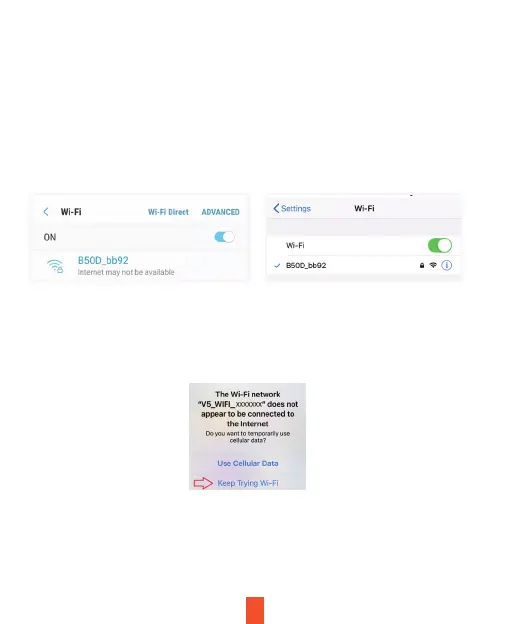
On your mobile device, navigate to your Wi-Fi settings. Connect to your
dash cam's Wi-Fi by tapping its name when it appears. Enter your dash
cam's Wi-Fi password if you are prompted to do so.
Note: On same mobile devices, you may have to try to connect more than
once. To ensure you've successfully connected, your mobile device's
screen should resemble the examples shown.
Step 3
Once you're connected to the dash cam, open the Rexing Connect app
on your mobile device.
Please select "Keep Trying Wi-Fi" if you see the notification on the right.
Step 4
In the app, hit the "Connect" button to connect to your dash cam, allowing
you to access live view and view/download your recordings.
Note: Press to the UP button to disconnect the Wi-Fi.
Samsung / Android Example iPhone / iOS Example


 To Next Page