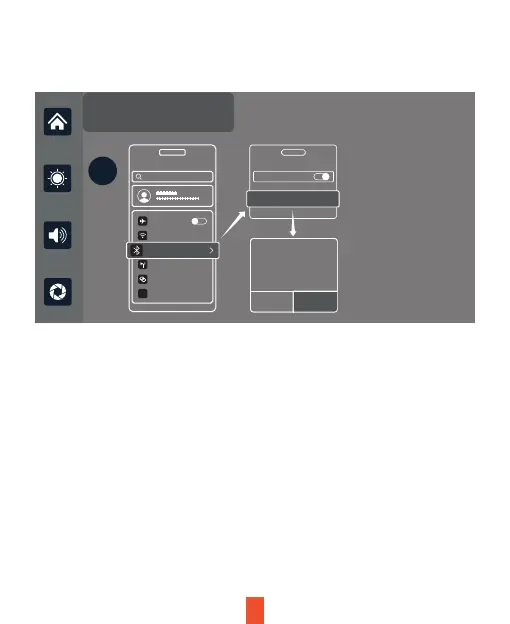
First turn on Wi-Fi and Bluetooth from your smartphone. Next, pair your
phone to the device Bluetooth: T86-XXXXXX, as shown in the figure above.
Once connected, you’ll receive a pop-up on your smartphone. Refer to the
figure above, and select‘Use CarPlay’ to successfully complete Apple
CarPlay integration.
Apple CarPlay
Apple Carplay Android Auto Wifi Video
?
Setting
Search
Airplane Mode
WLAN
Cellular
Personal Hotspot
VPN Disconnecting...
On
VPN
Bluetooth
Bluetooth
Connect
XXX-XXXXX
Use CarPlay with
CarPlay automatically connects your
iPhone to your car’s built-in display, and
can access your phone while it is locked.
“SmartScreen”?
Not Now Use CarPlay
Bluetooth On
Note:
The device will automatically pair with the last connected phone.
Smart your iPhone to
Smart Screen using
Bluetooth:
T86-200E6D
11


 To Next Page