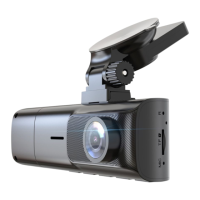
Installation
Step 1. Install the RoadMate CPDuo
1.1 Prepare the Mounting Position:
Clean the dashboard or windshield: Ensure the area where you'll mount
the camera is clean and free from dirt, oil, or debris. Use a mild cleaner
to wipe the surface and dry it thoroughly.
1.2 Mount the Camera:
Positioning: Align the camera to get the desired angle and view of the
rear. Rear dash cams come with adhesive mounts or brackets for
attachment.
Secure: Use the adhesive or mounting bracket to securely attach the
camera to the chosen spot. Ensure it's firmly fixed to avoid any
movement or displacement.
Step 2. Install the Memory Card
The Rexing RoadMate CPDuo accepts Class 10/UHS-3 or higher Micro SD
memory cards up to 256GB. You will need to insert a memory card
before begin recording.
Before inserting or removing a memory card, first ensure you’ve
powered down the device. Gently push the memory card in until you
hear a click, and allow the spring release to push the card out.
7


 To Next Page