Preparations for Use as a Network Scanner
20
2
F
FF
F
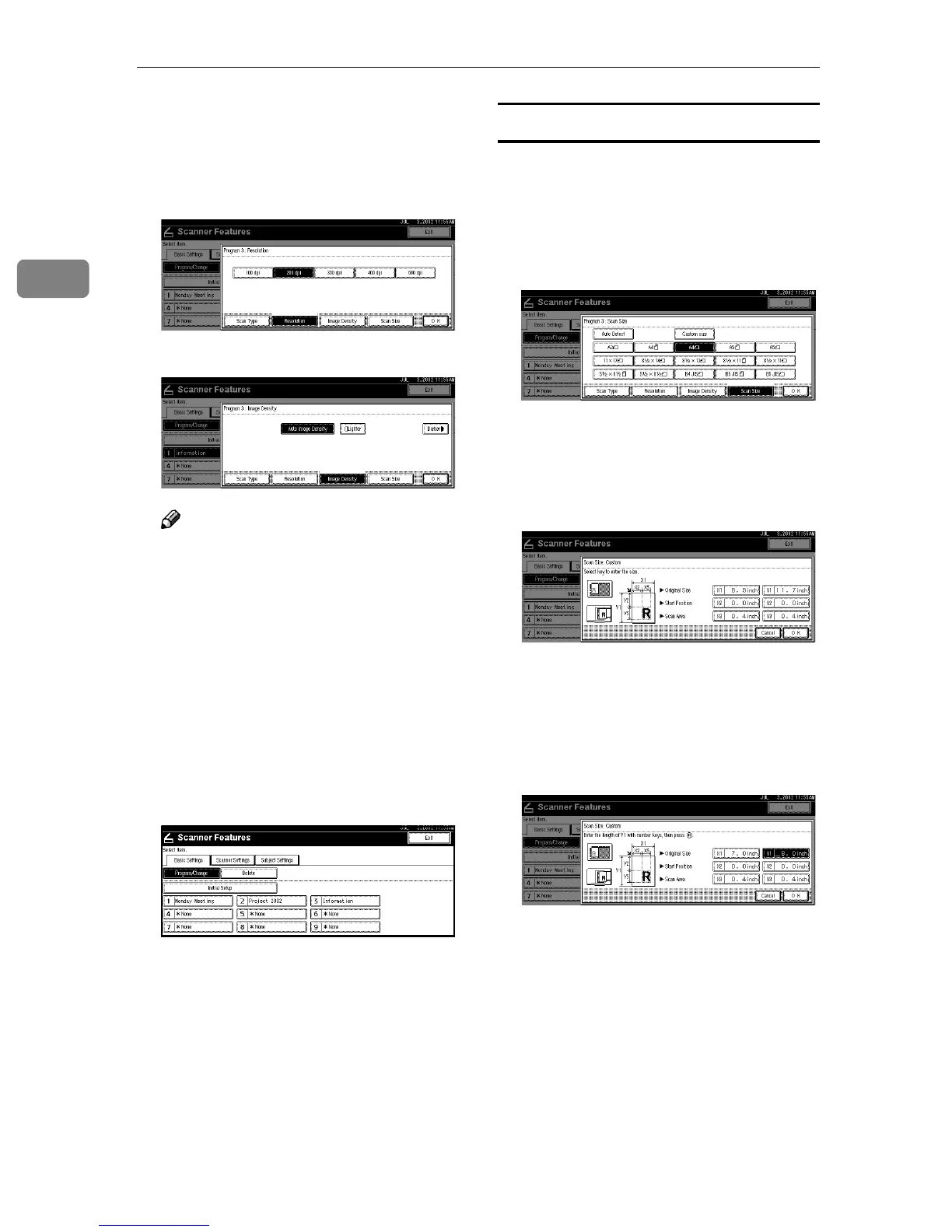
Select the item to be set.
To select an item, touch its key on
the screen. The item is highlighted.
Example: resolution setting
Example: image density setting
Note
❒ When selecting [Custom size] for
[Scan Size], see p.20 “Selecting a
custom size”.
G
GG
G
When all settings have been
made, press [OK].
The scan type setting is stored.
H
HH
H
To program other scan settings,
repeat the procedure from step
D
DD
D
.
I
II
I
When all settings have been
made, press [Exit].
The screen returns to the User
Tools/Counter/Inquiry.
J
JJ
J
Press [Exit].
The main menu is shown again.
Selecting a custom size
When [Custom size] is selected as the
scan size, follow the procedure be-
low.
A
AA
A
Press [Custom size] on the Scan
Size setting screen.
B
BB
B
Enter the original size with the
number keys.
Select and enter values for [X1] and
[Y1].
C
CC
C
Enter the scan starting point in re-
lation to the standard scan start-
ing point.
Select and enter values for [X2] and
[Y2].







 To Next Page