Security Settings
48
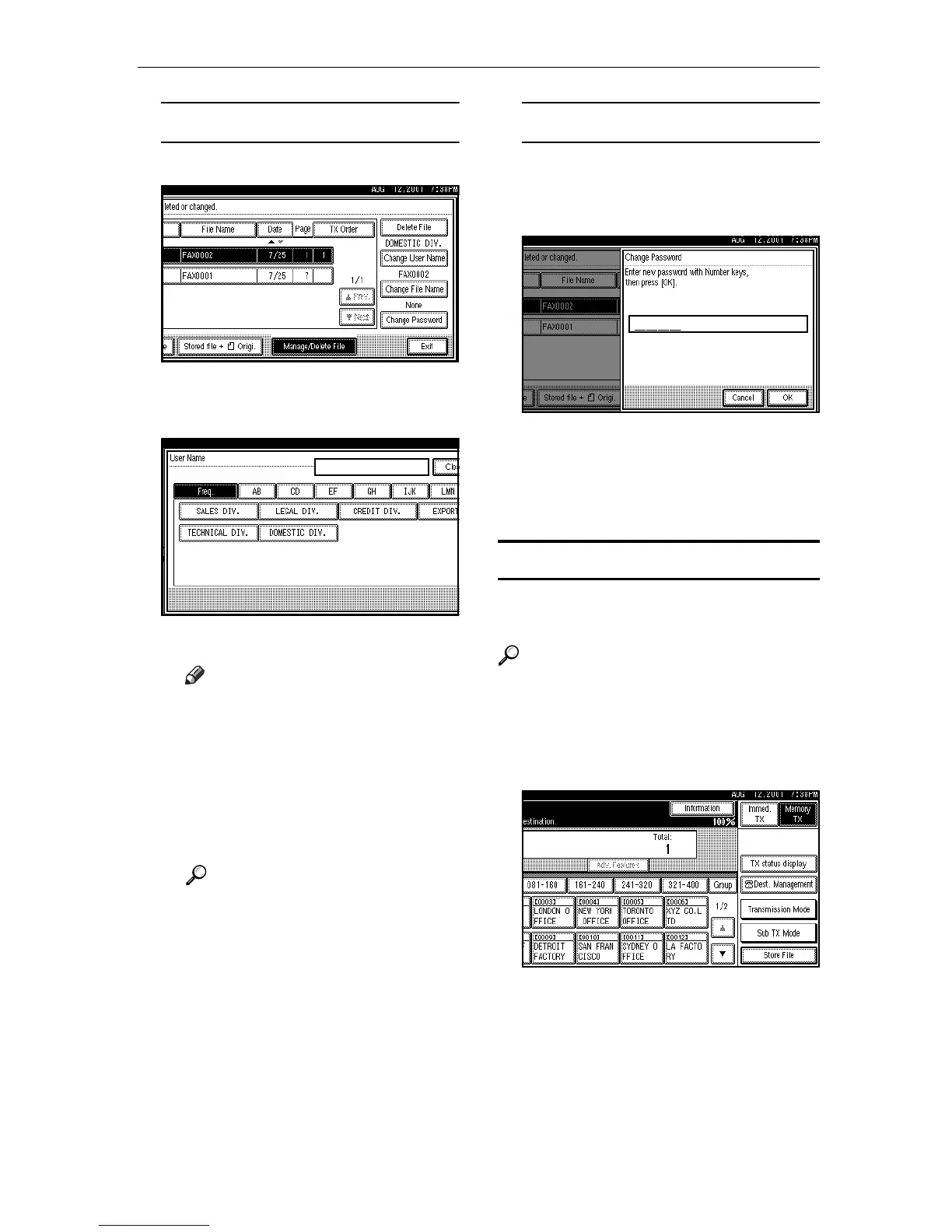
Changing a User Name
A Press [Change User Name].
B Press [Clear].
The user name is deleted.
C Press the new user name.
Note
❒
To set an unprogrammed user
name, press the
[Non-programed
Name]
, and then enter the name.
❒ User names that are entered
by pressing the [Non-pro-
gramed Name] are not pro-
gramed into the user code.
Reference
For information about how
to input characters, see the
System Settings manual.
D Press [OK].
Changing the Password
A Press [Change Password].
B Enter a new password using
the number keys.
C Press [OK].
E
EE
E
Press [OK].
The initial display is shown.
Delete File
Use this feature to delete your stored
documents.
Reference
For details, see "Delete File" in the
Facsimile Reference <Advanced
Features>
A
AA
A
Press [Sub TX Mode].




 To Next Page