Key Operator Tools (for Administrator)
63
Delivery Server IP Address
A
AA
A
Press the {
{{
{
User Tools/Counter
}
}}
} key.
B
BB
B
Press [
System Settings
].
C
CC
C
Select [
Delivery Server IP Address
].
D
DD
D
Press [←
←←
←] or [→
→→
→] to move between
each group of three numbers.
Note
❒ If you make a mistake, press the
[
Clear
] and enter the correct
number.
E
EE
E
Press [
OK
].
F
FF
F
Press [
Exit
].
G
GG
G
Press the {
{{
{
User Tools/Counter
}
}}
} key.
Programing/Editing Personal
Boxes
A
AA
A
Press the {
{{
{
User Tools/Counter
}
}}
} key.
B
BB
B
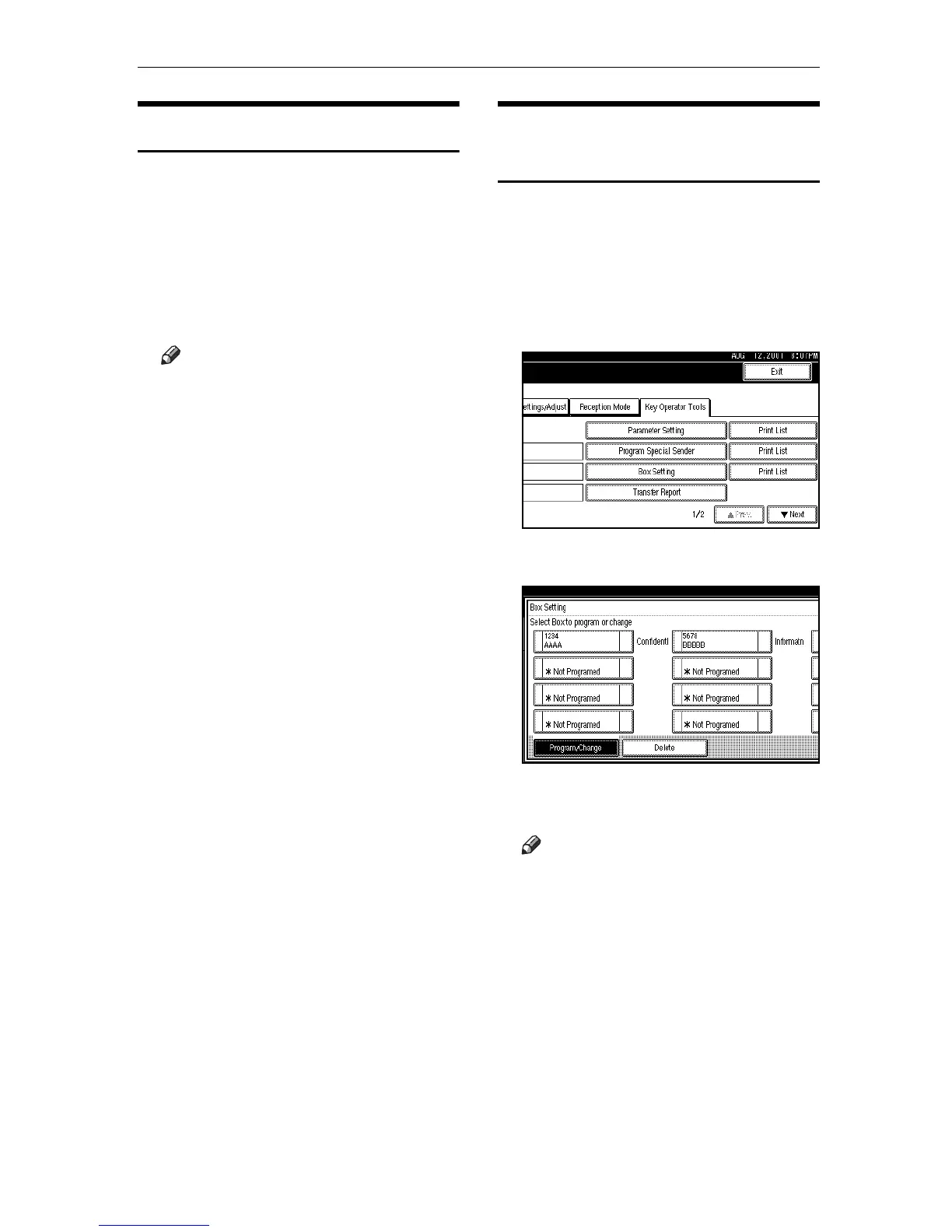
Press [
Facsimile Features
].
C
CC
C
Select [
Key Operator Tools
].
D
DD
D
Select [
Box Setting
].
E
EE
E
Select a box to program.
If you program a new box, press
"pNot Programed".
Note
❒ If you change a box already pro-
gramed, press it and go to step
I.
❒ The security is not guaranteed if
no password is entered.
❒ Enter the password using up to
eight characters.




 To Next Page