When a Message Appears
23
2
Reference
p.9 “When You Have Problems Operating the Machine”
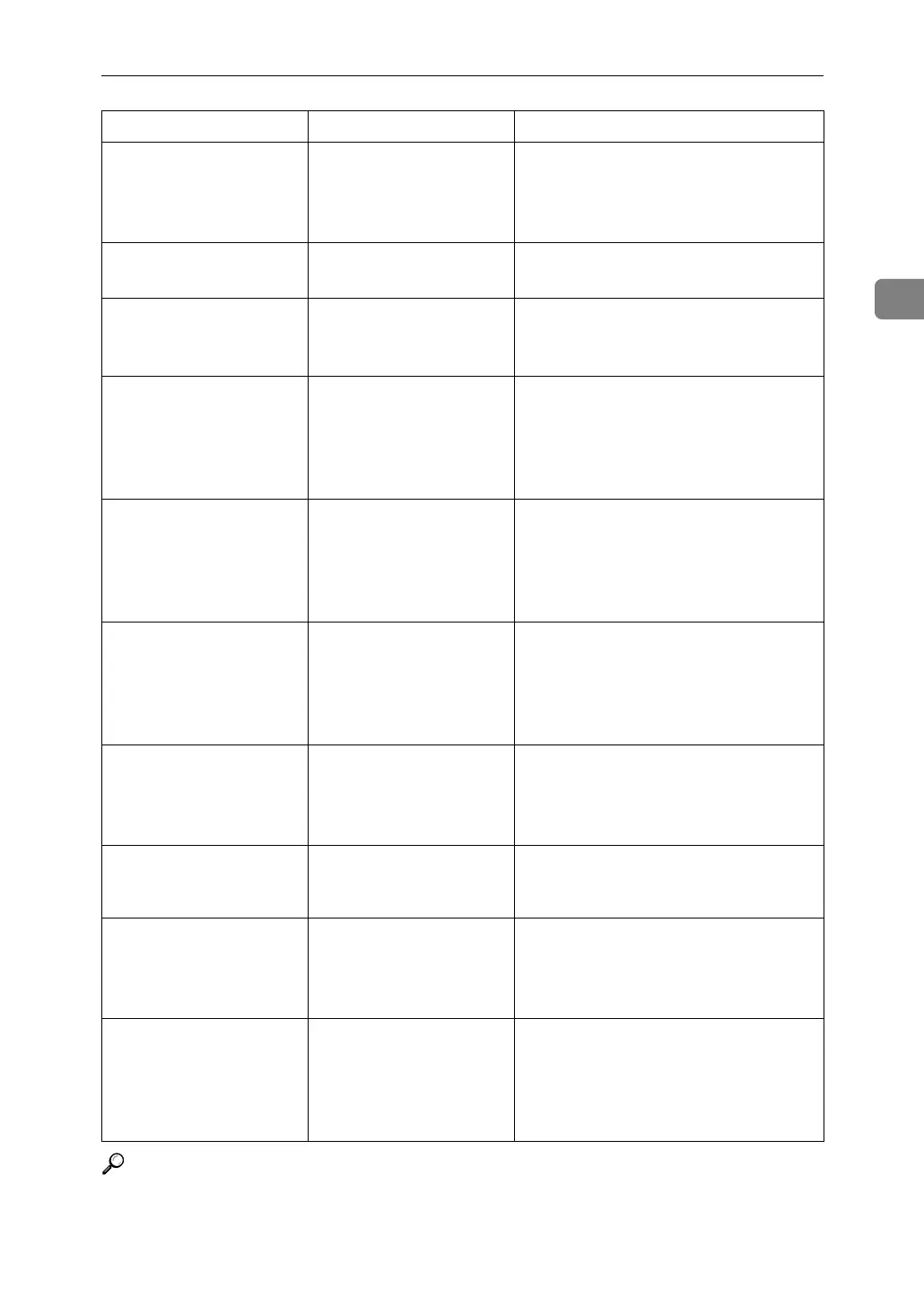
Cannot print from
the sub-machine.
Check the status of
the sub-machine.
The sub-machine's User
Tools menu is open.
Press the {User Tools} key to close the
User Tools menu.
Sub-machine is in
Interrupt mode.
The sub-machine is in In-
terrupt mode.
Press the {Interrupt} key on the sub-ma-
chine to cancel Interrupt mode.
Sub-machine does
not have the same
paper setting(s).
Paper type or tray set-
tings on the two ma-
chines do not match.
Make the same settings on both ma-
chines.
The Cover Sheet
setting(s) of the
sub-machine is
different from
the main machine.
Cover settings on the two
machines do not match.
Make the same settings on both ma-
chines.
The Slip Sheet
setting(s) of the
sub-machine is
different from
the main machine.
Slip Sheet settings on the
two machines do not
match.
Make the same settings on both ma-
chines.
The Designation
Sheet setting(s)
of sub-machine is
different from
main machine.
Designation Sheet set-
tings on the two ma-
chines do not match.
Make the same settings on both ma-
chines.
Sub-machine paper
settings must be
the same to use
this tray.
Paper tray settings on the
two machines do not
match.
Make the same settings on both ma-
chines.
No stamp data in
the sub-machine.
Stamp data on the sub-
machine has been delet-
ed.
Reprogram the stamp on the sub-ma-
chine.
Cannot print from
the sub-machine.
Sub-machine will
be disconnected.
The sub-machine has
stopped due to power
failure or communication
error.
Continue copying using the main ma-
chine.
Z-fold is avail-
able only when
Sort mode is se-
lected in Connect
Copy.
Sort has not been selected
with Z-fold.
Select the Sort function.
Message Cause Solution



 To Next Page