Troubleshooting When Using the Copy Function
24
2
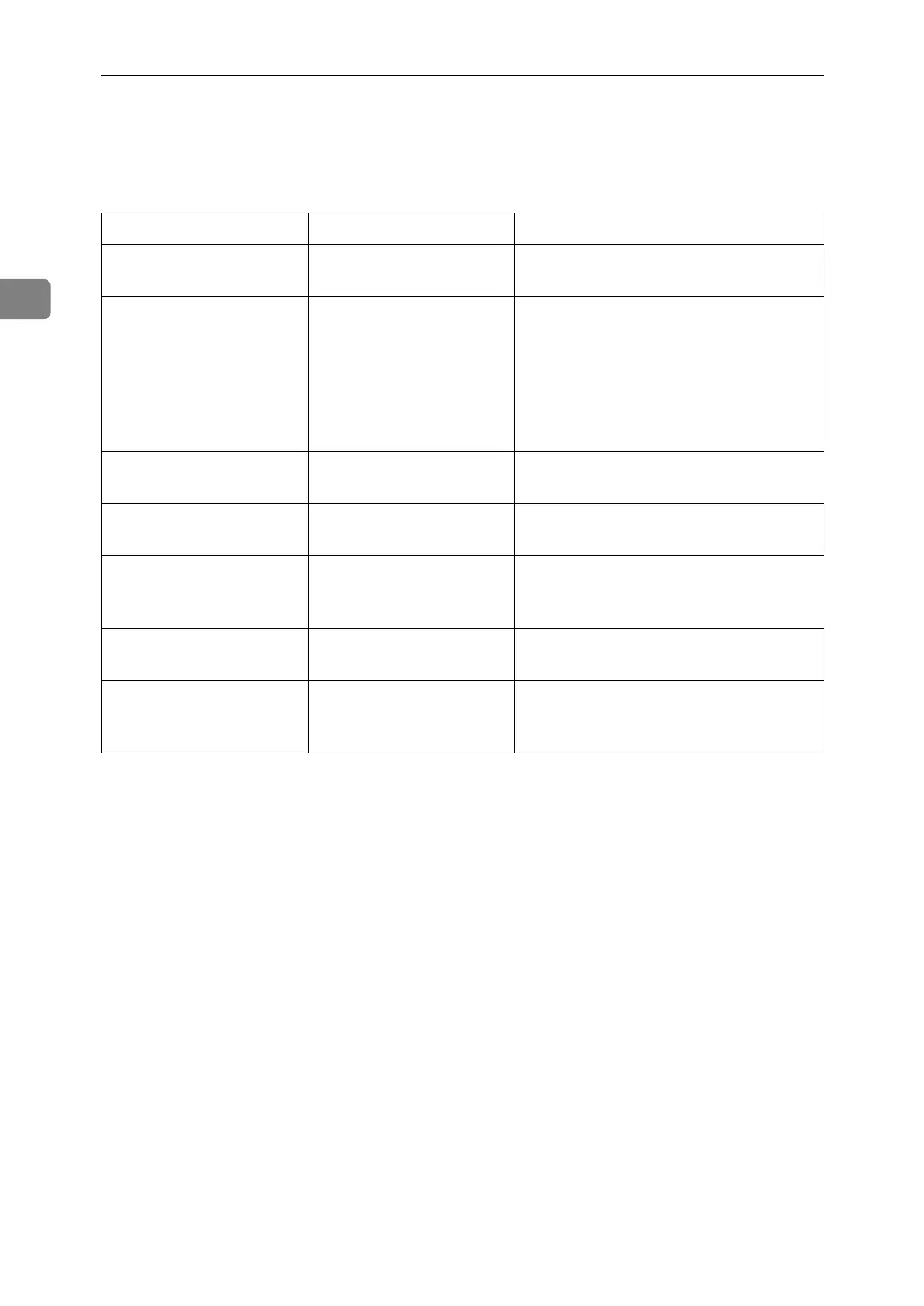
Display During Connect Copy
This section explains about the display during Connect Copy.
Problem Cause Solution
[Connect Copy] is not dis-
played.
The sub-machine's main
power is off.
Turn on the sub-machine's main power.
[Connect Copy] is not dis-
played.
Functions that cannot be
used with Connect Copy
are selected on the main
machine (such as storing
or copying the first page
of a document in the Doc-
ument Server).
Cancel the functions selected on the
main machine.
[Connect Copy] is not dis-
played.
The main machine is in
Interrupt mode.
Press the {Interrupt} key on the sub-ma-
chine to cancel Interrupt mode.
[Connect Copy] is not dis-
played.
The [Connect Copy Key Dis-
play] setting is off.
Select [Display] for the [Connect Copy Key
Display] setting.
[Connect Copy] is not dis-
played.
The cable connecting the
two machines is dam-
aged.
Contact your service representative.
[Connect Copy] is not dis-
played.
The L is lit. Follow the instructions displayed.
[Connect Copy] appears
faded.
Functions that cannot be
used with Connect Copy
have been set.
Press the {Clear Modes} key to clear the
settings.



 To Next Page