CCP-1116 Commentary Control Panel – Quick Guide 1.2
Page 15
6 PANEL TEST / CONFIG MODE
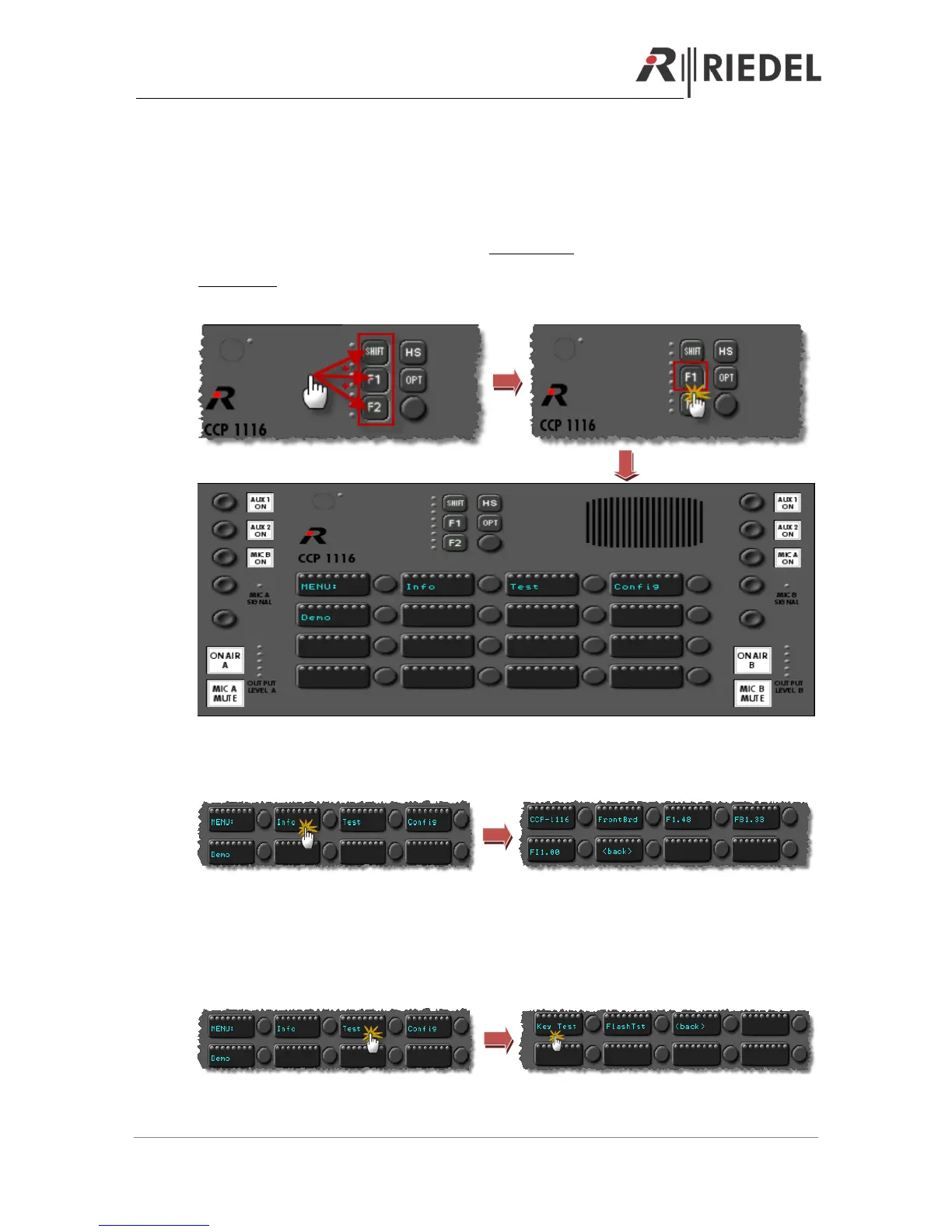
The CCP-1116 panel also has an internal Setup-Menu available, to edit basic settings of the panel
or for testing.
Therefore you have to press “Shift”+”F1”+”F2” simultaneous to reboot the panel.
Immediately press the “F1” - button and keep it pressed until the panel has started the Service
menu.
6.1 Info
Press the “Info”- button, to show the current installed firmware versions for the front board.
Press any button to go back to the main menu.
6.2 Key Test
Press “Test” to get into the test mode. Press “Key Test” to start the Key Test mode. Please do not
use the “FlashTst”, it is just for internal service. It will delete all Icons from the flash memory.


 To Next Page