CCP-1116 Commentary Control Panel – Quick Guide 1.2
Page 16
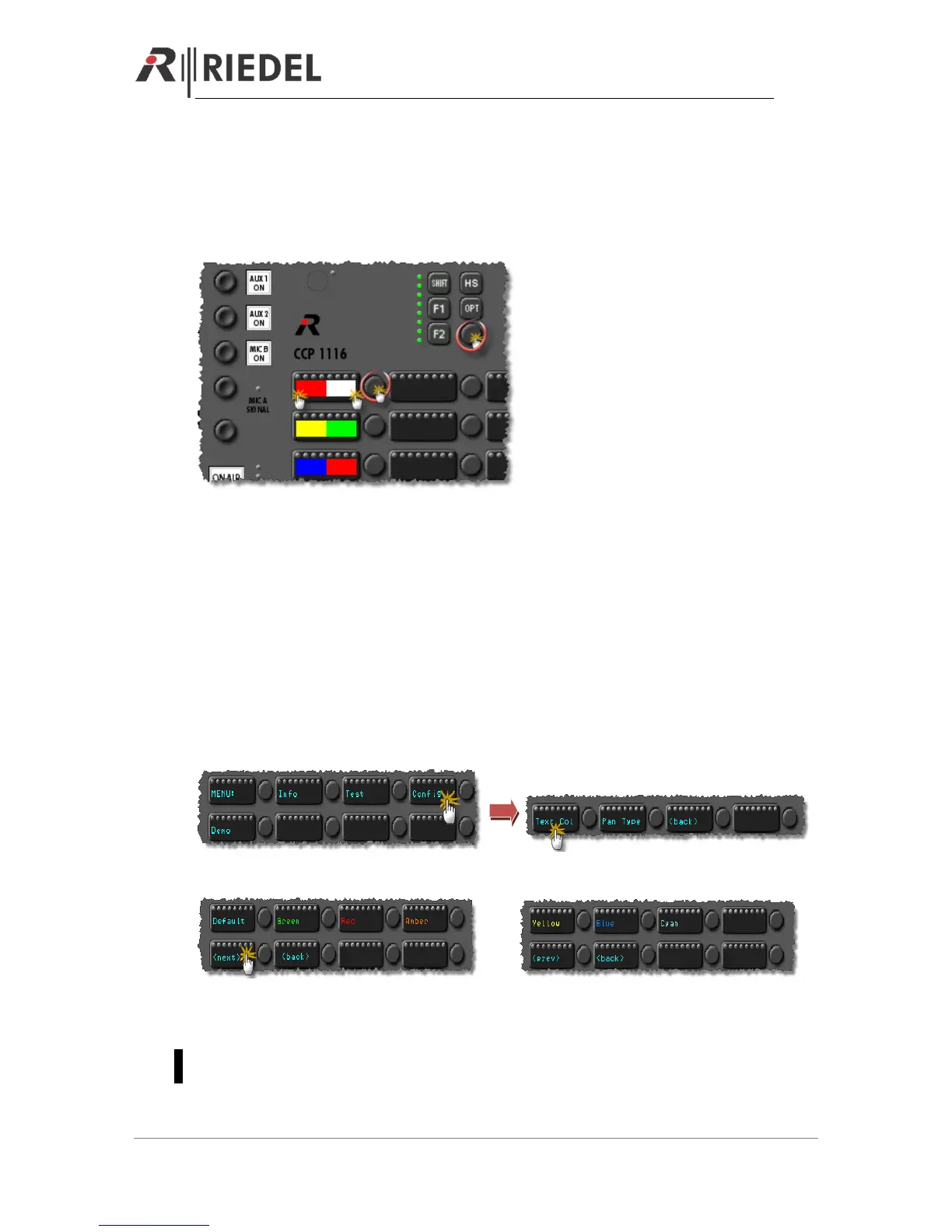
In the “Key Test” mode you can test all key-contacts, rotary encoders, encoder switches and LEDs.
Every time you press a button or turn an encoder, the half side color on the responsible OLED-
display will change.
By turning and pressing the Master volume encoder, the 8 Volume LEDs will change the color.
To stop the “Key Test” mode, you have to reset the panel by pressing “Shift”+”F1”+”F2”.
6.3 Config
In the “Config” menu, you can adjust the default display color and if the panel should be detected
by the Director as a “DCP-1116” or “CCP-1116”.
6.3.1 Config: Text Color
In this menu you can set the default text color. This default color is shown, as long the panel is in
the “Wait for” mode when it is not connected to the matrix.
Press “Config” in the main menu
Select the color by pressing the desired color button.
or
With “<back>” you can go back to the config menu. After resetting the panel, it will show the
selected color in the “Wait for” mode.
As soon the panel is connected to an Artist system, the Artist configuration assigns the colors to
the buttons.


 To Next Page